The SEO Agent integrations.
Connect the agent to the tools you already run. Native CMS publishing, a public API and webhooks, and agent-callable connectors so your stack can do keyword research, drafting, and publishing on its own.
FREE TRIAL · CANCEL IN ONE CLICK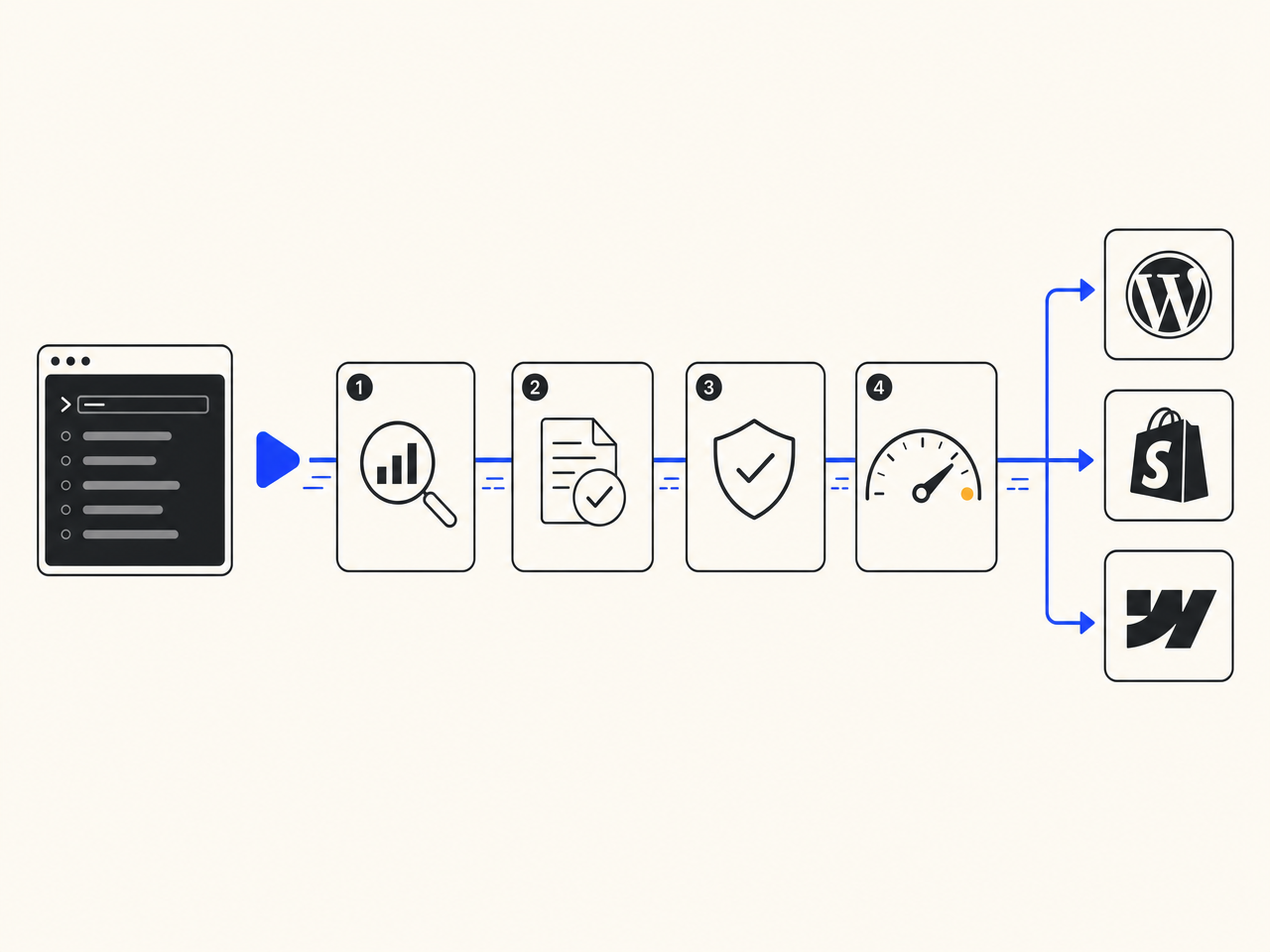
What does The SEO Agent integrate with?
The SEO Agent publishes natively to WordPress, Webflow, Shopify, Ghost, and Wix, with a webhook for anything else. It exposes a public REST API with bearer-key auth and signed outbound webhooks, plus agent-callable connectors: an MCP server and an n8n node so your own agents and workflows can run keyword research, drafting, and publishing. Live connectors link to a real setup page; planned ones are marked and link nowhere. See the public API docs.
Every way to connect, with an honest status on each.
We do not list connectors that do not exist as if they ship today. Live ones link to a real setup page. Planned ones say so and link nowhere, so you never hit a dead page.
WordPress
LIVEFree plugin on the WordPress.org directory. Articles publish as native posts, image and meta included, upserted on re-publish.
/connect/wordpress →Public API + webhooks
LIVEBearer-key REST endpoints to run audits, kick off generation, and publish, plus signed outbound webhooks when an article ships.
/connect/api →MCP server
PUBLISHINGA Model Context Protocol server so your own agent can tool-call keyword research, drafting, and native publish. Package is publishing.
/connect/mcp →n8n
PUBLISHINGA community node so an n8n workflow can trigger the pipeline and route the published URL anywhere. Package is publishing.
/connect/n8n →Zapier
PLANNEDTrigger generation and route published articles into thousands of apps. On the roadmap.
No page yetMake
PLANNEDScenario-driven automation around the publish lifecycle. On the roadmap.
No page yetPipedream
PLANNEDCode-level workflows calling the public API on a schedule or a trigger. On the roadmap.
No page yetActivepieces
PLANNEDOpen-source automation flows around audits and publishing. On the roadmap.
No page yetGitHub Actions
PLANNEDRun audits or kick off generation from CI on a schedule. On the roadmap.
No page yetVercel
PLANNEDA marketplace integration to wire the API into a deployed project. On the roadmap.
No page yetSlack
PLANNEDGet pinged when an article ships, kick off a brief from a channel. On the roadmap.
No page yetGPT Store
PLANNEDA custom GPT action that calls the same public API. On the roadmap.
No page yetIFTTT
PLANNEDLightweight applets around the publish event for non-technical stacks. On the roadmap.
No page yetA draft trapped in a dashboard.
Most SEO tools leave you exporting, pasting, and re-formatting to get anything onto your live site or into the rest of your stack. The work that should be one call becomes ten manual steps per article.
- Copy-paste from a dashboard into your CMS, every article
- No way to trigger the pipeline from an automation you already run
- Nothing your own agent can call to do real SEO work
- No webhook when an article ships, so downstream jobs stay blind
- A closed box you cannot wire into anything
A pipeline your stack can call.
The agent publishes natively to your CMS, exposes a public API and webhooks, and ships connectors so your own automations and agents can run keyword research, drafting, and publishing without a human in the loop.
- Native publish to WordPress, Webflow, Shopify, Ghost, Wix, or any webhook
- A bearer-key REST API to run audits, generation, and publishing
- Signed outbound webhooks the moment an article goes live
- An MCP server and an n8n node so agents and workflows can call the pipeline
- Honest status on every connector, no vaporware in the directory
Publish, call, automate, and hand it to an agent.
Articles land on your live site, not in your clipboard.
The agent pushes finished, formatted articles straight to your CMS: title, body, featured image, tags, meta, and schema all set. WordPress runs through the free plugin on the WordPress connector page, and the same native path covers Webflow, Shopify, Ghost, and Wix. It is the publish layer behind our SEO automation product, exposed as connectors you install.
Drive the whole pipeline from code.
A public REST API with bearer-key auth lets you run an audit, kick off generation, and publish, all programmatically. Signed outbound webhooks fire the moment an article ships so your downstream jobs can react. The endpoints and payloads are documented on the API docs page, and the API connector page walks the common calls.
Your own agent can run real SEO work.
SEO is becoming something agents do, not something humans operate in a dashboard. Our MCP server exposes keyword research, drafting, and native publish as tools your agent can call directly. It is the same capability set as the AI SEO tools pillar, handed to your stack instead of a screen.
Trigger the pipeline from the tools you already run.
Drop the agent into an existing automation. The n8n connector lets a workflow start a brief and route the published URL anywhere, and more platforms are on the roadmap below. Until a dedicated node lands, any of them can call the public API directly, so nothing is blocked on a package release. Everything is included in the flat pricing.
Four steps from a closed box to a pipeline your stack can call.
Install the WordPress plugin, or connect Webflow, Shopify, Ghost, or Wix with a token. Anything else takes a webhook. This is where finished articles will land.
A workspace key authenticates the public REST API, the MCP server, and the n8n node. The same key lets every connector trigger the pipeline and publish on your behalf.
Call the API directly, hand the MCP config to your own agent, or drop the n8n node into a workflow. Each connector page is the canonical reference for the exact setup.
Point the agent at keywords. It drafts, fact-checks, runs the quality gate, and publishes to your CMS. A signed webhook fires on every publish so downstream jobs can react.
The honest one-screen comparison.
| FEATURE | THE AGENT | EVERYONE ELSE |
|---|---|---|
| Getting an article onto your site | Native publish to 6 CMS targets | Export and copy-paste |
| Public REST API | ||
| Signed outbound webhooks on publish | ||
| Agent-callable via an MCP server | ||
| Workflow automation node | n8n today, more planned | None |
| Honest connector status (no vaporware) |
Q.01What can The SEO Agent integrate with today?+
Native CMS publishing to WordPress, Webflow, Shopify, Ghost, and Wix, with a webhook for anything else. A public REST API with bearer-key auth and signed outbound webhooks is live. An MCP server and an n8n node are built and being released. Zapier, Make, Pipedream, Activepieces, GitHub Actions, Vercel, Slack, GPT Store, and IFTTT are on the roadmap.
Q.02Why is the public hub at /connect and not /integrations?+
The path /integrations is already used inside the app for the paid CMS-connections surface where subscribers manage their live publish targets. The public, indexable connector directory lives at /connect so the two never collide. Both are surfaced from the footer.
Q.03Which connectors are real versus planned?+
The directory marks each one. The WordPress plugin and the public API plus webhooks are live now. The MCP server and the n8n node are built and being released, so their pages are the canonical setup reference. Everything in the planned group has no page yet and links nowhere, on purpose, so you never hit a dead end.
Q.04Is the MCP server or n8n node on npm yet?+
They are built and the publish is imminent. Until the package lands you can reproduce every call against the public REST API, so you are never blocked. Each connector page shows the canonical config to mirror, and starting the trial provisions the workspace key those connectors need.
Q.05What does agent-callable actually mean?+
It means your own AI agent can call our pipeline as tools rather than you operating a dashboard. The MCP server exposes keyword research, drafting, and native publishing as callable tools. The same operations are available over the public REST API for any agent or script that speaks HTTP.
Q.06How does an integration help with AI answer engines?+
Publishing the same fact-checked, cited article natively across your CMS, and triggering it through agents and workflows, gets defensible content live faster and in more places. That is what answer engines like Google AI Overviews and Perplexity reward when they pick sources to cite.
Q.07Do I need a developer to use the integrations?+
No for the no-code paths. The WordPress plugin is install-and-paste-a-token. The API, MCP, and n8n connectors are for teams that want to wire publishing into code or an automation, but even those are a config block you copy, not a service you host.
Q.08What does it cost to use the integrations?+
They are part of the flat plan. There is no per-connector charge and no separate API tier. The agent that writes and publishes the articles runs on the monthly plan, with a trial so you can watch articles ship before you commit.
Wire the agent in and watch it ship this week.
Three days for a dollar. Connect a CMS, grab a key, point the agent at a keyword list, and watch articles publish themselves across the tools you already run. Cancel in one click if it isn't working.
FREE TRIAL · CANCEL IN ONE CLICK