A Shopify SEO tool that writes and publishes your blog.
Technical Shopify apps are good at finding defects in pages that already exist. The SEO Agent researches, writes, checks, and publishes new articles into the selected store blog. The output is a native Shopify article, not another audit checklist.
FREE TRIAL · CANCEL IN ONE CLICK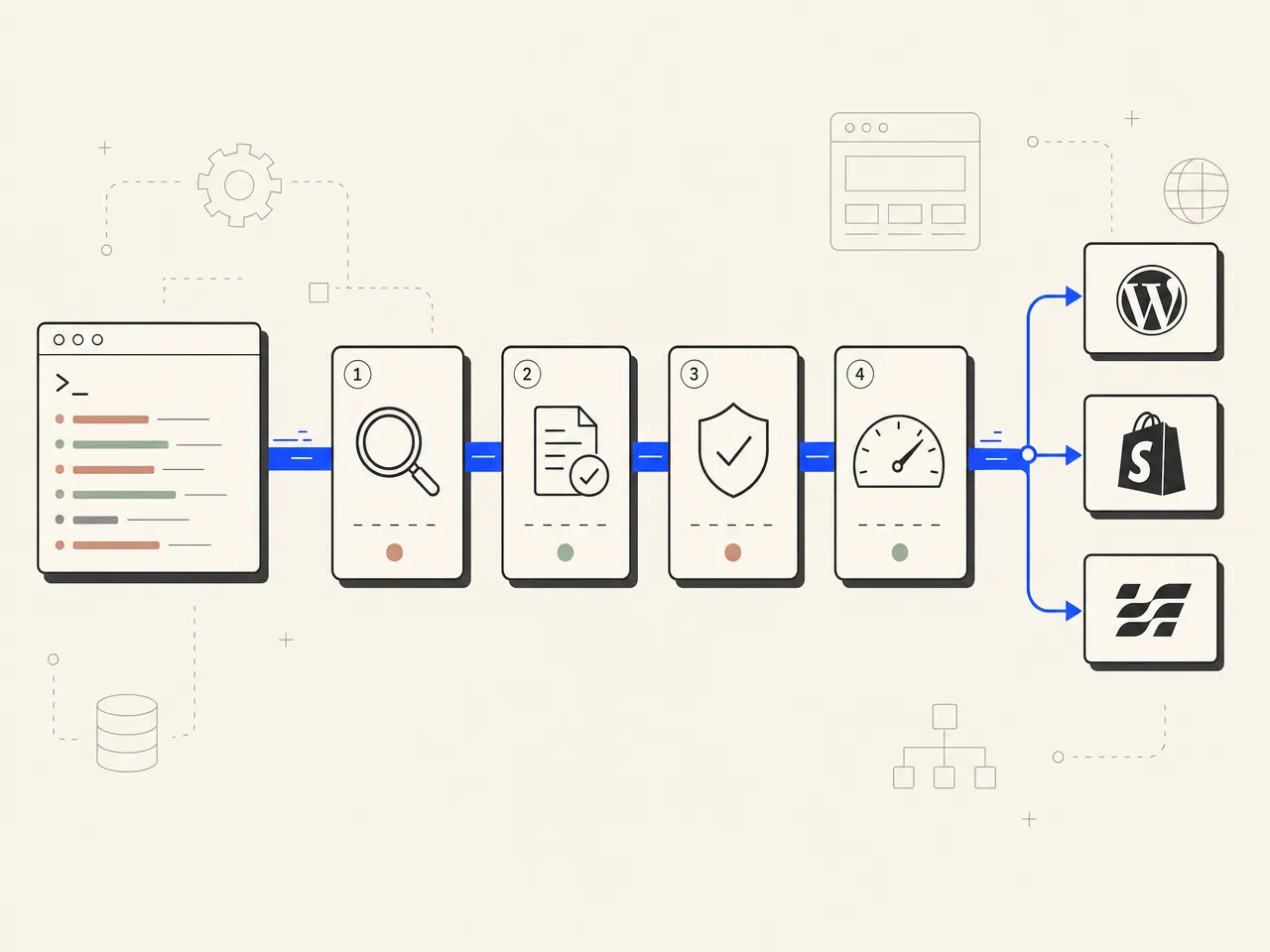
What is a Shopify SEO tool?
A Shopify SEO tool is software that helps a Shopify store improve its organic search performance. Technical apps usually audit existing pages, fix image alt text, find broken links, or check basic on-page fields. The SEO Agent handles the content-production side: live keyword research, sourced drafting, an AI fact-check pass against sources, and native article publishing to the selected Shopify blog. The wedge is finished content shipped directly to the store blog with every claim checked against its sources, for $99/mo flat.
Fix the page. Leave the blog empty.
Technical Shopify SEO apps are useful maintenance tools. They can find broken links, fill missing image alt text, flag thin titles, and check basic on-page fields. Their output is usually a repair list or a field change, so the merchant still has to research, write, edit, and publish every article.
- Bulk image alt-text fixes for existing product media
- Broken-link reports across products and collections
- Basic title, description, and heading checks
- Structured-data warnings on existing store pages
- Diagnostics that still leave article production to the merchant
Writes the article. Checks it. Ships it to Shopify.
The SEO Agent handles the content-production job those checklists leave open. It finds topics with live keyword data, turns an approved brief into a researched article, runs an AI fact-check pass against its sources, then creates the article inside the selected Shopify blog as a live post or a draft.
- Live keyword data grounds the topic and brief
- Complete articles arrive with formatted body copy and sources
- AI fact-check pass checks factual support before delivery
- Claims its sources do not back are cut before publish
- Native Shopify delivery creates or updates the store article
Four parts turn a content brief into a native Shopify article.
Finished articles land in the store blog, not a download folder.
The useful output is not a score, an export, or a draft waiting in another tab. After a brief clears the pipeline, The SEO Agent creates a native article in the Shopify blog selected for that store connection: title, formatted body, excerpt, tags, author, optional cover image, and live-or-draft state. The Shopify app connection handles the store-side handoff, and the full SEO automation pipeline handles everything before it. A republish updates the existing article instead of creating a duplicate, so the post lives at a normal Shopify blog URL the merchant can edit and link like any other page. How that URL is built from the blog handle, the post handle, and its tags is covered in our guide on how to set up a Shopify blog that ranks. The same delivery path runs for non-Shopify storefronts, which is what the ecommerce SEO agency alternative covers.

Technical fixes matter. They do not fill an empty store blog.
Bulk alt text, broken-link scans, and schema warnings solve real maintenance problems. Keep them, and pick them from the Shopify App Store SEO apps we ranked. This Shopify SEO tool is built for the other bottleneck: publishing pages for non-brand searches the catalog does not already cover. An audit protects the pages a store has; it cannot answer a query the catalog does not. The two meet in our Shopify store SEO audit, which reads the pages a store has and queues the ones it is missing. The blog-side options, from in-admin editors to AI writers, are judged on that job in our Shopify blog app rankings. If the immediate job is one search snippet, use the free meta description generator. If the job is a repeatable publishing system, the SEO agent owns the queue from topic selection through Shopify delivery. Merchants who would rather not touch the queue at all can run it as a flat-fee AI SEO service instead of a tool they log into.

Every article starts with search demand, then earns factual support.
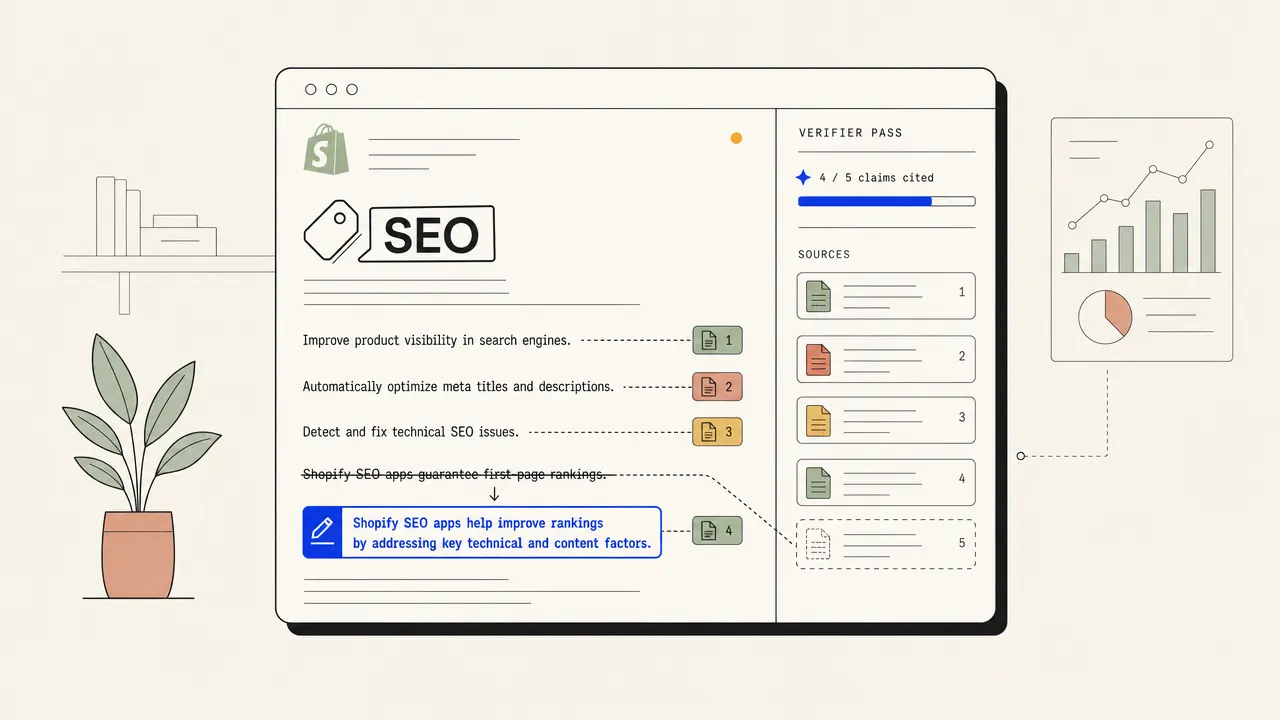
A generic prompt can produce fluent copy about almost any product category. That does not make it worth publishing. Every brief starts from live keyword data and current search results, so the article has a defined query and intent before writing begins. The draft is researched against current sources, then an AI fact-check pass checks whether each claim has support. Citations stay attached to the finished copy so the merchant can inspect the evidence. The criteria in our SEO automation tool comparison use the same split: draft generation is common, controlled delivery is the hard part.
Unfixed fact problems wait for you, not on the store.
Native publishing only helps when the draft deserves the store domain. Every claim is checked against the sources saved during research, the ones they do not back are softened or cut, and an article with a fact problem it could not fix waits for your review. Checked articles publish automatically once you switch on auto-publish, or land as a Shopify draft while the store is still calibrating voice. It is the same daily loop the autopilot SEO bot runs on every other stack we publish to. For a manual spot check on one page, the free keyword density checker gives a narrow diagnostic. The production workflow stays inside one flat $99/mo plan with no separate Shopify publishing add-on. Merchants who want the queue run for them rather than by them can buy the same loop as managed Shopify SEO services.

Four steps. One selected blog. Two publish states.
Connect Shopify from the workspace, validate the store access, and load the available blogs. Select one target blog for the connection, set the article author, then choose immediate publishing or save-as-draft delivery.
Use live keyword data to build a queue around searches the store can answer with useful content. Keep brief approval on for direct control, or allow high-confidence briefs to move into drafting automatically.
The pipeline researches the topic, writes the full article, attaches sources, and runs the AI fact-check pass against them. Claims the sources do not back are softened or cut before Shopify sees the article.
A checked draft becomes a native article in the selected blog with its formatted body, excerpt, tags, author, optional cover image, and chosen publish state. Later revisions update that same Shopify article.
The category comparison, without pretending technical fixes are useless.
| FEATURE | THE AGENT | EVERYONE ELSE |
|---|---|---|
| Technical fixes | Not the primary workflow | Strong on alt text, broken links, basic checks |
| Full article creation | Written from an approved brief | Usually left to the merchant |
| Shopify blog delivery | Creates or updates a native article | Varies, often stops at fixes |
| Editorial control | AI fact-check pass against saved sources | Technical checks, not an editorial check |
| Review option | Publish now or save as draft | Varies by app |
| Republish behavior | Updates the existing Shopify article | Varies by app |
Q.01What is a Shopify SEO tool?+
A Shopify SEO tool is software that helps a Shopify store improve organic search performance. Some tools focus on technical fixes such as image alt text, broken links, structured data, and basic on-page fields. The SEO Agent focuses on content production: it researches topics, writes sourced articles, checks quality, and publishes native articles into the selected Shopify blog.
Q.02Does this replace a technical Shopify SEO app?+
Not necessarily. Technical apps can be useful for bulk alt-text fixes, broken-link reports, and on-page checks across an existing catalog. This tool handles a different job: creating and publishing new blog content that can target searches beyond the product and collection pages already in the store. The two workflows can run together.
Q.03Does it publish directly to a Shopify blog?+
Yes. The publisher creates a native Shopify article in the blog selected for that store connection. A later republish updates the same article instead of creating a duplicate. If the original article was deleted, the publisher can recreate it.
Q.04What article fields are sent to Shopify?+
The Shopify article can include the title, formatted HTML body, excerpt, tags, author, optional cover image, and publish state. The merchant chooses one target blog for each store connection and decides whether approved articles publish immediately or arrive as drafts.
Q.05Can I review an article before it goes live?+
Yes. Set the Shopify connection to save articles as drafts and review them inside Shopify before publishing. If the project uses auto-publish, checked articles can publish automatically. Brief approval can also stay on when you want to control topics before drafting starts.
Q.06How are weak or unsupported drafts handled?+
The pipeline researches current sources, then runs an AI fact-check pass that checks every claim against those sources. An article with a fact problem it could not fix is held for your review instead of being dispatched to Shopify. Citations remain in the article so the merchant can inspect the support.
Q.07How much does the Shopify SEO tool cost?+
The software plan is $99 per month flat and includes the content pipeline plus Shopify publishing. There is a free trial, no separate Shopify publishing add-on, and cancellation is available in one click.
Q.08What does the paid pipeline add beyond the free SEO tools?+
The free tools solve narrow tasks one at a time. The paid pipeline connects the full job: live keyword data, brief control, researched drafting, citations, an AI fact-check pass, a claim check, and native Shopify article delivery. It is built for merchants who need a repeatable publishing queue, not another isolated diagnostic.
Related guides + features.
SEO automation
The full pipeline: research, drafting with every claim checked against its sources, and native publish. Where these tools stop, the agent ships the page.
/features/seo-automation →PILLAR · AUTOBLOGGINGAutoblogging
Hands-off publishing on a cadence you set, with every claim checked and anything unsupported cut before it reaches your site.
/features/autoblogging →PRICINGSimple pricing
$1 for a 3-day trial if eligible, then $99 per month. No per-keyword meter. Cancel in the app.
/pricing →Put finished articles in your Shopify blog.
Connect the store, approve the target topics, and let the pipeline research, write, check, and publish. Start with a free trial. Cancel in one click.
FREE TRIAL · CANCEL IN ONE CLICK