
Ranked on unattended work, not on feature count.
Every plugin here was scored on one question: with the settings saved and the tab closed, what still happens? A plugin that generates schema on every new post scores. A plugin that shows you a report of posts missing internal links does not, because a human still has to open each one. That test moves several well-regarded SEO plugins down this list and moves two content plugins that nobody would call an SEO tool onto it.
The order is not strictly best to worst. Rank one automates the most of the chain, and ranks two through eight are ordered by how much genuinely unattended work they do against how much risk that work carries. Ranks nine and ten automate more than anything above them and are ranked last on purpose: unattended volume with no demand check and no fact check is a liability, not a feature. Nothing here is sponsored, there are no affiliate links, and no third-party vendor was contacted.
W3Techs tracks WordPress at roughly 59% of every site with a known CMS. That share is why this category is crowded and why almost every plugin in it now advertises automation. Read the claims carefully. A one-click title suggester and an SEO pipeline that runs without you are different products, and the gap between them is where most of the disappointment in this category comes from.

WordPress blog automation happens at three different layers.
Layer one is metadata. Title tags, descriptions, schema, canonicals, sitemaps, redirects. This layer has been solved for years and the free tiers are generous, so you should never pay much for it. Layer two is on-page assistance: link suggestions, readability scores, AI-drafted paragraphs inside the editor. Useful, and still gated on a human opening the post. Layer three is production: deciding what deserves a page, writing it, verifying it, and publishing it.
Almost every disappointed review of an automatic SEO plugin comes from buying a layer one or layer two product expecting layer three behaviour. The plugin worked exactly as designed. The expectation was wrong. Before you install anything, name the layer you need. If the blog is well optimised and still empty, no amount of layer one tooling will help.
Layer three is also the only layer where automation carries real downside, which is why the two most automated entries sit at the bottom of this ranking. Unattended publishing is safe when something upstream validated the query and something downstream verified the claims. Strip those two checks out and you are running a content farm. That distinction is the whole argument for a gated WordPress publishing pipeline over a scheduler pointed at a feed. If your question is simply which on-page plugin to install, the nine best WordPress SEO plugins compared is the more direct answer, and writing WordPress posts with AI covers the manual version of layer three.

The SEO Agent
The only entry here that automates the whole chain rather than one link of it. Keyword research runs against live search data, the draft is written and fact-checked, a quality gate can refuse it, and the approved article lands on WordPress as a finished post through a free plugin on the official directory.

Read the other nine entries and you will notice they automate a fragment: a title suggestion, an internal link, a scheduled import, a metadata field. The article itself stays your problem. The SEO Agent inverts that. It picks the keyword worth a page, writes the draft, checks the claims in it, applies a quality gate, and then hands the finished post to WordPress. The plugin, listed as Seobot Publisher for The SEO Agent, is a small receiver: you paste a 64-character token into it once and it listens for approved articles.
What arrives on the site is the title, the full HTML body, a featured image pulled into the media library, tags, a custom slug, and a meta description written into the field Yoast and Rank Math already read. That last detail is deliberate. It is built to sit beside an on-page plugin, not to replace one. The two-step setup is written out in the WordPress connector guide, and the mechanics of the pipeline live on the automatic WordPress SEO publishing page.
The honest limits. It writes no focus keyword, generates no schema markup, and does not audit the 200 posts already on your site. It also costs more than a plugin licence, because it is not one. If you write your own posts and only want the metadata tidied, pick from ranks two through ten and the flat monthly plan is not for you. If the blog has been silent since March, this is the entry that changes that.
GOOD AT
- Automates the step every other plugin assumes you already did
- Keyword targets come from live search data rather than in-house estimates
- A quality gate can refuse a weak draft instead of posting it
- Republishing updates the existing post rather than creating a duplicate
WATCH FOR
- It does not audit or score pages it did not write
- The plugin sets a meta description but no focus keyword and no schema
- A monthly subscription costs more than a one-off plugin licence
Rank Math
The strongest automation inside a classic SEO plugin. Rank Math writes schema automatically across 18 pre-defined types, keeps sitemaps and canonicals current without input, watches for 404s, and bolts a credit-metered Content AI module onto the editor.

Rank Math is the default answer for anyone who wants automation without leaving wp-admin. Around 4 million active installs and a 4.8 rating on the official directory make it the most-installed modern option, and the free tier is where most of the automatic behaviour lives: structured data generated from post type, XML sitemaps that update themselves, canonical tags handled without thought, and a redirect manager that offers to catch 404s as they appear.
Content AI is the piece relevant to this list. It sits inside the editor, pulls competitor and keyword context for the post you are writing, and drafts sections on request. It is genuinely useful and it is genuinely assistive: a human still opens the post, prompts it, edits it, and clicks publish. That is a different thing from automation, and the credit meter makes the difference expensive to ignore once you are producing more than a handful of posts a month.
Treat Rank Math as the metadata autopilot and pair it with something that produces the posts. That split is exactly what the general WordPress SEO plugin comparison works through in more detail, with a wider field of on-page contenders.
GOOD AT
- Schema generation and Search Console data sit in the free tier
- Five focus keywords per post before any upgrade prompt
- PRO licences cover unlimited personal sites rather than charging per domain
- Content AI keeps its research and drafting inside the post editor
WATCH FOR
- Content AI runs on a credit meter, so heavy use turns into a second bill
- The module list is long and easy to over-configure on a small site
Link Whisper
The one plugin in this roundup that automates a ranking factor rather than a field. Link Whisper scans your library, proposes internal links inside the editor as you type, and can add dozens of them across old posts in a single bulk action.
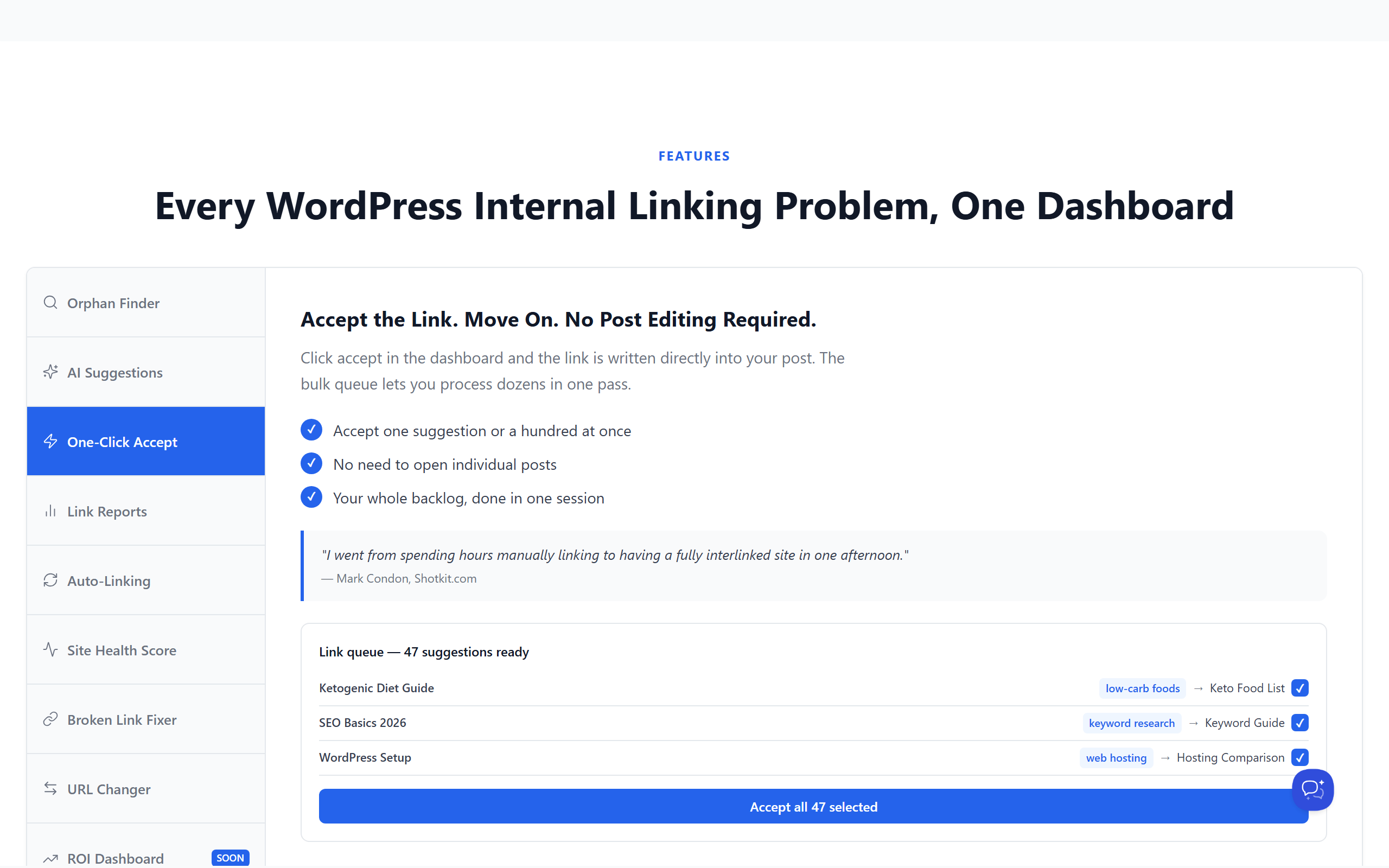
Internal linking is the highest-leverage job on most WordPress sites and the one nobody does, because doing it by hand means opening 80 old posts. Link Whisper indexes the library, then surfaces relevant targets in a panel beside the editor with the anchor text pre-filled. Accepting a suggestion writes the link into the post. The bulk tool goes further and applies a batch of links across the archive at once.
The critique is the one every suggestion engine earns: it matches on term similarity, so it will happily offer a link from a post about invoicing to a post about invoice templates when the reader gains nothing from the trip. Skim the batch before you apply it. The orphaned-post report is worth the licence on its own, because it tells you which pages Google is finding only through the sitemap.
If you want the links placed as the article is written rather than retrofitted afterwards, that is a different approach to internal linking. Retrofitting works. Writing the link into the draft in the first place is cheaper.
GOOD AT
- Suggests links while the draft is open, not in a report you never read
- Bulk insertion fixes years of orphaned posts in one pass
- Reports which posts have no inbound links at all
- Works alongside any on-page plugin without conflict
WATCH FOR
- Suggestions are keyword-similarity driven and need a human sanity check
- On a very large library the initial scan is slow and memory hungry
GetGenie AI
A WordPress-native AI writing plugin with keyword research and competitor analysis bolted to the side. GetGenie will produce a full blog post from a keyword inside the editor, then score it against the pages currently ranking.

GetGenie is the closest thing on this list to a one-plugin content workflow. You give it a keyword, it proposes an outline, it writes the sections, and it scores the result against the top-ranking pages for that query. Because it lives inside the editor, nothing has to be copied between tabs, which is the small friction that kills most external AI writing workflows.
Two things to be clear-eyed about. First, the word allowance is the real price. A 30-post month burns through a mid-tier plan quickly, and the cheap plan exists to demonstrate quality rather than to sustain a program. Second, and more important, there is no verification layer. The plugin will write a confident statistic with no source behind it, and on a site that sells something that is a liability rather than a typo.
Anything that writes at volume needs a verification pass over every claim before the post goes live. For the wider field of AI-assisted WordPress plugins, including the ones that handle images and translation rather than SEO, see the AI plugin roundup.
GOOD AT
- Generates a full draft from a keyword without leaving WordPress
- Bundles keyword research and competitor analysis into one plugin
- Templates cover product copy and meta tags, not just blog posts
- The free tier is enough to judge output quality before paying
WATCH FOR
- Word allowances run out fast at any real publishing cadence
- No fact-check pass, so claims and statistics need manual verification
AI Engine
Meow Apps ships AI Engine as a free plugin that talks to whichever model provider you hold an API key for. No word allowance, no seat pricing, no vendor markup: you pay the model bill directly and the plugin takes nothing.

AI Engine is the developer answer to the word-allowance model. You bring an API key, the plugin gives you generators, bulk tasks, a chatbot, and a playground inside WordPress, and nobody sits between you and the model charging a margin on tokens. For anyone publishing heavily, that structural difference outweighs almost every feature comparison you could run against the metered plugins.
The trade is that it hands you parts rather than a process. There is no opinion about which keyword deserves a page, no gate that refuses a thin draft, and no research step that grounds a claim. It will generate exactly what you prompt for, at whatever quality your prompt earns, and it will do it a hundred times if you queue it. That is powerful and it is how a lot of low-value AI content gets made.
Use it if you already know what good looks like and want cheap execution. If you want the judgment included, look at the SEO automation tools compared end to end instead, where the pipeline rather than the generator is the product.
GOOD AT
- No word quota, because you are billed by the model provider not the plugin
- Swaps model providers without changing the WordPress workflow
- Bulk content generation tools for anyone comfortable with a queue
- Pro tier is a one-plugin purchase rather than a metered subscription
WATCH FOR
- Requires an API key and a spend cap you set yourself
- It is a toolkit, not a workflow, so the SEO judgment stays with you
Yoast SEO Premium
The most widely installed SEO plugin in existence, and Premium is where its automatic behaviour lives: automatic redirects when a URL changes, internal link suggestions from the site index, and AI-generated titles and meta descriptions per post.
Yoast is the plugin your client already installed. Around 10 million active sites run it, which means every WordPress tutorial and host onboarding flow on the internet assumes those fields exist. That gravity is a real feature. The automation people actually notice is the redirect manager in Premium: change a slug and the 301 is written for you, which quietly prevents the single most common self-inflicted traffic loss on WordPress.
Premium also generates titles and meta descriptions on request and suggests internal links from an index it maintains of your own content. Both are assistive rather than autonomous. They save a minute per post rather than removing the post from your to-do list, and that is the correct expectation to set before you buy.
The structural critique is worth repeating. A green bullet means the keyphrase appears in the right places. It does not mean the article answers the question better than the page ranking third, which is why a free crawl of your own site so often finds perfectly optimised pages sitting on page four.
GOOD AT
- Creates the redirect automatically when you change a permalink
- Internal link suggestions draw on an index of the whole site
- AI title and meta description generation is one click per post
- Ten million installs mean every host and theme assumes it exists
WATCH FOR
- Licensed per site, so a portfolio of domains gets expensive quickly
- The traffic light grades a draft against a checklist, not against the live result
Squirrly SEO
Squirrly automates the audit loop rather than the writing. It grades each page continuously against a long checklist, manages which AI crawlers may read the site, and generates an llms.txt file from inside wp-admin.

Squirrly made an unusual bet: rather than compete feature for feature on classic on-page scoring, it repositioned around answer engines. The plugin scores how ready a page is to be quoted by an assistant, controls which AI crawlers can read the site, generates an llms.txt, and pushes answer-shaped structured data. The classic basics are still underneath.
Whether that is the right bet depends on your traffic mix. If a real share of your discovery already happens inside chat assistants, a tool that grades citability is more useful than one that grades keyword density, and the audit output is actionable: shorter answer blocks, clearer entity naming, better structured data.
The constraint is architectural. The audits, keyword data, and tracking run in the vendor cloud, so the plugin is a client for a service and you must connect an account before it does much. Roughly 30,000 sites run it at a 4.6 rating, which is small next to the leaders but healthy for a specialist.
GOOD AT
- Audits run continuously rather than only when you remember to click
- Generates and maintains an llms.txt file without manual editing
- Per-bot crawler controls for AI user agents
- Scores how citable a page is, not just how keyword-dense it is
WATCH FOR
- The useful audits are cloud features, so an account is mandatory
- Free quotas are tight and the upgrade prompts arrive early
Uncanny Automator
Not an SEO plugin at all, which is exactly why it earns a slot. Automator wires WordPress events to actions in recipes: publish a post and it can push to social, update a spreadsheet, ping a webhook, or trigger the next step of your process.
Every WordPress blog has an after-publish checklist that nobody follows: share it, add it to the newsletter queue, log it in the tracker, ping the client. Automator turns that checklist into recipes. A trigger fires when a post in a category is published, and the actions run without anyone remembering. On a site where publishing is already happening, this is the cheapest automation win available.
The honest framing is that it does nothing for the post itself. No keyword, no draft, no metadata, no ranking factor. It is plumbing, and it only pays for itself once there is water in the pipe. Buying it before you have a publishing cadence is buying the conveyor before the factory.
It sits well next to a production layer, because the thing worth automating after publish is the distribution of an article somebody else wrote. That is the same logic behind hands-off publishing on a fixed cadence: make the boring recurring step invisible, then spend attention on the parts that need judgment.
GOOD AT
- Turns publishing into a trigger for the rest of your distribution
- Free tier covers WordPress-only recipes without credits
- Removes the manual after-publish checklist most teams forget
- Integrates with the tools already in your stack rather than replacing them
WATCH FOR
- Automates distribution, never the content itself
- External app actions consume credits that add up on a busy site
CyberSEO Pro
The serious end of classic auto blogging. CyberSEO Pro imports RSS and XML feeds on a schedule, rewrites each item with a model of your choosing, generates images, and posts the result without anyone opening WordPress.

If your definition of an automatic SEO plugin is one that produces posts while you sleep, this is the category and CyberSEO Pro is the most capable member of it. Point it at feeds, set a rewriting prompt, choose a schedule, and posts appear. It handles images, categorisation, and duplicate detection, which are the three places cheaper auto-posters fall over.
Now the caveat that matters more than any feature. Feed-driven autoblogging inherits the topic selection of whoever runs the feed. Nothing in the chain asks whether the query has search demand, whether you can realistically rank for it, or whether the claim in paragraph three is true. You get volume with no targeting and no verification, which is the exact profile Google's helpful-content work is built to demote.
Used narrowly, on a genuine news vertical, with a human skimming the queue, it is a legitimate tool. Used as a traffic strategy it is the reason the whole category has a reputation problem. The auto blogging software comparison walks through where each tool in that space cuts corners.
GOOD AT
- Genuinely unattended: set the feeds and the schedule, then leave it
- Rewrites imported items rather than republishing them verbatim
- Fine-grained control over categories, tags, and post scheduling
- Long-lived product with a maintainer who ships updates
WATCH FOR
- Output quality is bounded by the feed you point it at
- Volume without editorial judgment is the fastest route to a thin-content problem
WP Automatic
The plugin that defined WordPress auto blogging. WP Automatic scrapes and imports from feeds, video platforms, marketplaces, and search results, then posts the results on a schedule for a one-off licence fee.
It belongs on this list because it is honestly the most automatic plugin in the category and because pretending it does not exist would be dishonest in an article about WordPress blog automation. It imports from feeds, video platforms, marketplaces, and search results, runs the text through a rewriting step, and publishes on a campaign schedule. The licence is a one-off marketplace purchase, which is why it keeps showing up in cheap-traffic tutorials.
The problem is not the plugin, it is what the plugin is usually pointed at. Republishing other people's content at scale, lightly reworded, is the exact pattern search engines have spent a decade learning to detect and demote. A site built this way can look fine in analytics for a few months and then lose everything in a single update, with no path back because the archive itself is the liability.
If the appeal is volume without effort, the honest fix is volume with grounding: pages built from a real data source and a template you control, which is what programmatic SEO done properly means. Same output count, entirely different risk profile.
GOOD AT
- A one-off licence with no recurring cost is genuinely rare here
- Imports from more source types than anything else in this roundup
- Scheduling and campaign controls are mature after many years of releases
WATCH FOR
- Scraped and spun content is a direct violation risk, not a grey area
- Support runs through a marketplace rather than a vendor relationship
- Nothing in the workflow checks demand, accuracy, or originality
Name the bottleneck, then install exactly one thing.
Metadata is a mess: Rank Math, free tier, done in an afternoon. Posts exist but nothing links to anything: Link Whisper. Permalinks keep changing and traffic keeps vanishing: Yoast Premium for the automatic redirects. You write well but slowly: GetGenie inside the editor, or AI Engine if you would rather pay a model bill than a word quota. Publishing already happens and the follow-up steps do not: Uncanny Automator. Discovery is moving into chat assistants: Squirrly.
Nothing has gone up on the blog in two months: none of the above will fix that, and the two plugins that will publish for you unattended do it by importing somebody else's work. That is the gap the first entry exists to fill. Whichever route you take, run one on-page plugin and one production layer, never two of either, and check what your current pages actually look like to a crawler before you add a ninth plugin to the stack.