Shopify blog SEO: how to set up and run a store blog that ranks.
Every Shopify store already has a blog. It is called News, it lives at /blogs/news, and on most stores it holds a launch post and nothing since. This guide covers adding a blog, handles, tags and authors, the SEO fields on every post, links into products and collections, what to write and how often, plus five live store blogs worth copying.

How do you do SEO for a Shopify blog?
Shopify blog SEO comes down to five things. Give the blog a handle that names its job, because every post lives at /blogs/<blog-handle>/<post-handle>. Fill in the search engine listing on every post: a page title under 70 characters, a meta description of about 140 to 160 (Shopify allows 320), and a short URL handle. Keep tags to a small set you reuse, since each one makes its own /tagged/ page. Link every post to the products and collections it is about. And publish on a schedule, writing buying guides, comparisons and how-tos for what you sell, which is what stores like Fellow, Beardbrand and Death Wish Coffee do.
Blog set up, now it needs posts. The SEO Agent writes one researched post a day, linked into your products, and publishes it into your Shopify blog. Enter your store to start.
Free trial · Cancel in one click- 01Can you blog on Shopify?
- 02How to add a blog to Shopify.
- 03Blog handles, URLs, tags and authors.
- 04The SEO fields on every Shopify blog post.
- 05Link every post to the products it is about.
- 06What to write, and how often.
- 07Shopify blog examples worth copying.
- 08A worked example: one post, start to finish.
- 09Common mistakes on a Shopify blog.
1. Can you blog on Shopify?
Yes, and you already are, at least on paper. Shopify's Help Center describes a built-in blogging engine on every online store, and every store ships with a default blog called News. There is nothing to install. A store can hold several blogs, each blog holds posts, and every post lives at /blogs/<blog-handle>/<post-handle> on your own domain, in the same sitemap as your products and collections. The /blogs/ prefix is fixed, the same way /products/ and /collections/ are.
The reason to use it is arithmetic. Your product and collection pages can rank for the queries that name what you sell. Everything shoppers type before they know what to buy, the how-to-choose question, the comparison, the care question, needs a page to land on, and on Shopify that page is a blog post. Most stores never build those pages, which is why the blog shows up as the step most stores skip in our Shopify SEO checklist, next to the domain, catalog and speed work.
This page is the Shopify-specific part: which admin screens to use, which fields matter, and how a store blog should be wired into the catalog. The method for making any single post rank, whatever platform it is on (search intent, structure, the answer up top, refreshing old posts), is the deeper read in our guide to blog SEO. Read that one for the writing, and this one for the store.
2. How to add a blog to Shopify.
Six steps, about ten minutes. You can skip the first five and simply start writing in News, but a blog named after its job reads better in the navigation and in every URL, and it is far easier to set up now than to rename once posts have earned links.
- STEP 01
Open Content, then Blog posts, then Manage blogs.
Blogs moved out of the Online Store menu into Content in March 2025, which is why older tutorials send you to a screen that no longer exists. Manage blogs lists every blog on the store, starting with the default one called News.
- STEP 02
Click Add blog and give it a title.
The title is what shows above the post list and in the browser tab, and it can run to 255 characters. Name it after the job the blog does for a shopper (Guides, Learn, Care), not after the company.
- STEP 03
Choose how comments work.
Shopify gives three settings: comments disabled, comments allowed pending moderation, or comments allowed and published automatically. Moderated is the safe choice if you want questions from buyers. Automatic publishing on a store blog is an open door for spam.
- STEP 04
Pick a template if your theme has more than one.
The Template drop-down only appears useful once a custom blog template exists. Every post in the blog uses the template you pick here, so this is where a store gives guides a different layout from news.
- STEP 05
Edit the search engine listing, then Save.
The blog listing page gets its own page title, meta description and URL handle. The handle becomes the middle of every post URL, /blogs/<handle>/<post>, so set it now rather than after 50 posts exist.
- STEP 06
Add the blog to your navigation.
A blog that only exists in the sitemap gets crawled and almost never visited. Add it to the main menu or the footer under Content, then Menus. Death Wish Coffee puts the word Blog in its main navigation between Find in Store and About.
Then write the first post. Go to Content, then Blog posts, and click Add blog post. The editor is a rich text editor that takes images, links, tables and embedded video. A title is required before you can save, the Organization panel on the right picks the author and the blog, and Visibility decides whether the post goes live now, stays hidden or publishes on a date you set. Every field that matters for search is covered in section 4.
One blog or several? One is right for most stores. Add a second only when it does a different job for a different reader: a guides blog for shoppers and a news blog for press and stockists, say. If you would rather not run any of this by hand, our Shopify blog publishing tool creates finished posts in whichever blog you point it at.
3. Blog handles, URLs, tags and authors.
Handles. A Shopify blog post URL has two parts you control: the blog handle and the post handle. The blog handle is set once, in the blog's search engine listing. Fellow uses /blogs/learn, Bushbalm uses /blogs/pubic-hair-removal, and the default is /blogs/news. The post handle is generated from the post title, so it tends to come out long. Cut it to the query before you publish. If you change either handle later, Shopify preselects the Create a URL redirect box; leave it ticked, or the old address starts returning a 404 along with every link it earned. Our free URL slug generator turns a long headline into a handle worth keeping.
Tags. Each tag you add to a post creates a filtered listing at /blogs/<blog>/tagged/<tag>. Shopify's default robots.txt blocks tag combinations (any /blogs/ URL with a plus sign in it), but single tag pages stay crawlable. That makes tags a small navigation tool and a poor keyword tool. Forty tags across thirty posts gives you forty thin pages with one or two posts each. Pick five to ten topics you will actually reuse, keep them lowercase and consistent, and if your theme shows tags as filters, those are the categories a reader browses by. Beardbrand does the same job with nine categories across more than a thousand articles.
Authors. The Author drop-down only lists the store owner and staff accounts. To credit a buyer, a stylist or a freelance expert by name, give them a staff account or have the theme show a different byline, and whether the name appears on the post at all is up to your theme. It is worth the effort on advice content: a named person with a reason to know the answer reads as more trustworthy than a post by the store, which is the point of the experience signals in Google's guidance on helpful content. Bushbalm prints the writer's name on every post card.
4. The SEO fields on every Shopify blog post.
Eight fields, and three of them hide behind a pencil icon. Shopify shows a Search engine listing preview near the bottom of the post editor; click the pencil to edit the page title, meta description and URL handle. A post saved without opening it ships with a title copied from the post, a description lifted from the first lines of text and a handle built from the whole headline.
- 01
Title
Required, up to 255 characters, and in most themes it renders as the H1 of the post. Write it for the reader. The page title below is where you write for the results page.
WHERE Top of the post editor.
- 02
Page title
The blue link in search results. Shopify warns that anything over 70 characters may be cut off. Lead with the question the post answers, and leave room for the store name the theme adds on its own.
WHERE Search engine listing preview, the pencil icon.
- 03
Meta description
Shopify allows up to 320 characters before results may cut it off, but most results show far less. Aim for 140 to 160 characters that say what the reader gets. Left blank, the snippet is built from whatever text opens the post.
WHERE Search engine listing preview, the pencil icon.
- 04
URL handle
Generated from the title, so a long title makes a long URL. Cut it to the query: /blogs/guides/how-to-descale-a-kettle, not the full headline with dates and filler. Spaces are not allowed; use dashes.
WHERE Search engine listing preview, the pencil icon.
- 05
Excerpt
The summary your theme shows on the blog listing page and anywhere posts are featured, such as the homepage. It is not the meta description. One sentence that makes someone scanning the list click is the whole job.
WHERE Below the content, Add excerpt.
- 06
Image and alt text
The featured image heads the post on most themes and is usually the thumbnail when the post is shared. Give it alt text that describes what the image shows, in the words a shopper would use.
WHERE The Image panel on the post.
- 07
Author, blog and tags
The Organization panel. Author is a drop-down of the store owner and staff accounts. Blog decides which blog, and therefore which URL, the post lives under. Tags are covered in the section above.
WHERE The Organization panel on the right.
- 08
Visibility
Visible publishes now, Hidden keeps it off the storefront, and a future date and time schedules it. Scheduling is the cheapest way to turn a writing day into a week of posts.
WHERE The Visibility panel.
Inside the post, use H2 and H3 headings from the editor's text style menu, and do not add a second H1: the theme already renders the title as one. Open with the answer to the question in the title, then the detail. For the two snippet fields, our free SEO title generator and meta description generator give you drafts to edit, which you then rewrite until they sound like the store.
None of this is hard. It is just eight fields on every post, every time, and on a blog that publishes weekly that is the part that quietly stops happening. Look at the search engine listing on your last ten posts. On most stores, at least half are still on the defaults.
5. Link every post to the products and collections it is about.
A store blog exists to send readers, and ranking signals, into the catalog. A post that links nowhere is traffic with no next step. The mechanic is small: two or three in-body links per post to the collection and the specific products the post discusses, with anchor text that describes the destination (“our ceremonial matcha”, not “click here”), and one link to a related post so readers and crawlers can move sideways through the blog.

Link to the /products/<handle> address, not to a copy of the product inside a collection. Shopify serves every product at its own URL and again at /collections/<collection>/products/<handle>, and the canonical points at the first. Copy product links from the product page itself, not from a collection grid. Then close the loop from the other side: a line in the collection description pointing at the best guide for that collection, so the strongest page in the category passes some weight to the post. Our internal link mapper shows which pages point at which, if you want to see the gaps before editing.
Two theme-level upgrades are worth doing once. Shopify's Help Center notes you can edit templates to add sections, so a product or collection block under the post body puts the catalog one tap away on every post without a link in the copy. Shopify also allows more than one template for blog posts, which lets buying guides carry a product grid while news posts stay plain. For catalogs where this linking has to happen across hundreds of posts and thousands of products, our ecommerce SEO page covers what it looks like run as a system rather than by hand.
6. What to write, and how often.
Write the questions people search before they buy what you sell. Four formats cover almost every store blog worth reading, and all four sit one link away from a product:
- Buying guides. How to choose a beard comb, how to pick a rug size, what to look for in a pour-over kettle. The reader is already shopping and wants someone to narrow the options.
- Comparisons inside your category. Electric vs stovetop kettles, whole bean vs ground coffee, hard wax vs soft wax. Each one answers a fork in the decision, and the store can sell both branches.
- How-tos and care guides. How to care for a Meyer lemon tree, how to descale a kettle, how to wash linen. They bring in owners as well as buyers, which is where repeat orders come from.
- The problem your product solves. Ingrown hairs, razor burn, browning leaves. People search the symptom long before they search the fix.
What to skip: launch announcements, company news and seasonal roundups that nobody searches for. Check every topic against real search demand before you write it. A post the team finds interesting and a post people actually type into Google look identical in the editor and produce completely different results. If you are stuck for a list to start from, our blog post idea generator turns a store URL into topics to check.

Cadence matters more than any single post. A blog earns search traffic roughly in proportion to the number of useful pages on it, so a post a week is a sensible floor for a small team, and a post a day is what it takes to cover a real catalog's question space inside a year. Write in batches and use the Visibility date on each post to schedule them, so one writing day becomes a month of releases. Give the calendar a named owner, because a calendar without one stops in the second month.
That second month is where most store blogs die, and it is a staffing problem, not a Shopify one. The apps that try to fix it range from layout builders to AI writers, and our roundup of the best Shopify blog apps compares what each one actually does.
7. Shopify blog examples worth copying.
Five store blogs on Shopify, each loaded and screenshotted on 18 October 2026. All five are product stores, not publishers, and all five publish the questions their buyers ask. Each one does one thing worth stealing.
The Sill
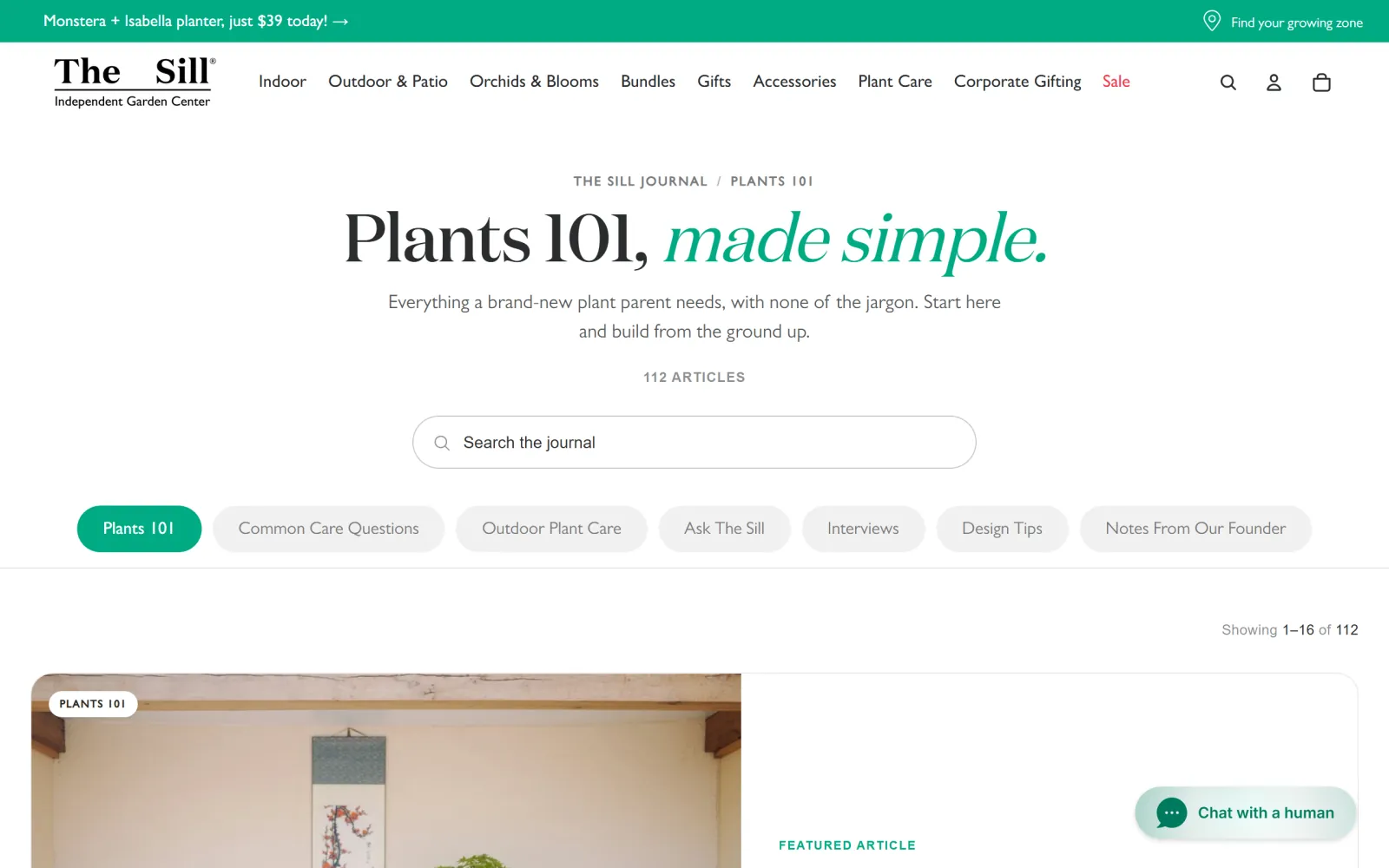
A plant shop running its journal as several Shopify blogs at once: Plants 101, Common Care Questions, Outdoor Plant Care, Ask The Sill and more, each shown as a tab. Plants 101 alone holds 112 articles, and the recent ones are care guides for specific plants, such as how to care for a Meyer lemon or a key lime.
What to copy: One blog per job. Separate blogs give each section its own URL and listing page, which is cleaner than one News blog held together with tags.
Fellow
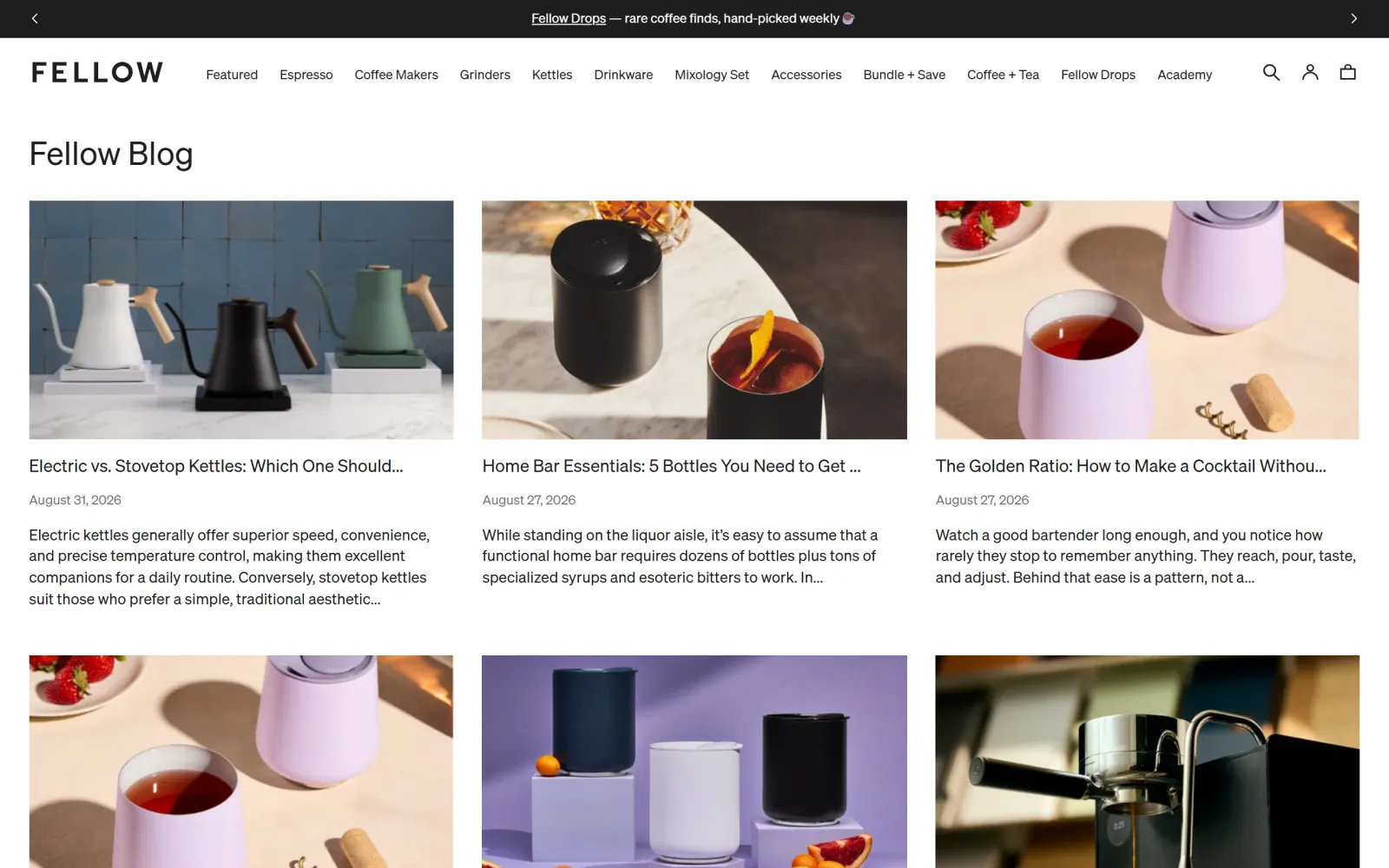
A coffee equipment brand whose blog handle is learn, which tells you what the blog is for before you open it. The most recent post is a straight comparison inside a category it sells, Electric vs. Stovetop Kettles: Which One Should You Choose?, and every card carries a date and a two-line excerpt.
What to copy: Comparisons inside your own category. The shopper deciding between two kinds of kettle is one step from buying one, and a store that stocks both can link to each.
Beardbrand
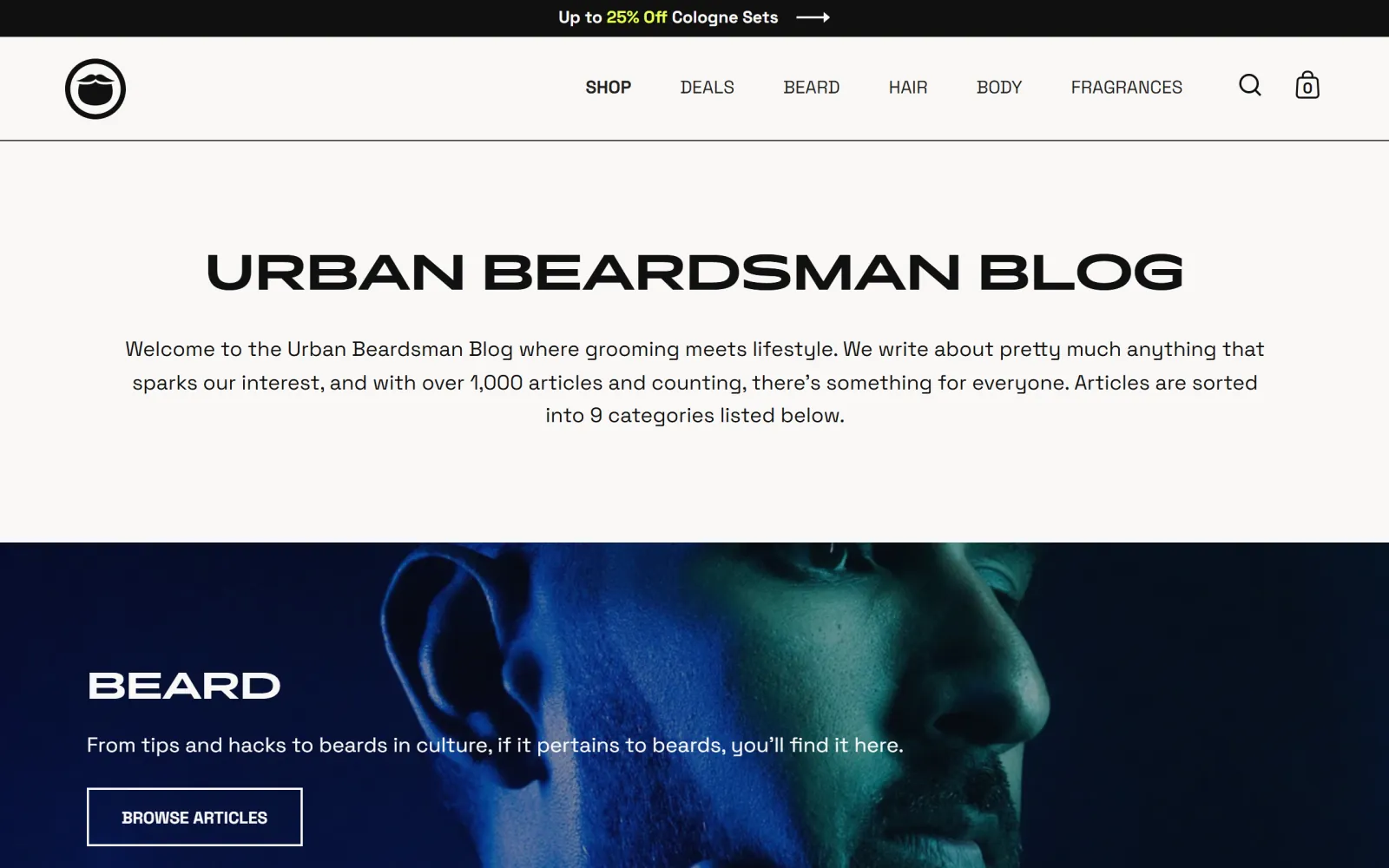
The Urban Beardsman Blog says on its own landing page that it holds over 1,000 articles sorted into nine categories. Recent posts are how-tos and buying guides that sit next to the products: how to choose the best beard comb, eleven ways to use beard balm.
What to copy: Volume, organised. A thousand posts only work because the categories make them browsable, and each category maps to a part of the catalog.
Death Wish Coffee
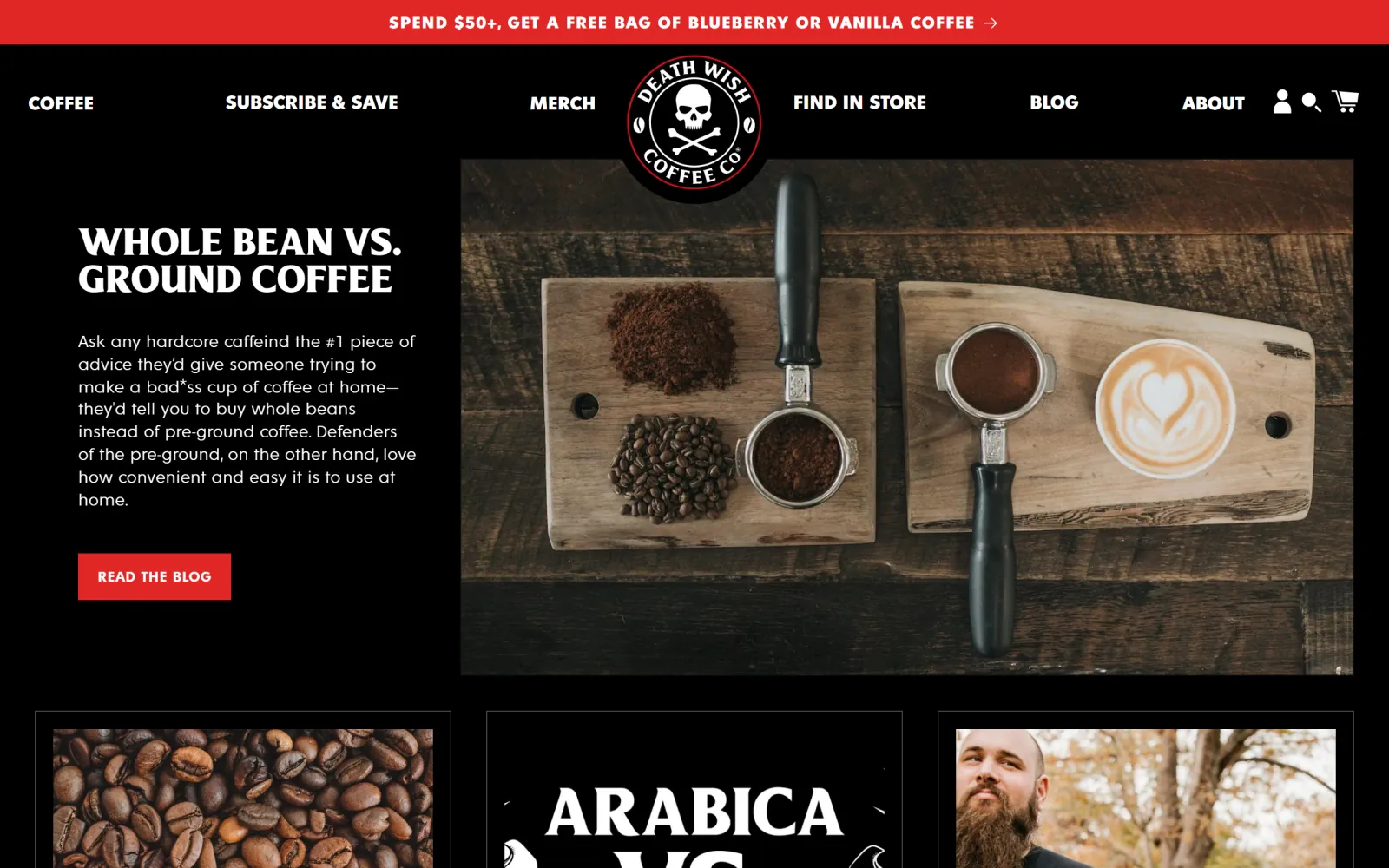
Coffee Talk leads with a featured post, Whole Bean vs. Ground Coffee, and the list below keeps the same pattern: Dark Roast vs. Medium Roast, the key differences between Arabica and Robusta. The word Blog sits in the main navigation, not buried in the footer.
What to copy: The questions a buyer asks before choosing a bag. Every versus post answers one, and whichever way the reader decides, the next click is a product.
Bushbalm
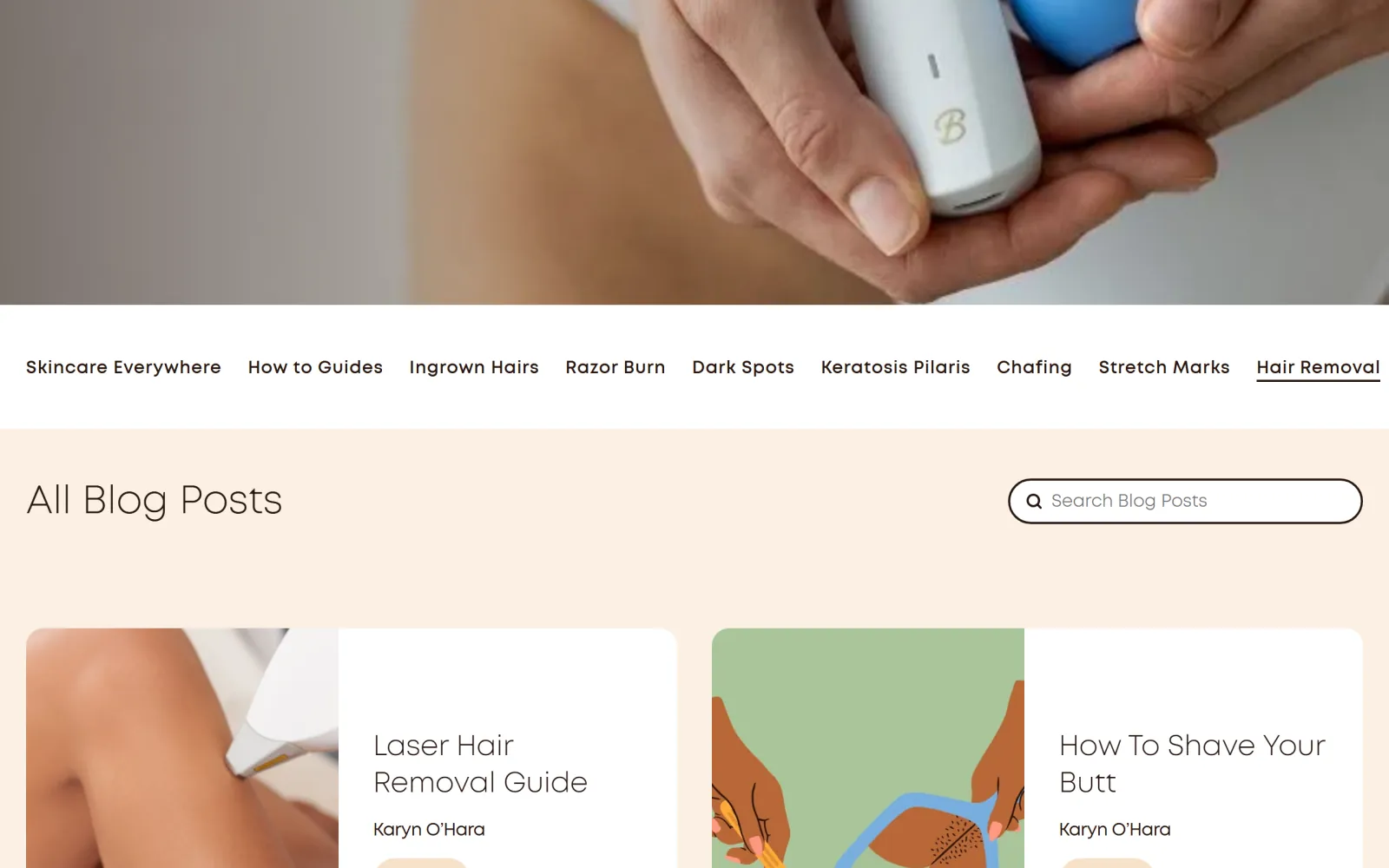
A skincare brand whose blog handle is the topic itself, pubic-hair-removal, with navigation built from the problems its products treat: Ingrown Hairs, Razor Burn, Dark Spots, Keratosis Pilaris, Chafing. Every post card names the writer.
What to copy: Problem-first categories and a real byline. A shopper with razor burn searches for razor burn, not for the product name.
The common thread is not design. It is that every one of these blogs answers questions sitting next to the catalog, keeps publishing, and organises posts so a reader can find the next one. A blog of three launch posts with a beautiful theme loses to a plain one with three hundred useful answers. Volume like that is what an autoblogging setup that checks claims against its sources is for.
A worked example: one post, start to finish.
Take a fictional tea store, Northfold Tea: 48 products in 7 collections, a News blog with two posts from launch, and a support inbox that keeps getting the same email, “I bought matcha but no whisk, what do I do?”. The question also shows real search demand in their keyword data, and none of their pages answers it. Here is the post as it was set up in the Shopify admin, field by field.
A new blog titled Guides, handle guides, comments allowed pending moderation, added to the main menu. The two launch posts stay in News, so their URLs never change.
Title: How to make matcha without a whisk (and when a whisk is worth it). Handle cut from the generated version to /blogs/guides/how-to-make-matcha-without-a-whisk.
Page title (45 characters): How to Make Matcha Without a Whisk: 3 Methods. Meta description (147 characters): No whisk? A shaker bottle, a milk frother or a small jar gets matcha smooth and lump-free. Here is how each method compares, with ratios that work.
Author: the founder, who has a staff account and has made matcha every morning for a decade. Tags: matcha, how-to. Featured image alt text: matcha being shaken in a glass jar beside a bamboo whisk. Excerpt: three ways to get smooth matcha with what is already in your kitchen.
In the body: the matcha collection, the ceremonial matcha product page, the bamboo whisk set at the point the post says when a whisk is worth buying, and the sibling post on matcha vs sencha. One line added to the matcha collection description pointing back at the post. Visibility: scheduled for Tuesday at 7am, the third of four posts written in the same session.
What is working: the topic came from a real question with real demand, not a brainstorm. The page title leads with the exact query and leaves room for the store name the theme appends. The post sells the whisk honestly, by saying when you do not need one, which is the paragraph a reader trusts. And the collection description links back, so the post is not an island.
What it cost: about an afternoon, most of it research and writing, for one post. Northfold has 48 products and well over a hundred questions like this one sitting next to them. That is the gap our AI SEO agent exists to close: the same steps, one post a day, without the afternoon.
Common mistakes on a Shopify blog.
- Writing company news instead of buyer questions. Launches, team updates and “we're at a trade show” posts feel like content and bring in nobody, because nobody searches for them. Keep a news blog if you need one, and point the main blog at questions with search demand.
- Saving posts with the listing on defaults. The pencil icon is easy to miss, so posts ship with a full-headline handle and a snippet built from the opening sentence. Open the search engine listing on every post before it goes live.
- Tag sprawl. A new tag for every post creates a crawlable /tagged/ page with one post on it, dozens of times over. Decide the tag list once and reuse it.
- Posts that never link to a product. A guide that ranks but sends nobody into the catalog is a cost, not a channel. Two or three links per post to the products and collection it discusses, at the /products/ address.
- Renaming a blog or post handle without the redirect. Untick Create a URL redirect, or rename in bulk without it, and every link the old address earned now lands on a 404. Change handles rarely, and redirect every time.
- Publishing in a burst, then stopping. Ten posts in launch week and none after is the most common Shopify blog there is. A schedule with a named owner, or a process that does not depend on one person finding a free afternoon, is the whole difference.
The setup is an afternoon. The posts are the program.
Name the blog, set the handle, fix the tags and fill in the fields, and the Shopify side of blog SEO is done. What is left is the part no platform does for you: a steady supply of posts that answer what shoppers search before they buy, each one linked into the catalog.
That is the part we automate, at a flat $99 a month: topics validated against live keyword data, drafts run through a claim check against their sources, and native posts created in your Shopify blog by our Shopify SEO tool. If you would rather hand the whole program to someone else, there is a done-for-you Shopify SEO service built on the same pipeline, and if the blog is fine but the rest of the store is not, start with our roundup of Shopify SEO apps for the technical layer.
Can you blog on Shopify?
Yes. Every Shopify online store comes with a built-in blog engine and a default blog called News at /blogs/news, so there is nothing to install. You can add more blogs, write posts in a rich text editor with images, links, tables and video, schedule them, tag them and give each one its own page title, meta description and URL handle. Posts live at /blogs/<blog-handle>/<post-handle> on your own domain and are added to the store sitemap automatically.
How do I add a blog to Shopify?
In the Shopify admin, go to Content, then Blog posts, then Manage blogs, and click Add blog. Give it a title, choose how comments are handled, pick a template if your theme has more than one, edit the search engine listing to set the handle, and save. Then add the blog to your main menu or footer under Content, then Menus, so shoppers can find it. To write a post, go to Content, then Blog posts, and click Add blog post.
Where is the blog in the Shopify admin?
Under Content, then Blog posts. Shopify moved blogs out of the Online Store menu and into the Content section in March 2025, so tutorials that tell you to open Online Store, then Blog posts are describing the old layout. Manage blogs, on the same screen, is where you add, rename or delete whole blogs.
How do I do SEO for a Shopify blog post?
Open the post, click the pencil icon on the Search engine listing preview and fill in all three fields: a page title under 70 characters that leads with the question the post answers, a meta description of roughly 140 to 160 characters, and a short URL handle. Add alt text to the featured image, write an excerpt for the listing page, use H2 and H3 headings inside the post rather than a second H1, and link to the products and collections the post is about.
Should I use tags or separate blogs on Shopify?
Use separate blogs for different jobs and tags for a small set of topics within one. A blog has its own listing page and its own URL segment, which suits sections such as guides versus news. Each tag creates a filtered page at /blogs/<blog>/tagged/<tag>, and Shopify blocks tag combinations in its default robots.txt but not single tags, so a sprawl of one-post tags becomes a pile of thin pages. Five to ten tags you actually reuse is plenty for most stores.
How often should a Shopify store publish blog posts?
Often enough that the blog keeps adding pages for real questions, and on a schedule someone owns. One post a week is a sensible floor for a small team. Below that, a year produces a few dozen posts and the blog never covers much of what shoppers search. Use the Visibility date on each post to schedule a batch, so one writing day becomes a week or a month of releases.
What should I write about on my Shopify blog?
The questions people search before they buy what you sell. Buying guides (how to choose X), comparisons inside your category (X vs Y), how-tos and care guides for products you stock, and posts about the problems your products solve. Check that each topic has search demand before writing it, and skip launch announcements and company news unless people actually search for them.
Can I change the author on a Shopify blog post?
Yes, from the Author drop-down in the Organization panel, but it only lists the store owner and staff accounts. To credit a freelance writer or an expert by name, either give them a staff account or have your theme show a different byline. Whether the author appears on the post at all is decided by the theme.
Set the Shopify blog up once. Then publish the posts your catalog cannot.
The agent validates topics against live keyword data, writes answer-first posts with their sources, cuts the claims those sources do not back, links into the products and collections you already have, and delivers each post to your Shopify blog as a draft or live.
FREE TRIAL · CANCEL IN ONE CLICK