SaaS SEO Checklist: Technical, Content and Product Pages
A practical SaaS SEO checklist covering technical audits, product-led pages, content and measurement, with Core Web Vitals targets and fixes.
Most SaaS SEO advice tells you to publish more content. I'd tell you to stop until you know Google can find, index, and measure what you've already published. A SaaS SEO checklist works as an order of operations, not a grab bag of tactics. Fix discovery first, then performance, then content, then measurement, including whether AI answers cite you when no one clicks.
Table of Contents
- The SaaS SEO Checklist at a Glance
- Technical Foundations Search Engines Must Pass
- Core Web Vitals Targets for SaaS Templates
- Product and Content Pages That Pass Review
- Measure Organic Growth and AI Citations
- Start Week One of the Checklist This Month
The SaaS SEO Checklist at a Glance
Use this table before you brief another post. The top rows are blockers. A faster, better written page that Google can't index earns no clicks, so content and speed work can't rescue it.
| Check | Where to Verify | Pass Condition | When |
|---|---|---|---|
| Priority pages indexed | Search Console URL Inspection | Indexed, with the page itself as canonical | Week 1 |
| Sitemap submitted | Search Console Sitemaps report | Submitted with no fetch errors | Week 1 |
| robots.txt and noindex | robots.txt and page source | Pricing, product and blog pages not blocked | Week 1 |
| Crawlable internal links | Crawl report | Every priority page linked with plain HTML links | Week 2 |
| Core Web Vitals | Search Console Core Web Vitals report | Good on LCP, INP and CLS at the 75th percentile | Week 2 |
| Template JavaScript weight | Field data and page audit | No template slipping from good to needs improvement | Week 2 |
| Structured data | Rich Results Test | No critical errors on eligible pages | Week 3 |
| Page title and heading uniqueness | Crawl report | No duplicate titles across templates | Week 3 |
| Query to page intent match | Search Console queries | Top queries match the page's purpose | Monthly |
| Click-through gaps | Search Console performance | High-impression pages with weak CTR reviewed | Monthly |
| AI answer citations | Manual prompt tracking for 20 target queries | Brand or product cited for core queries | Monthly |
How To Use This Table
Work top to bottom for the first three weeks. Don't rewrite a pricing page in week one if URL Inspection shows a different canonical, and don't tune titles for pages your sitemap omits. I would mark the first four rows pass or stop. Everything below them assumes Google can reach the page.
The monthly rows never pass permanently. Intent match, click-through rate, and AI citations shift as queries, competitors, and answer formats change, so put them on a recurring calendar rather than a launch checklist. A page can stay indexed for a year and still lose its job when searchers start asking a different question.
If a check has no owner and no review date, it isn't a checklist item. It's a hope.
This scope suits a SaaS site with a few hundred URLs, where you can inspect priority pages individually. If you've got thousands of integration, directory, or multilingual URLs, apply the same checks to each template and locale instead of pretending you'll review every page by hand.
Technical Foundations Search Engines Must Pass
Discovery comes before keywords. Google describes search as crawling, indexing, and serving results, with crawlers finding URLs through links and then analysing text, titles, and image alt attributes before storing pages in the index, according to the Google SEO Starter Guide. That sequence sets your first six checks.
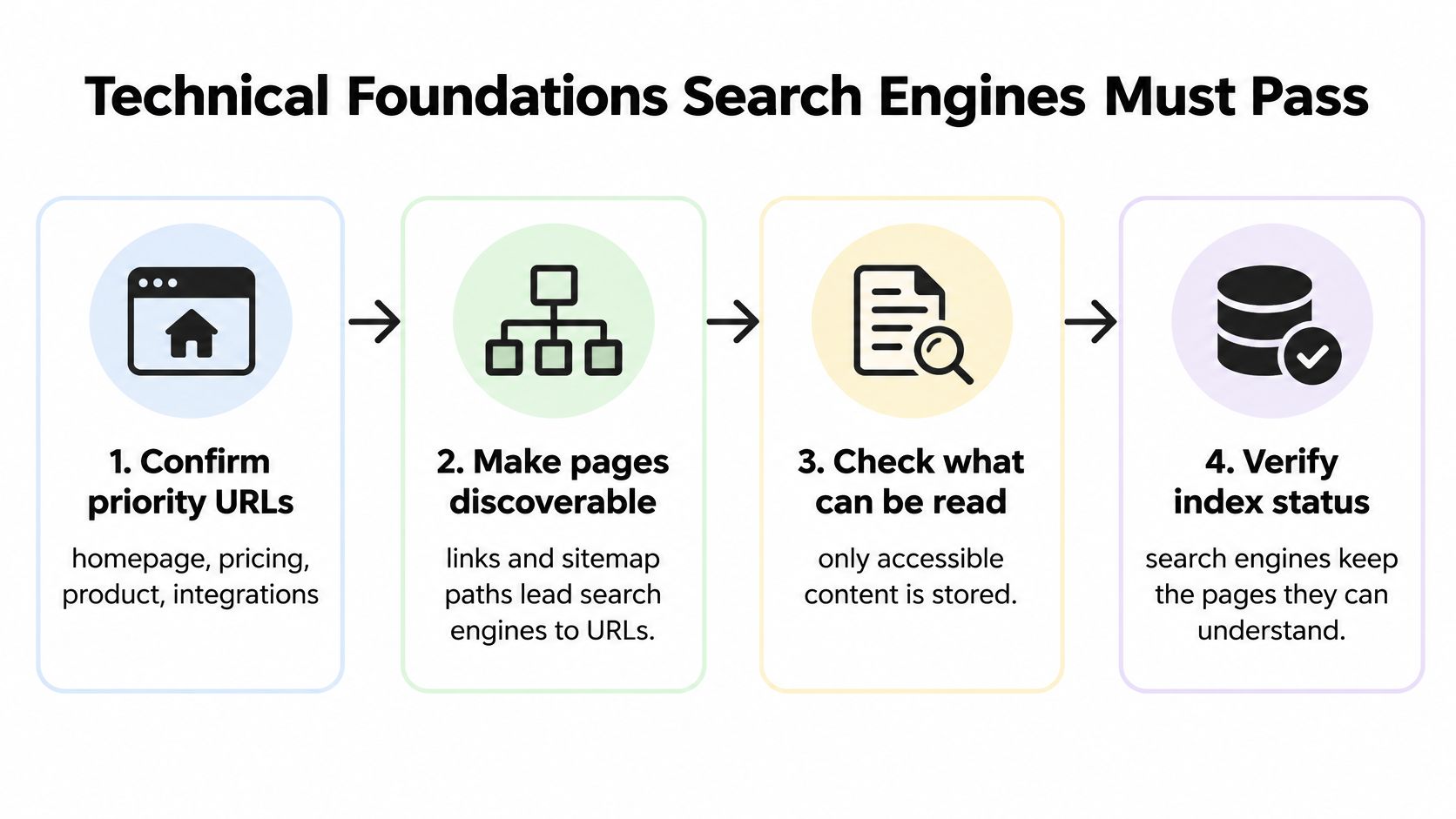
The Six Index Checks
- Confirm priority URLs load for everyone. Check your homepage, pricing, product, integrations, and top posts return a 200 status and aren't behind a login or carrying a leftover staging noindex. That staging tag is the classic launch slip, and it can hide a whole site for weeks.
- Inspect each URL. In Search Console URL Inspection, confirm the page is indexed and Google's chosen canonical is the page itself. A different canonical means you're optimising a URL Google treats as a copy.
- Check robots.txt. Look for accidental Disallow rules on /pricing, /features, or /blog. Use robots.txt to manage crawling, not as your main way to prevent indexing.
- Submit a clean sitemap. Submit the XML sitemap in Search Console, list only indexable canonical URLs, and add the Sitemap line to robots.txt. A sitemap helps prioritise crawling, but it doesn't override a block.
- Make internal links crawlable. Every priority page should be reachable from navigation or a hub through plain HTML links, not only JavaScript buttons or site search. If a human needs the app to find it, a crawler probably does too.
- Check titles and headings by template. Ten integration pages shouldn't share one title. Google reads titles to understand pages, so duplicates blur which page answers which query.
A scripted audit makes this repeatable. Our audit walks the sitemap, fetches the pages that carry the traffic, and scores each page on titles, descriptions, headings, schema, thin or duplicated content, and the stock phrasing that marks a page as machine-written. A technical SEO audit guide helps you structure the same pass manually.
Structured Data Is Eligibility Work
Add only properties that match what's visible on the page. Run the Rich Results Test and fix critical errors. Warnings are optional polish, not blockers. Then confirm the live URL isn't blocked, request recrawling, and allow several days.
Don't oversell schema internally. It's not required for generative AI features, and no markup forces a citation. Before any content work starts, pick five priority URLs and confirm all six checks pass.
Core Web Vitals Targets for SaaS Templates
Performance is where checklists get vague, so use numbers. Google's good thresholds are LCP at 2.5 seconds or less, INP at 200 milliseconds or less, and CLS at 0.1 or less, assessed at the 75th percentile over the previous 28 days in Google's Core Web Vitals documentation. One fast Lighthouse run on your office connection proves almost nothing.
| Metric | Good | Needs Improvement | Poor |
|---|---|---|---|
| LCP, loading speed | 2.5 seconds or less | Above 2.5 to 4 seconds | Above 4 seconds |
| INP, responsiveness | 200 milliseconds or less | Above 200 to 500 milliseconds | Above 500 milliseconds |
| CLS, visual stability | 0.1 or less | Above 0.1 to 0.25 | Above 0.25 |
Test Templates, Not Trophy Pages
Pull mobile field data for five representative templates, one landing page, pricing, docs, blog, and integration page. SaaS sites rarely have a slow page problem. They have a slow template problem repeated across hundreds of URLs, which is also why your choice among SEO-ready publishing platforms for lean teams matters less than what you load on every template.
Responsiveness still separates sites. The 2025 Web Almanac performance chapter reports 77% of mobile page loads achieved good INP, while the top 1,000 websites reached 63% good INP in its top-site comparison. Big sites carry heavy script loads, and your chat, analytics, and A/B tools can put you in the same position.
- Inventory JavaScript by template. Defer analytics, chat, and experimentation scripts that don't need to run on first load. INP fails usually trace back to third parties, not your hero copy.
- Set dimensions on media. Add width and height to hero images, videos, and embeds so the browser reserves space before assets arrive.
- Reserve space for late elements. Cookie banners and web fonts are common CLS culprits on marketing sites. Give them fixed space or load them without pushing content.
Release gate: Block publication when a template slips from good to needs improvement on any metric, then retest after caching and third-party scripts are enabled.
Passing all three supports ranking systems, but Google cautions it doesn't guarantee top positions. Relevance and content quality still decide most results. The usual misses are compressing only the hero image, ignoring a chat widget that delays interaction, and validating desktop while your buyers browse on phones.
Product and Content Pages That Pass Review
Templating pages by keyword is how SaaS sites end up with forty integration pages nobody trusts. Google's people-first guidance asks whether content shows first-hand expertise and leaves readers able to achieve their goal, in Google's helpful content guidance. Apply one test per page type.
Pricing and product pages need the same honesty you'd want from a vendor you're evaluating.
- Pricing pages state plan limits, trial terms, and what changes on upgrade in plain language. If a buyer needs a sales call to learn a seat limit, the page hasn't done its job.
- Feature pages show a real screen or workflow your team has used, plus one honest limitation. A page with no limitation reads as ad copy.
- Integration pages list setup steps, required permissions, and a time estimate from tested setups, not from the partner's marketing page.
- Comparison pages name at least three criteria, say where competitors are stronger, and date the pricing. Undated prices decay into misinformation.
- Blog posts include a first-hand example, a sourced data point, and a clear next step. That's the working core of blog optimization from The SEO Agent.
- Documentation pages answer the exact question in the first paragraph, then add detail. Docs readers arrive mid-task and won't scroll through an introduction.
This video walkthrough shows how that review looks when you apply it page by page.
Then clean up duplication. Say a team maintains forty near-identical integration pages built from one template and a logo swap. Merging them into a dozen detailed pages with real setup steps gives each query one clear answer and removes pages competing with each other.
Finish every review with one question. What has the author done that a competitor couldn't copy from your public documentation? If the answer is nothing, the page isn't ready, however well it matches a keyword.
Measure Organic Growth and AI Citations
Start with a baseline you can return to. Export Search Console performance by query, URL, country, impressions, clicks, and CTR, then keep a weekly change log for priority pages. Without that log, you'll credit a ranking rise to a rewrite that shipped after the rise began.
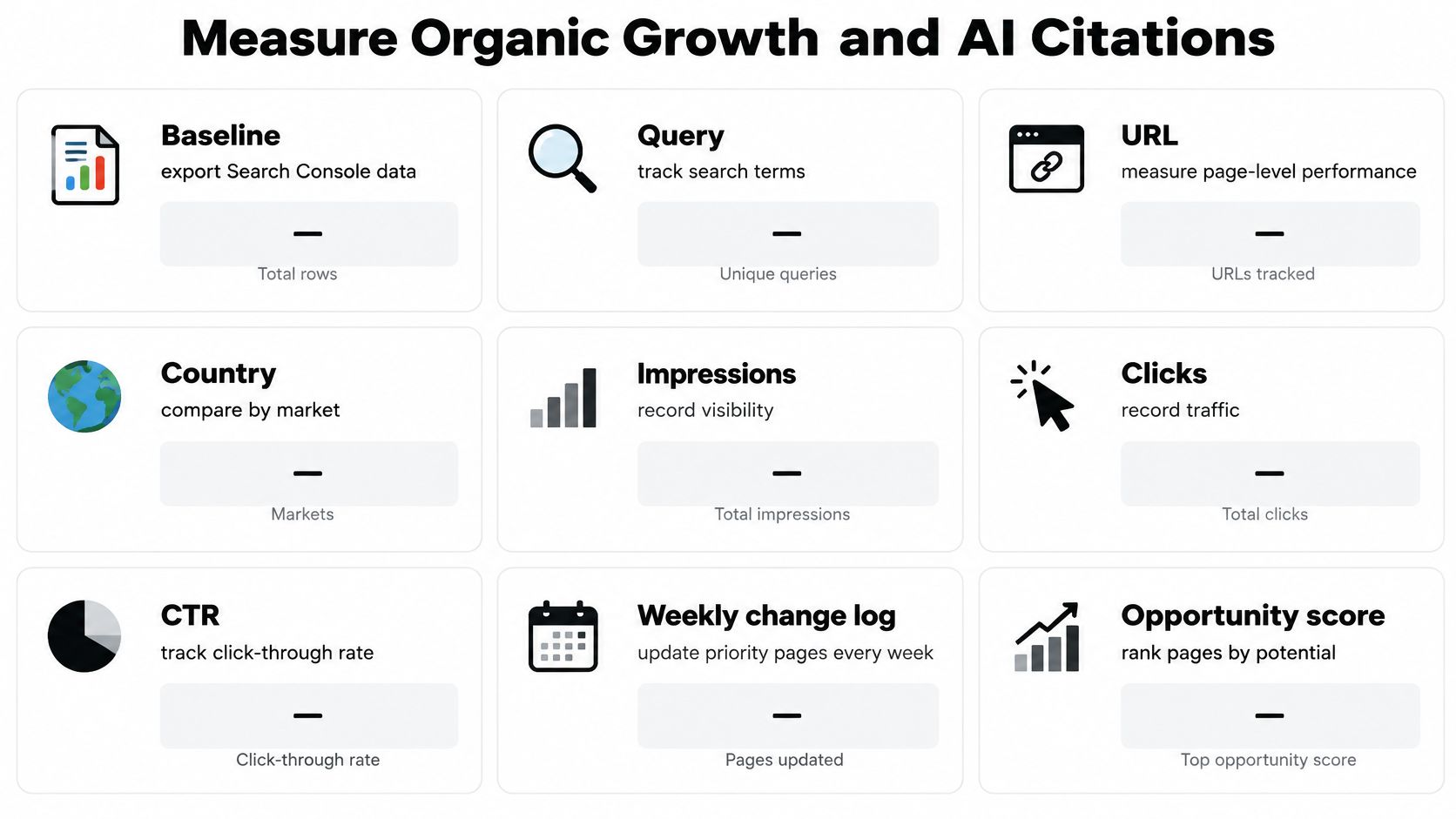
Rank fixes with an opportunity score, impressions multiplied by the gap between target and current CTR, multiplied by conversion value. That formula pushes high-impression, weak-CTR pages to the top, which is where a title fix beats a new post almost every time.
Use benchmarks as sanity checks, not goals. SaaS companies in Databox's benchmark database had a median of 1.05K organic clicks, a 1.25% median click-through rate, and an average Google search position of 33.44 in November 2023. Meanwhile, Conductor's Organic Search Traffic Benchmarks Report put organic search at an average of 33% of overall website traffic across seven industries in 2024, and Campfire Labs' analysis of more than 500 B2B SaaS companies found the average company increased organic traffic by 24% over the preceding 12 months in 2024. If you're far from those marks, ask why, but don't chase another company's median.
| Metric | Where to Find It | What It Tells You | How to Read a Change |
|---|---|---|---|
| Impressions by query | Search Console performance | Demand for target pages | Rising impressions with flat clicks means the snippet needs work |
| Clicks and CTR by page | Search Console performance | Pre-click appeal of each page | CTR well below the page's target signals a weak title or description |
| Good Core Web Vitals share | Search Console Core Web Vitals report | Real-user experience by URL group | A template falling to needs improvement needs a script review |
| Organic sessions | Analytics | Growth baseline | Compare against the same period last year, not against a fixed number |
| AI answer citations | Manual tracking across 20 target queries | Visibility when no click happens | More citations with flat clicks can still mean more demos |
| Assisted conversions | Analytics | Value beyond the last click | Pages with citations and branded searches deserve a conversion check |
The AI Citation Layer
Clicks no longer capture visibility. Reporting citing Pew Research found users clicked a traditional result in 8% of visits when an AI summary appeared, compared with 15% without one, while links inside the summary got clicks in about 1% of visits, as covered in PR Newswire's release on AI search behaviour. Judging pages on clicks alone will make good pages look like failures.
Each month, run your 20 target queries through AI answers and record whether your brand or product is cited, a habit the tools in AI visibility insights for growth teams can help you scale. Compare citations against branded search and assisted conversions. A comparison page that's cited often may lose clicks while producing more demo requests, and that's a trade most SaaS teams should accept.
Start Week One of the Checklist This Month
Don't turn this into a quarter-long project. Your first month needs four moves, in order.
- This week, spend one hour on ten URLs. Pick the homepage, pricing, two feature pages, two integrations, and four posts that already earn impressions. Confirm each shows as indexed with itself as canonical, the sitemap has no fetch errors, and robots.txt plus any noindex tag don't block them.
- In week two, fix the worst template. Open the Core Web Vitals report, find the template with the weakest mobile field data, and defer its on-load scripts before anyone rewrites copy. Speed work on a template helps every page using it.
- Pick one fixed monthly date for measurement. Export impressions, clicks, and CTR by query and URL, then run the same 20 target queries in AI answers and mark whether your brand or a product URL is cited. Same queries, same date, every month.
- Log every change. Record the date, what changed, and which metric you expect to move. Future you will otherwise guess.
Stop there for the month. Content rewrites wait until those ten URLs pass the blockers. If you'd rather not run the inspection yourself, The SEO Agent runs the site inspection as the first step of a $99 per month subscription, then writes and publishes the gaps it finds. That's a workflow offer, not a ranking promise, since we don't guarantee published articles will rank, attract traffic, or produce any specific outcome.
If your SaaS site needs this checklist run and the content gaps written and published without adding headcount, The SEO Agent handles the audit, keyword research, drafting, and CMS publishing for you. Start with your ten priority URLs this week, then let the monthly citation and CTR review decide what gets built next.