What Is Cannibalization in SEO and How to Fix It
What is cannibalization in SEO? Learn how competing pages split rankings, how to spot overlap in Search Console, and which fix to choose.
Keyword cannibalization happens when two or more URLs on the same site target the same search query and intent, so they compete for one ranking slot. The popular advice says to find every overlap and merge, canonicalize, or delete pages at once. Don't start there. Most overlap is harmless, and a cleanup done without proof can remove pages that earn clicks, links, and sales. Treat what is cannibalization as a measurement question first. You need evidence that pages are dividing visibility and hurting the combined result before you change anything.
Table of Contents
- What Keyword Cannibalization Means in Plain Terms
- How to Spot Competing Pages in Search Console
- Why Overlap Usually Costs Clicks Rather Than Penalties
- Choosing the Right Fix for Each Overlap Type
- Measuring Results After a Fix
- Mistakes That Make Overlap Worse and Your Next Step
What Keyword Cannibalization Means in Plain Terms
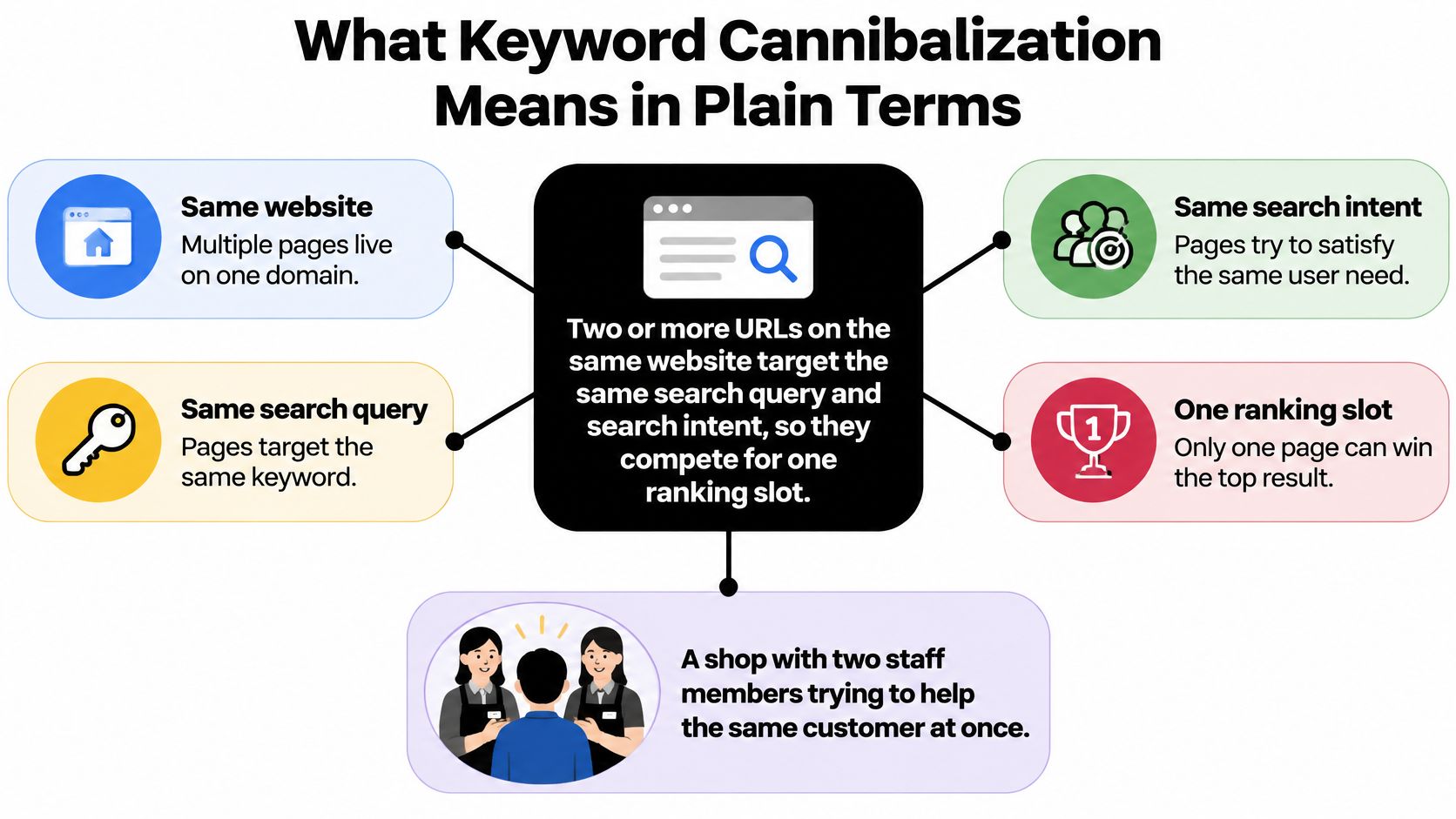
Keyword cannibalization means two or more URLs on the same website target the same search query and search intent, so they compete for one ranking slot. The Marketer Coffee glossary on keyword cannibalization gives the same test, overlapping intent combined with competing URL-level search visibility. Repeated wording alone doesn't create the problem.
Think of a shop where two staff members answer the same customer's question at once. The customer hears a split answer, and the shop never fully owns the topic. Search works in a similar way, because Google has to pick one URL to show, may divide clicks between pages, or may rotate which page appears over time.
A Running Shoe Example
Say a store publishes a buying guide for running shoes and later writes a product page that also tries to answer beginners choosing their first pair. If both pages chase the same shopper asking the same question, they can keep trading places in results. One week the guide ranks, the next week the product page replaces it, and neither builds stable momentum.
That's different from a guide that helps readers choose and a product page that helps them buy a specific model. Those pages can share words like running shoes without competing, because they serve different jobs. Clear roles like this are central to good SEO strategies for startup blogs, where each article needs a distinct purpose.
The problem isn't using a keyword twice. It's asking two pages to satisfy the same searcher in the same moment.
The term also appears in business strategy, where a new product that draws sales from an existing one is called cannibalization, but this guide covers only the SEO meaning. Carry one idea forward. Divided visibility on one query is the issue to confirm, not a list of pages that happen to mention the same phrase.
How to Spot Competing Pages in Search Console
Start with one query that matters, not your whole site. A focused check gives you a clear yes or no, and it stops you flagging pages just because they repeat a word.
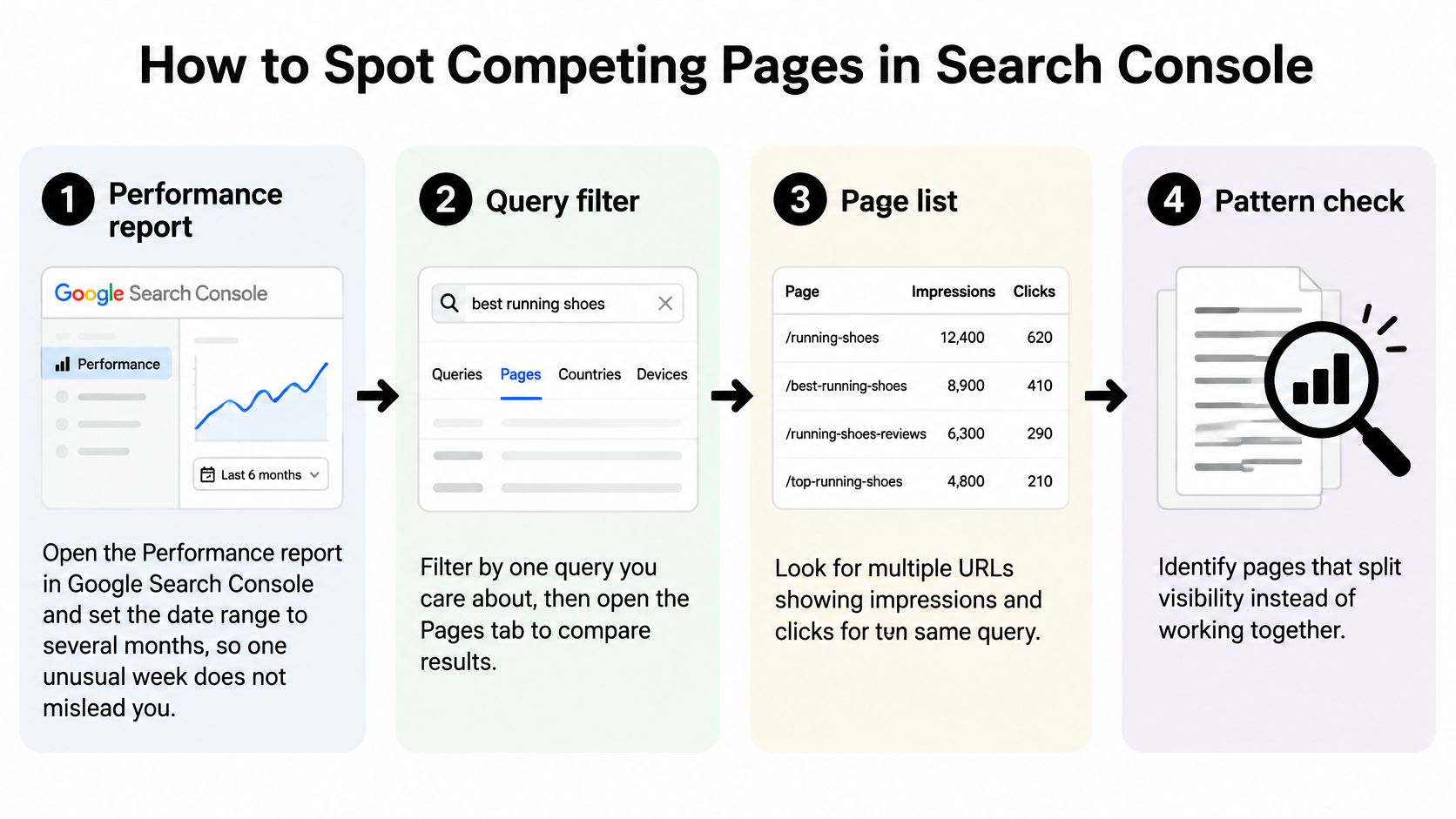
- Open the Performance report. Set the date range to several months in Google Search Console, so one unusual week doesn't mislead you. Short ranges make normal movement look like a crisis.
- Filter by one query. Add the exact query you care about, then open the Pages tab to see which URLs received impressions for it.
- Count the URLs collecting impressions. More than one URL is a signal to investigate, not proof on its own. Note how evenly impressions and clicks are split.
- Compare the trend over time. Look for the ranking URL changing, with one page gaining while another falls, then reversing. That swapping pattern is stronger evidence than a single snapshot.
- Check the live result. Search the query in a private browser window and ask whether the ranking pages answer the same question for the same searcher. If they serve different needs, the overlap may be harmless.
- Record the details. Write down each URL with its clicks, average position, and the intent it serves. You'll need that baseline if you change anything later.
The diagram below sums up the sequence before you interpret the signals in the table.
If you're connecting Search Console data to other tools, NotFair's Search Console integration guide explains the setup in practical terms. For a wider technical review alongside this check, The SEO Agent's technical audit checklist helps you separate overlap from indexing or site structure issues. The video below walks through the same query and Pages tab workflow visually.
Reading the Signals
| Search Console signal | What it usually means | Next action |
|---|---|---|
| One URL gets all impressions for the query | No internal conflict | Leave it alone |
| Two URLs with the same intent, rankings swap over time | Keyword cannibalization | Choose a primary page and consolidate |
| Two URLs with different intents, such as guide and product page | Harmless overlap | Keep both and link between them |
| Two URLs with the same intent, both stable and converting | Shared demand that needs checking | Measure before changing |
| Impressions split and combined clicks falling | Real loss in visibility | Prioritize the fix |
Finish with a short list, not a mass cleanup. Keep only queries where intent overlaps and combined performance is flat or falling, and take those pages into the decision process.
Why Overlap Usually Costs Clicks Rather Than Penalties
Many articles call cannibalization a penalty. That's the myth to drop first. Google's Search Central documentation describes no documented keyword cannibalization penalty, and ordinary duplicate or overlapping content isn't automatically a spam violation.
Selection, Not Punishment
Google's job is to select which URL should appear. When several URLs look substantially similar, it may choose a canonical version, show different pages over time, or divide impressions between them. You can get unstable rankings and the wrong page in results without any manual action against your site.
The damage is practical. Say a helpful older guide ranked well, then a newer similar post goes live. The newer post gains some impressions, the older guide loses ground, and combined clicks stay flat while your preferred page looks weaker. You've added content but haven't gained demand, and readers may land on the page that's less likely to convert.
Diagnostic test: Compare combined traffic and conversions for the query before you redirect anything. If the total holds, you may not have a problem worth fixing.
Overlap is harmless in common cases. Pages can serve different stages of the buying journey, such as learning, comparing, and buying. They can also hold distinct query variants, where similar wording hides different needs.
The same logic holds beyond search. A new offer can lift total sales while weakening an existing one, so judging only the declining product gives a false picture. Judge the combined result for the query, not the fall of a single URL, and you'll avoid fixing overlap that isn't costing you anything.
Choosing the Right Fix for Each Overlap Type
Use one decision rule. Keep the stronger page as the primary page, and act on the weaker one only when both target the same intent. Strength means the better mix of rankings, backlinks, clicks, and conversions, not just the newer publish date.
The Main Moves
For true duplicates chasing one intent, merge the weaker page's useful content into the primary page. Then set a 301 redirect from the weaker URL, so readers and links land in one place. Don't throw away unique examples, answers, or sections that the primary page lacks.
When intents differ, keep both pages and make the split obvious. Sharpen titles and headings so one page clearly teaches and the other clearly sells or compares. Then link between them at the point where a reader's need changes, for example from a guide into the product it recommends.
An older page can also be refocused. Update it to target a distinct query variant with its own audience and purpose, rather than a slightly reworded version of the primary query. Use a canonical tag only for true duplicates that must stay live, because it's a hint rather than a redirect and Google can ignore it.
Businesses that rely on search to turn contractor searches into booked jobs face the same choice on service pages. A location page and a service guide shouldn't be merged if one books work and the other answers early questions. Clarify intent first, then consolidate only where pages duplicate each other.
After any change, update internal links so they point to the primary page with descriptive anchor text. You can add relevant links between articles to reinforce which URL owns the topic. Refresh your sitemap so it lists the primary URL, then watch Search Console for that query over the next measurement window.
| Situation | Best move | Why it works |
|---|---|---|
| Near-duplicate pages with the same intent | Merge into the stronger page and 301 redirect the weaker one | Consolidates ranking signals on one URL |
| Same topic, different intent | Keep both, sharpen titles and headings, link between them | Each page serves its own searcher |
| Older page losing to a newer, similar one | Refocus the older page on a distinct variant, or redirect it | Stops the two URLs from swapping |
| Both pages convert for different audiences | Keep both, link between them, and add no canonical tag | A canonical would hide a page that earns revenue |
| Overlap unproven or traffic stable | Change nothing and keep measuring | Avoids redirects that cost more than they save |
Match your case to one row before you act. If you can't place it confidently, the last row is the safest default.
Measuring Results After a Fix
A fix without a baseline is guesswork. Record the numbers first, using the same date range you'll repeat later, so you're comparing like with like.
What to Record Before You Change Anything
For the target query, note the combined clicks across all competing URLs. Add the impressions split by URL, the average position of your intended primary page, and the conversions tied to each URL. Save the live intent check too, including which page you want Google to show and why.
- Combined clicks: The total for the query, not one page in isolation.
- Impressions split: How visibility is divided between the URLs.
- Primary page position: Where your chosen winner ranks now.
- Conversions by URL: Signups, sales, or enquiries each page produces.
Then wait. Allow a full measurement window of several weeks before judging, because rankings settle slowly after redirects and recrawls. Compare a period of the same length before and after the change, and use rank tracking recommendations from The SEO Agent if you want position history alongside Search Console.
Success looks like consolidation, not just movement. Combined clicks and conversions for the query should hold or rise, and the primary URL should gain the impressions the weaker URL lost. That's demand moving to one stronger page.
If one page falls and no other page gains, you haven't consolidated demand. You've lost it.
When that happens, reopen the decision. Check whether the two pages really shared one intent, whether merged content kept the answers readers needed, and whether internal links now point clearly to the primary page.
Log each change with its date, the primary page chosen, and the reason. A short log makes later reviews faster and shows whether the overlap has returned when new content is published.
Mistakes That Make Overlap Worse and Your Next Step
Most damage comes from acting too broadly or too soon. Run through this checklist before you touch a URL, and use a structured guide to auditing search visibility if you want the wider audit context around these checks.
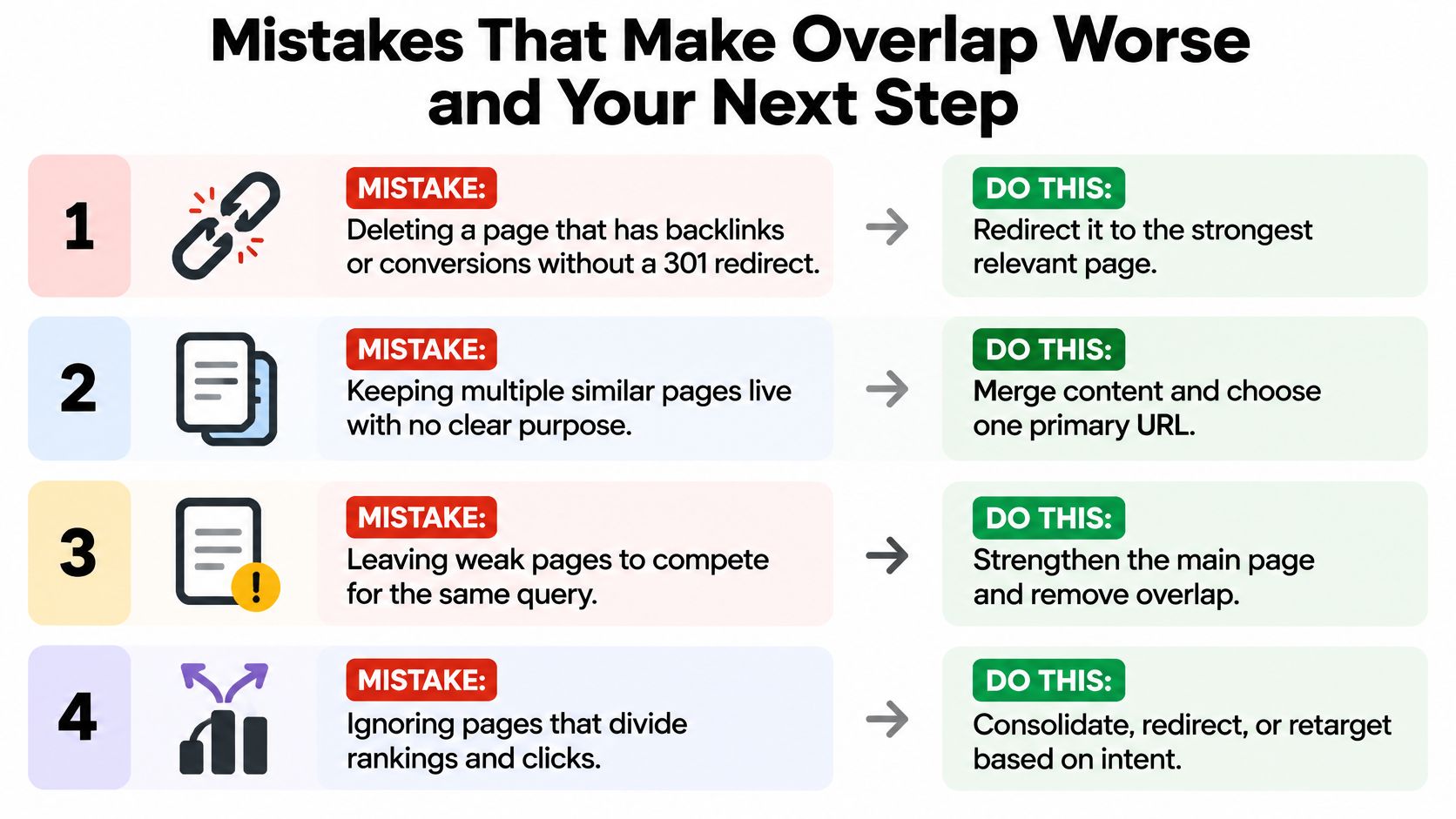
- Deleting without a redirect: Removing a page that has backlinks or conversions loses that value. Redirect it to the primary page with a 301 instead.
- Canonicalizing different intents: A canonical can hide a useful page that serves its own searcher. Keep both pages and link between them.
- Merging before confirming competition: Two URLs in Search Console isn't enough proof. Measure intent, swapping, and combined performance first.
- Publishing a third page: A new article for the same query deepens the split. Consolidate or refocus the pages you already have.
- Leaving old URLs in the sitemap: Updated internal links send mixed signals if the sitemap still promotes the weaker URL. List only the primary URL.
- Judging from one week: Short windows turn normal settling into a false verdict. Use the full measurement window of several weeks.
- Adding more variants to both pages: Stuffing related phrases into each page makes them more alike. Narrow each page to one clear intent.
Your Next Step
Pick one primary page for each competing query and write a one-line note on why you chose it. That note should name its intent, its conversions or links, and what will happen to the weaker URL. Keep those decisions in a checklist for consistent SEO publishing so future writers don't undo them.
Prevention is simpler than repair. We map pages your site already ranks for before new articles are planned, so no second article is written for a query your site already owns. Articles also include internal links into pages that already exist on your site, which reinforces your primary pages instead of creating rivals. Apply the same rule in your own planning, and confirm an existing page doesn't already own the query before any new article is approved.
If you're spending more time untangling overlapping pages than publishing, The SEO Agent can map what your site already ranks for, plan articles around gaps instead of duplicates, and publish pieces that link into your existing primary pages. Visit us to turn one keyword into one clear ranking post, without creating a second page that competes with the first.