9 Types of Writing Formats for SEO Content in 2026
Explore 9 types of writing formats, from how-to guides to case studies and news pieces, with examples and when each one fits your SEO goals.
Most content underperforms because its format misses the reader's intent, not because the writing is weak. A person trying to complete a task needs steps, while someone choosing between products needs a fair comparison. A polished article can still fail if it makes the reader work to find the answer.
Publishing formats have changed whenever producing and distributing writing became easier. Historical publishing research estimates that more than 10 million books were published in the West between 1450 and 1910, and annual production later rose from about 21,000 titles to roughly 1.6 million titles across the periods it compares, as described in this Oxford history of publishing. Digital publishing has widened the toolkit again. For SEO teams, the practical choice is no longer whether to write an article at all. It's which format best answers the query and what evidence the format requires.
Use these nine formats as a working toolkit: how-to guides, listicles, pillar articles, comparison posts, case studies, product reviews, interview articles, FAQ articles, and news articles. Each should earn its place by completing a reader's job and matching a search intent. The sections below show where each fits in the publishing pipeline, what to verify before shipping, how to structure it, and what to try if it doesn't perform.
Table of Contents
- 1. How-To Guide
- 2. Listicle
- 3. Ultimate Guide
- 4. Comparison Article
- 5. Case Study
- 6. Product Review
- 7. Interview Article
- 8. FAQ Article
- 9. News Article
- How the 9 Writing Formats Compare by Search Intent, Best Use, and Main Drawback
- Choose the Format by the Job Your Page Must Do
1. How-To Guide
A how-to guide should help a reader complete one clearly defined task. Someone searching how to configure a CRM doesn't need a broad overview of customer relationship management. They need steps that work, in the right order, with enough context to recover when something goes wrong.
Start in research by checking the exact task, the tools involved, and what the search results already answer. In the brief, define the reader's starting point and the finished outcome. Draft the guide as a sequence, with prerequisites before step one and expected results after important actions. HubSpot's CRM setup articles and Google Search Central's structured-data documentation are useful models for task-focused instructions. A WordPress installation guide, for instance, should say what the reader needs before they begin, then separate installation from initial configuration.
Practical rule: If you haven't tested a procedure against the current product version, don't present it as a reliable tutorial.
During fact-checking, verify every action yourself and record the software version tested. Check that screenshots match the current interface, links still work, and warnings reflect the actual risks. Use short, active instructions and keep each paragraph focused on one idea, as recommended by the U.S. National Archives plain-writing principles.
Publish an outcome-led headline, a “what you'll need” section, numbered steps, and a troubleshooting section for common errors. A how-to is the wrong format when readers need to choose among solutions rather than perform one task. If the guide isn't attracting the right query, narrow it to one specific task or turn the decision-making parts into a comparison post. Teams planning AI-powered WordPress publishing for lean teams can use the same workflow principle: make the intended reader action clear before drafting.
2. Listicle
A listicle promises a bounded answer: a selection of tools, approaches, mistakes, or ideas that readers can scan and compare. It fits discovery searches such as “ways to improve onboarding” and broad consideration queries such as “best project management tools.” A listicle is a poor fit when the answer depends on a careful sequence of steps. Use a how-to guide for that.
In research, define what qualifies for the list and gather evidence for each entry. A list of email tools, for example, needs criteria that matter to the intended reader, such as integrations, ease of setup, and support for the team's workflow. The brief should specify a consistent template for every item. In the draft, give each entry a clear use case, its strongest advantage, its trade-off, and a verdict. That consistency makes the list easier to scan and easier to trust.
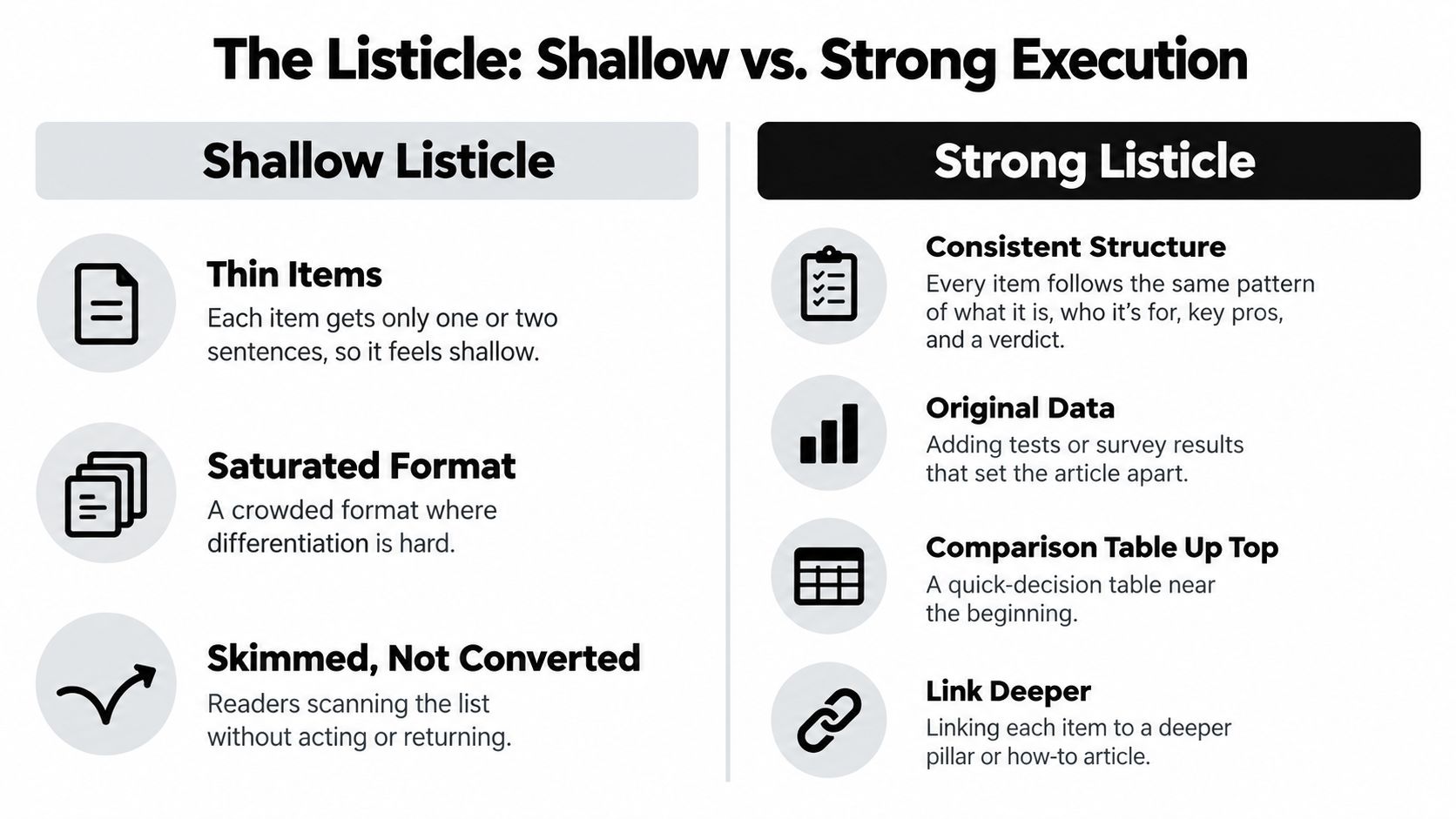
Put a compact comparison summary near the top when readers need to make a quick choice. Don't pad the count with near-duplicates or entries that don't meet the stated criteria. Before publishing, verify product names, capabilities, links, and any claims about testing. The Content Marketing Institute reports that short articles and posts were used by 92% of B2B marketers in 2024 in its B2B content marketing trends research. Adoption alone doesn't make a list useful; specific judgments and well-supported distinctions do.
If a listicle earns impressions but doesn't help readers decide, replace generic descriptions with clearer best-fit recommendations. If the items require detailed instructions, split them into dedicated guides. A focused roundup of best SEO automation tools shows the value of connecting a discovery format to a concrete selection task.
3. Ultimate Guide
An ultimate guide works as a pillar article: a central resource that explains a broad subject and directs readers to deeper pages on its subtopics. It suits readers who need a reliable overview before they can decide what to learn or do next. It's the wrong choice for a narrow query with a direct answer. A long guide can bury that answer instead of improving it.
Build the page in research by mapping the subject into distinct questions. Then plan a central article and supporting pages, each with a specific purpose. A guide to SEO, for example, might cover technical health, keyword research, content planning, and measurement, while linking out to focused explanations of each. The brief should identify what belongs on the pillar and what belongs on a supporting page. Without that boundary, teams repeat themselves and readers have to search within a single oversized article.
In the draft, give each major subtopic its own useful section. Use descriptive headings, a navigable contents list, and internal links that explain what a reader will get next. Link supporting articles back to the pillar with meaningful anchor text. During fact-checking, confirm that claims are current and that every supporting page adds detail rather than restating the overview. Refresh the guide on a planned schedule so old examples and recommendations don't undermine its usefulness.
A pillar page should make the topic easier to navigate, not force every related answer onto one page.
A broad guide also needs a direct answer near the top. Readers shouldn't have to work through background before they can tell whether the page addresses their question. If the guide draws visits but doesn't help readers reach a useful next step, tighten its scope and strengthen the links between topic pages. For ongoing planning and publishing, The SEO Agent offers a way to organize sourced articles around a content workflow.
4. Comparison Article
A comparison article helps readers decide between products, services, or approaches. It matches searches such as “A vs B” and “alternatives to A,” where the reader already knows the options and wants to understand which one fits. It's the wrong format when a reader first needs a basic explanation of the category. Start with an explainer in that case, then lead into the comparison.
In research, choose criteria before you evaluate the options. For a comparison of analytics tools, that might include setup effort, reporting features, integrations, and suitability for a small team. The brief should identify the audience and the conditions behind each recommendation. In the draft, use the same criteria for every option and put the main differences where scanners can find them. A “best for” verdict helps readers choose without pretending one product suits everyone.
Before fact-checking, confirm that feature details, limitations, plan names, and prices still match the products being compared. Date-stamp details that may change. Give competing options credit where it's deserved. A one-sided comparison reads like a sales pitch and makes it harder for readers to trust the verdict.
Decision test: A comparison is useful only if a reader can see why one option suits them better than another.
If readers leave without choosing, the criteria may be too vague or the page may be comparing products for different jobs. Narrow the audience, state the trade-offs plainly, and make the verdict conditional. If the core question is whether one product is worth buying at all, use a product review instead. A focused example is The SEO Agent vs Outrank, where the comparison should help a reader judge fit rather than assume a universal winner.
5. Case Study
A case study shows how a person, company, or project tackled a specific problem and what happened. It fits readers who need proof that a proposed approach can work in a relevant situation. Unlike a how-to guide, it doesn't promise a repeatable procedure. Unlike a product review, it centers on a particular result and the process behind it.
Begin research by gathering the starting conditions, the actions taken, and the outcome from people and records close to the work. For a search-growth case study, the team might document the initial site condition, the content changes, the measurement window, and the resulting change in qualified organic visits. The brief should name what can be substantiated and what the reader should learn. In the draft, open with the central outcome, then explain the problem, approach, execution, and limitations in a clear sequence.
For fact-checking, verify the baseline, measurement period, and source of every result. Ask the subject to review quotations and confirm that any private information can be published. Show screenshots only when you have permission and can explain what the image demonstrates. Don't treat a correlation as proof that one change caused the entire outcome.
A useful case study also says where the approach might not transfer. Different starting conditions, audiences, or resources can change what works. If the article has a compelling story but no verifiable evidence, publish it as an interview or profile instead. If readers need step-by-step instructions, turn the tested process into a how-to guide. Teams can explore AI-driven content publishing through a case study that makes its scope and evidence visible rather than relying on an unsupported success claim.
6. Product Review
A product review helps a reader decide whether one specific product is right for them. It matches evaluation searches and can support a purchase decision, but it isn't a substitute for a comparison when readers are choosing between several options. A review without hands-on testing, clear evidence, or honest limitations is an advertisement in editorial clothing.
Use research to define the product version, the reader's needs, and what you can actually test. The brief should include a consistent evaluation method, such as setup experience, core features, reliability, and fit for different users. In the draft, describe what the product does, how it performs against those criteria, what works well, and where it falls short. A review of a project-management app, for example, should explain whether it handles a small team's actual planning workflow, not just repeat the feature list.
During fact-checking, confirm that interface details and current product information remain accurate. Disclose affiliate or sponsorship relationships clearly. Distinguish tested observations from claims made by the manufacturer, and don't imply you tested features you only read about. State who should consider the product and who should avoid it.
Trust depends on the method: Explain what you tested, what you didn't, and how those limits affect your verdict.
Publish the review with its date and the product version or edition assessed. Return to it when meaningful changes affect the recommendation. If your testing covers multiple products under one set of criteria, a comparison article may serve readers better. If you can't test the product directly, use an explanatory overview and attribute product claims instead of presenting them as your own findings.
7. Interview Article
An interview article brings a firsthand perspective into a topic. It fits readers who want an experienced practitioner's reasoning, a founder's account of a decision, or an expert's interpretation of a problem. It can add original material to search coverage, but a transcript on its own rarely gives readers the context or synthesis they need.
Start research by identifying what the audience wants to learn and why this particular person can answer it. The brief should connect each question to that reader need. Send questions in advance when it helps the guest give considered responses, but leave room for follow-up questions. A conversation with a product leader about onboarding, for example, should ask how their team identified friction and what evidence shaped its changes, rather than inviting broad opinions about growth.
In the draft, introduce the guest's relevant background and bring the most useful answer forward. You can keep a question-and-answer format or build a narrative around selected quotations. Edit for clarity without changing the speaker's meaning. Link to the guest's work and explain unfamiliar references so the article makes sense to readers who weren't part of the conversation.
During fact-checking, confirm names, titles, quotations, and contextual claims with reliable records and the guest where appropriate. Don't let a speaker's opinion appear to be an independently verified fact. A strong interview makes the difference clear.
If the interview produces practical instructions but little original insight, convert the material into a how-to guide and attribute the expert's advice. If readers need formal evidence rather than one person's perspective, use a sourced guide or case study. Interviews work best when the questions elicit specifics that the guest can explain and readers can apply.
8. FAQ Article
An FAQ article answers a cluster of closely related questions in the language readers use to ask them. It works well for support needs, long-tail searches, and objections that interrupt a decision. It's the wrong choice when the questions are only loosely connected. In that case, a broad FAQ can feel like a disorganized collection of fragments.
Gather candidate questions during research from search queries, customer-support conversations, and sales discussions. Then group them by the reader's task or stage of understanding. The brief should define which questions belong together and what each answer needs to resolve. In the draft, make the first sentence direct. Add context or a link to a deeper article only when it helps the reader act or understand a limitation.
For example, a FAQ about a subscription service might group questions on setup, billing, cancellation, and troubleshooting. Answer “How do I cancel?” with the actual steps and relevant conditions, not a promotional paragraph about the service. Clear headings make it easier to find the right answer, and short paragraphs help readers stay oriented. Plain-language guidance from the U.S. National Archives checklist recommends checking for active voice, simple tense, and short sentences.
During fact-checking, confirm answers against the current product, policy, or process. Questions about pricing, eligibility, and account access can become misleading when the underlying terms change. Publish each question as a useful heading and link out to more detailed documentation where needed.
If the questions reveal a larger decision that needs comparison or explanation, build a dedicated article and keep the FAQ as a concise entry point. If the page attracts questions that don't belong together, split it by topic rather than adding more unrelated answers.
9. News Article
A news article reports what has changed and why readers should care now. Its inverted-pyramid structure puts the most important verified information first, then adds supporting detail and background. It suits announcements, industry developments, and product launches. It's the wrong choice for an evergreen question with no timely change; a durable guide will usually serve that search intent better.
In research, establish what happened, when it happened, who confirmed it, and which primary material supports the claim. The brief should distinguish confirmed facts from interpretation and identify the audience's immediate questions. In the draft, put the essential announcement and its significance in the opening. Follow with supporting detail, an attributed quote, and context for readers who are new to the subject. A SaaS launch story, for example, should say what the company launched, who can use it, and what the company itself says the change does.
The fact-check is central, not a final formality. Attribute claims to named people, official documents, or directly relevant records. Confirm quotations and dates, and don't turn a company's description of its product into an independently verified outcome. Link to primary material when it helps readers check the announcement themselves.
After publishing, update the story when material details change and point readers to an evergreen explainer once the immediate news passes. If the item is mainly a company's product description, a review or comparison will better serve readers making a decision. If a story lacks confirmation, wait to publish rather than filling gaps with speculation. A timely format earns trust by being fast and accurate, not merely fast.
How the 9 Writing Formats Compare by Search Intent, Best Use, and Main Drawback
| Item | Search Intent | Best For | Biggest Drawback |
|---|---|---|---|
| How-To Guide (Tutorial) | Informational with high action intent | Task-based keywords with clear, repeatable outcomes | Becomes outdated as tools and interfaces change |
| Listicle | Commercial investigation and discovery | Roundup, “best of,” and idea-generation keywords | Can feel shallow without specific, differentiated content |
| Ultimate Guide (Pillar Article) | Informational, often top-of-funnel | Broad head terms and building topical authority | Time-consuming to produce and maintain |
| Comparison Article (Versus Post) | Commercial investigation and transactional | Bottom-funnel “vs” and “alternatives” keywords | Pricing and features change frequently |
| Case Study | Commercial investigation and trust-building | Proof-driven content for agencies, SaaS, and B2B buyers | Requires client cooperation and approved data |
| Product Review | Transactional and commercial investigation | Brand-plus-review and “is X worth it” queries | Requires hands-on testing and regular updates |
| Interview Article | Informational and thought leadership | Authority building and original perspective | Depends on guest availability and cooperation |
| FAQ Article | Informational and support-oriented | Long-tail question keywords and objection handling | Can feel fragmented without a unifying theme |
| News Article (Inverted Pyramid) | News and time-sensitive informational | Timely industry updates, launches, and announcements | Has a short shelf life |
Choose the Format by the Job Your Page Must Do
Start with the reader's intent, then choose the format that makes the answer easiest to use. A person trying to finish a task needs a how-to guide. Someone scanning options needs a listicle or comparison. A reader looking for evidence may need a case study, review, or interview. A timely development calls for news, while recurring questions may belong in an FAQ. A pillar article makes sense when the subject is broad enough to need a central guide and supporting pages.
Then ask whether you can verify the evidence that format depends on. A tutorial needs tested steps. A review needs a transparent method. A case study needs a credible baseline and outcome. A comparison needs current product details and criteria applied fairly. A news article needs attribution. If the evidence isn't available, choose a format that doesn't imply more certainty than you have.
Use the publishing pipeline to catch problems before they reach readers. In research, confirm the search intent and collect source material. In the brief, define the reader's task, the evidence standard, and the proposed structure. In the draft, make the answer easy to find and the trade-offs plain. During fact-checking, verify claims, links, dates, names, and any product details. At publication, check the page on mobile, confirm its internal links, and make sure the headline reflects what the page delivers.
The format should also match the evidence's shelf life. Date-stamp comparisons and reviews where product information can change. Verify tutorial steps and refresh screenshots when interfaces change. Attribute every factual claim that depends on a source. For pillar pages, set a fixed review schedule and revisit the supporting pages and internal links, not just the opening paragraph. A format that once matched the query can become a poor fit when the reader's question or the underlying facts change.
For teams that want help managing that workflow, The SEO Agent drafts articles from cited sources, fact-checks them, and publishes to the CMS. Customers can edit any draft, change the publishing cadence, and choose whether each post goes live or waits as a draft for review. That flexibility matters: automation can move research and publishing forward, but a person still needs to review generated content before it goes live.
Choose the format that completes the reader's job with evidence you can stand behind. If the page underperforms, diagnose the mismatch before adding length: the reader may need a clearer comparison, a more focused tutorial, or proof instead of another general explanation. Make the smallest change that addresses the actual gap, then check whether readers can find the answer and take the next step.
The SEO Agent helps founders and content teams research, draft, fact-check, and publish SEO articles with cited sources and internal links. Choose whether approved posts publish automatically or wait for your review, then visit The SEO Agent to explore the workflow.