SEO for PDF Files That Search Engines Can Read
Learn SEO for PDF files with practical steps for metadata, accessible text, crawlable links, indexing, and tracking in one focused guide.
Adding keywords to a polished PDF won't fix text that machines can't read. The more useful starting point for SEO for PDF is the exported document itself: can someone extract its words, follow its structure, and understand its content without relying on the page's visual design?
Treat accessibility engineering as a publishing requirement, then handle discovery, indexing, and measurement separately. That approach gives teams specific problems to fix instead of a vague instruction to optimize the file.
Table of Contents
- Why PDF Search Visibility Is More Than Keywords
- Prepare Searchable PDF Content and Metadata
- Build Accessible Structure Into Every PDF
- Control Crawling, Indexing, and URL Choices
- Apply PDF SEO to Real Publishing Workflows
- Verify Text Extraction, Links, and Indexing
- Build a Sustainable PDF SEO Workflow
Why PDF Search Visibility Is More Than Keywords
A report can look excellent and still be difficult to interpret. Consider a publication with a descriptive cover title, carefully designed charts, and text flattened into page images. A reader may understand the layout immediately, while extracting the underlying content produces missing passages or disconnected fragments.
Visual quality and machine readability are different acceptance criteria. Keyword placement matters only when the document exposes the relevant words and relationships. Accessibility work addresses that foundation, rather than adding another layer of promotional language.
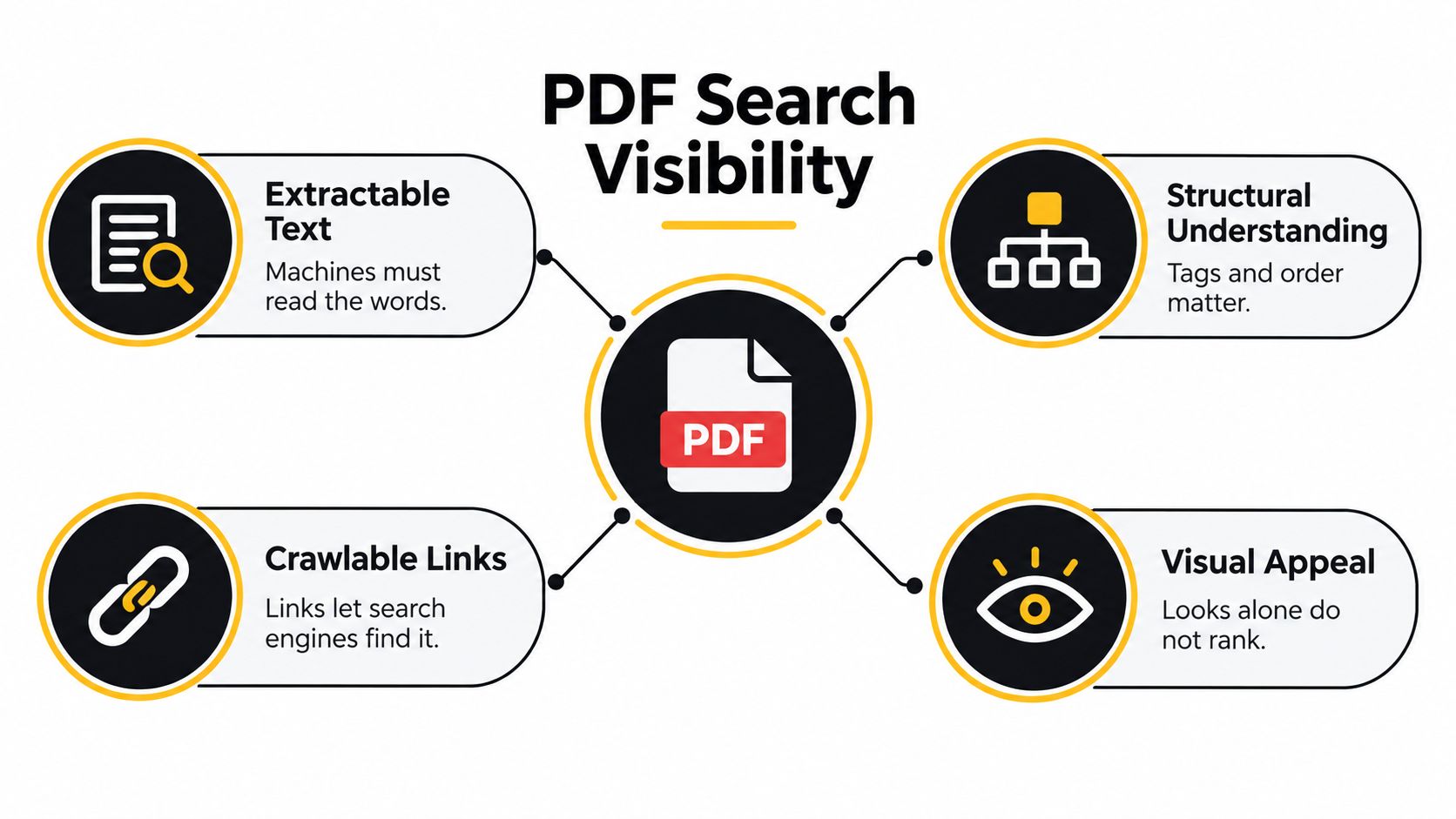
Separate the search visibility layers
Use distinct questions when diagnosing a PDF:
- Discovery and crawling: Can a search engine reach the public file through a usable URL and crawlable links?
- Indexability: Is the document available for indexing, rather than intentionally excluded or protected?
- Interpretation: Can software extract meaningful text in a sensible sequence?
- Search presentation: Does the document provide a useful title and enough context to represent its subject accurately?
These distinctions prevent the wrong repair. Changing a filename won't restore missing text. Repairing tags won't reverse an intentional indexing exclusion. A better title doesn't prove that the uploaded file is accessible.
The relationship between these layers is easier to see as a document-level publishing model.
Assign each problem to its owner
The writer and designer control source content, semantic structure, and export quality. The publisher controls the public location, surrounding HTML, and links. Whoever manages delivery must verify response behavior and indexing directives.
Keep those responsibilities visible in the release record. Otherwise, an SEO reviewer may flag an unreadable PDF without anyone knowing whether to change the source document, export settings, or hosting configuration.
Practical rule: Diagnose the layer before changing the asset. A discoverability problem and an extraction problem need different fixes.
The editorial planning principles in these AI-powered SEO blog tips can support topic selection and intent matching. Document publishing still needs its own technical acceptance criteria. A useful topic is the starting point, not evidence that the PDF is ready for search.
Prepare Searchable PDF Content and Metadata
A supplier report arrives as final-approved.pdf, its title field inherited from an unrelated sales deck. That is what weak PDF SEO looks like in practice: the file shipped before anyone decided what it was called, who produced it, or what it covers. Make those decisions in the editable source, where heading styles, real text, and document properties cost almost nothing. Retrofitting a finished file is recovery work, and recovery work always gets less back.
Every choice at this stage decides what a crawler can extract. Whether the file gets indexed at all is a separate decision, made in the hosting layer.
Set the document's identity before export
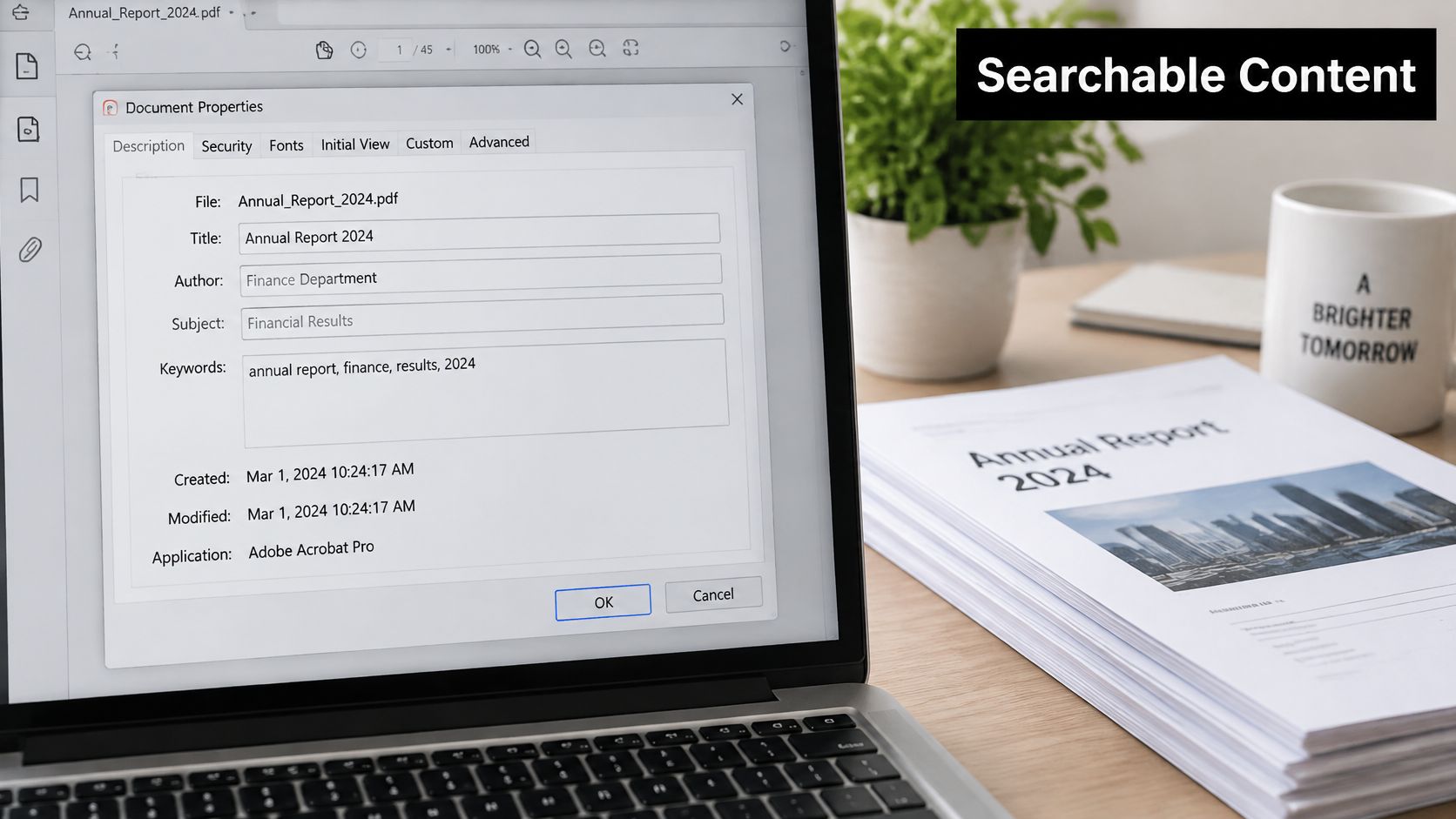
Adobe's PDF optimization guidance recommends relevant title and subject information alongside repaired tags and image descriptions. Fill each field to describe the actual resource. Repeating one target phrase across every property tells a reader, and a crawler, nothing new.
| Property | Review standard |
|---|---|
| Title | Name the resource in language its intended reader would recognize. |
| Author | Identify the responsible person or organization accurately. |
| Subject | Summarize the document's scope instead of copying the title. |
| Keywords | Keep entries relevant and restrained. |
| Language | Match the document's language so extraction and accessibility workflows get the right context. |
Metadata earns the same scrutiny as the cover page. It describes the resource, it cannot rescue thin content, and no property field promises placement.
Check what the export keeps
Selectable text is the minimum deliverable. When the only original is a scan, run OCR as a recovery measure, then inspect the output for incorrect characters, missing labels, and disrupted sentences. Recognized text alone never establishes document structure.
Extract text page by page and compare it with the visible file. Include captions, footnotes, chart labels, and table content rather than body paragraphs alone. Extraction quality is where accessibility work and search visibility meet: if a crawler receives garbled output, the document's meaning is gone regardless of how clean the layout looks.
Back to the supplier file: rename it quarterly-supplier-risk-report.pdf, set the internal title to Quarterly Supplier Risk Report, and replace inherited properties before export. Reviewers and publishers can then identify the asset without opening several similarly named files, a precision gain rather than a ranking claim. If the file ships through a CMS media library, evaluate the wider setup with these SEO-friendly CMS recommendations, and verify the actual PDF export independently of whatever the CMS reports.
Build Accessible Structure Into Every PDF
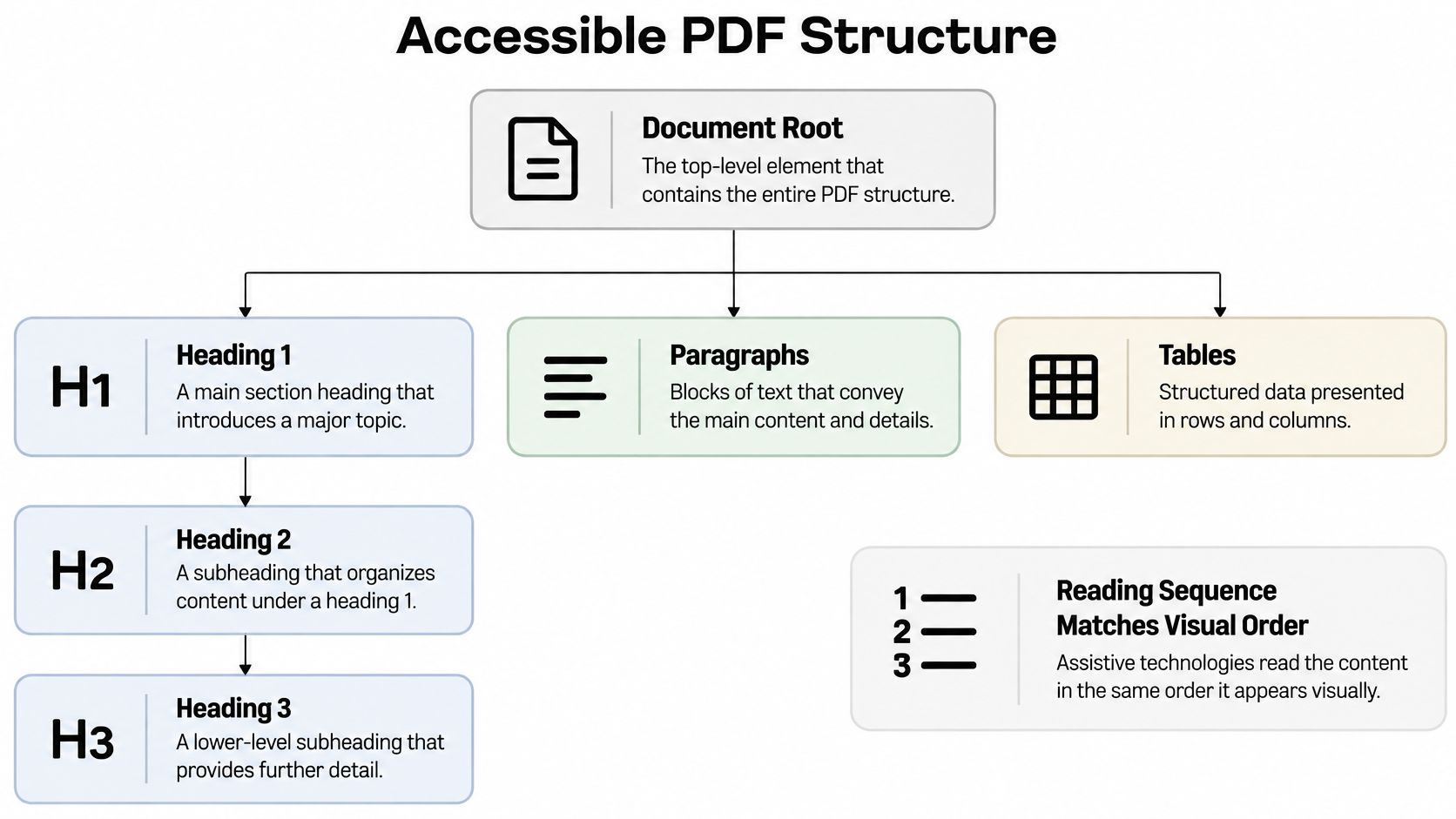
Two versions of the same quarterly report can produce very different extraction output. Exported with tags, the document arrives as a hierarchy a parser can follow. Exported flat, the same words arrive as fragments: headings flattened into paragraphs, table rows fused into single lines, captions cut loose from the charts they explain.
The W3C's PDF accessibility guidance identifies Tagged PDF as the most reliable approach to accessible PDF creation, since tags carry structural information and logical reading order into both assistive technology and content extraction. Tags are a technical foundation. Whether the document earns visibility afterward is a separate question, and no tag guarantees it.
Structure first, styling second.
Audit semantics before visual polish
Open the tag tree before touching anything visual, then work through the document in a fixed order:
- Confirm headings form a sensible hierarchy with paragraphs nested under the right sections. Large, bold text often looks like a heading while remaining an ordinary paragraph in the document structure.
- Check that lists use real list markup. Manually typed symbols and spacing give extraction tools nothing to group.
- Encode table headers and their relationships to data cells, then read the extracted output to see whether the table survives without its visual grid.
- Give links labels that describe the destination rather than repeating an instruction to click.
- Describe graphics that carry information, and embed fonts as part of a dependable export.
That last step involves a judgment call. A chart showing a material change needs a concise explanation of what it communicates, plus a nearby text equivalent when the detail matters. Decorative graphics get a brief description or none at all, and repetitive keyword-stuffed alt text helps no one.
Check the sequence a reader actually receives
Multi-column layouts fail quietly. Read the extracted content start to finish and confirm the sequence travels down one column before entering the next, watching for sidebars inserted mid-sentence and captions stranded away from the material they explain.
The walkthrough above shows how document structure translates into reading order, which gives teams a shared reference before they review their own export.
Run an accessibility checker once the manual pass is done. Inspect whatever it flags instead of clearing items mechanically. An automated pass is evidence about the checks performed, and it says nothing on its own about whether the relationships make sense.
Accessibility validation belongs in the release decision. Don't postpone it until someone reports that the published document is unusable.
Clearer structure gives extraction systems better context to work with. That alone never establishes that a particular tag lifts rankings, but it does produce a stronger, inspectable document foundation, which is the part of this work a team controls directly.
Control Crawling, Indexing, and URL Choices
Decide whether the PDF should appear in search before uploading it. A public report intended for independent discovery needs a different setup from a downloadable copy of an existing article.
Google's guidance on PDFs in search results confirms that readable, unencrypted PDF text can generally be indexed and that PDFs can rank similarly to other web documents. It also explains that internal title metadata and incoming anchor text can influence the displayed search title. PDF is a searchable format, not an automatic exclusion from organic results.
Choose the right publishing approach for each PDF
| Publishing need | Recommended setup | Indexing decision | Key implementation |
|---|---|---|---|
| Standalone research or reference document | Public PDF linked from a relevant HTML page | Make the PDF eligible for indexing | Descriptive URL, meaningful incoming link, readable file |
| Download-only companion | Explanatory HTML page with a downloadable PDF | Exclude the PDF if it has no independent search purpose | Send an X-Robots-Tag: noindex HTTP header |
| Substantially identical HTML and PDF | Maintain both for different user needs | Signal the preferred version | Coordinate the preferred-version signal with delivery configuration |
| Private or restricted material | Access-controlled delivery | Don't treat it as an organic search asset | Apply appropriate access protection |
For a searchable asset, link from a crawlable HTML page using a label that describes the resource. Avoid leaving discovery dependent on an email attachment or a download button whose destination hasn't been checked.
Google's same PDF guidance says links inside PDFs may be treated similarly to HTML links, including passing PageRank and indexing signals. PDF links can't use the nofollow attribute, so review outbound destinations deliberately rather than assuming HTML-level link controls are available.
Inspect delivery separately from document quality
For a download-only copy, configure X-Robots-Tag: noindex in the HTTP response. That's a delivery control, not something to type into the visible document or its metadata. Confirm that the public response contains the intended directive.
When HTML and PDF substantially duplicate one another, make the preferred-version decision explicit. Don't assume the search engine will choose the format your team prefers.
Inspect redirects, response codes, authentication requirements, and obsolete file paths. A correctly prepared document at an outdated URL is still a publishing failure. Include file delivery in the wider technical review, using The SEO Agent's on-page audit guide alongside a dedicated PDF inspection record.
Apply PDF SEO to Real Publishing Workflows
A polished PDF can still fail search before anyone reads it. I treat the release like a small technical launch: source semantics, export structure, delivery behavior, and public evidence all need a named owner.
Take a procurement guide with an HTML summary and email push. The writer owns selectable source text, heading order, alt wording for charts, and link labels that survive export. Design owns the tag tree, reading order, table headers, and a preflight before approval. Publishing owns the live URL, response behavior, access rules, and the single landing page that introduces the file. The SEO reviewer owns the released copy and the decision record, not the visual sign-off.
Put the gate before upload
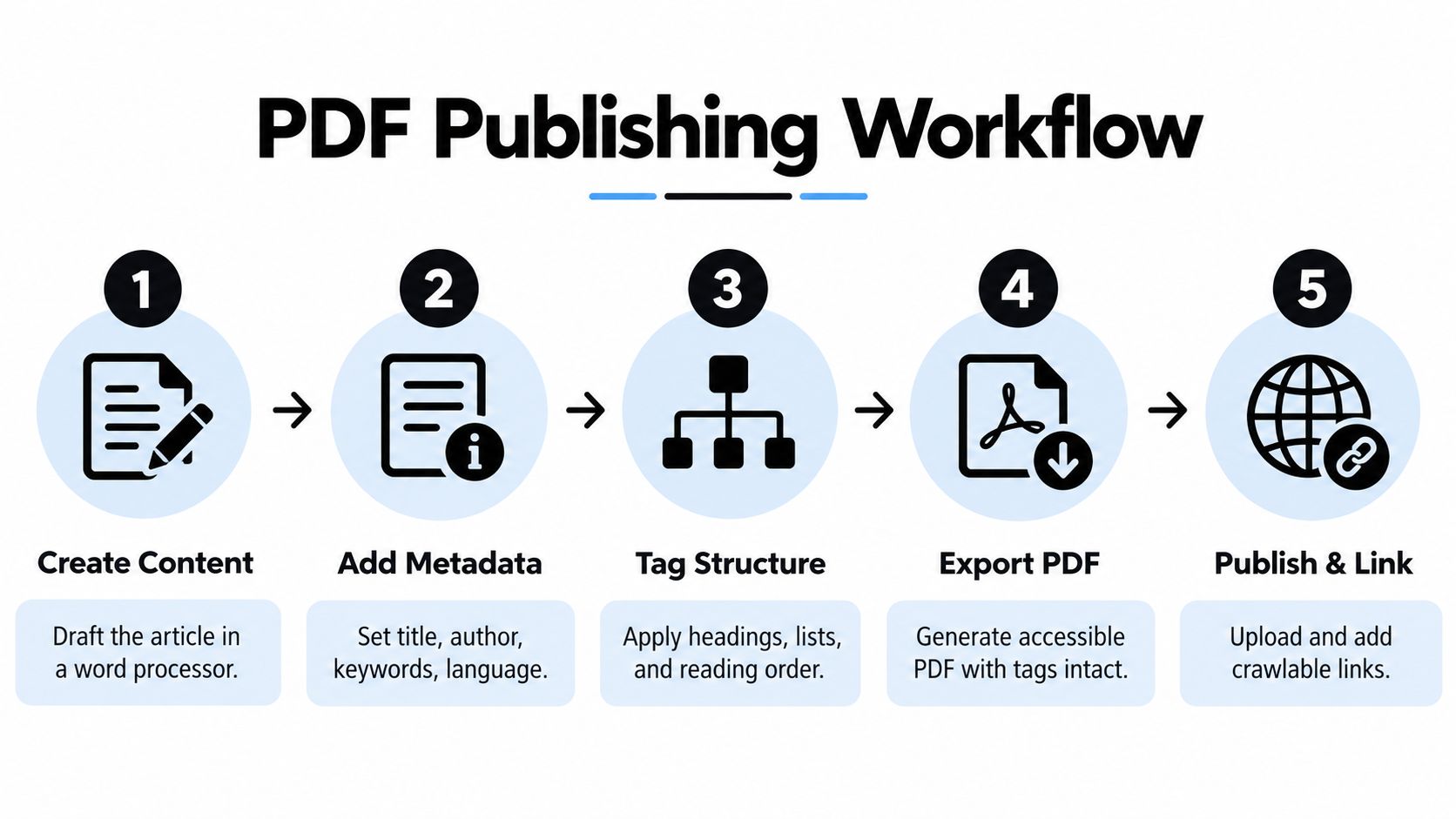
Set three separate questions in the release ticket:
- Interpretation: can a machine reach real text, tagged headings, and sane reading order?
- Control: is the file meant to rank, support an HTML page, or stay private?
- Proof: what evidence closes the ticket, and who can reopen it?
This gives accessibility work search weight. Tags and order decide whether extraction preserves arguments, procedures, and specifications; selectable text decides whether quoting and indexing are possible at all. If a form, diagram, or scanned page cannot be interpreted, fix the source or provide an HTML equivalent rather than asking review to rescue a flat export.
Run bad handoffs out of the process
A file called final.pdf hides every weak decision. Inherited metadata, unmanaged email copies, and “approved” screenshots can pass design review while failing publication. Require every handoff to produce something checkable: styled source, exported PDF with completed properties, live URL plus landing URL, and signed test notes.
Keep ownership after launch. When results look weak, route the work back to the right layer: content and export, indexing preference, or measurement. That separation keeps PDF SEO diagnosable instead of mystical.
Verify Text Extraction, Links, and Indexing
Test the uploaded PDF, not just the local export. The public artifact is the one users and search systems encounter, so it must be the basis of the final review.
Extract its text and compare it with the visible pages. Scan for missing paragraphs, broken words, repeated furniture, and content appearing in the wrong sequence. Include pages with tables and complex layouts rather than checking only the introduction.
Diagnose by symptom
| Symptom | Likely layer to investigate | Next action |
|---|---|---|
| Extraction is blank or incomplete | Source content or export | Inspect text layers and export settings |
| Words exist but context is scrambled | Reading order or structural tagging | Review the tag tree and affected page sequence |
| Public file can't be retrieved | Access or response configuration | Check protection, redirects, and the delivered response |
| Reachable file doesn't appear in results | Indexing signals, preferred version, or content assessment | Inspect available webmaster-tool evidence and review the intended search role |
| Search title is unhelpful | Document properties or incoming context | Revisit the title and descriptive links pointing to the file |
Confirm metadata and language, then inspect link labels and destinations. A link should still make sense when read outside its surrounding paragraph. Test whether it points to the approved destination, not a staging page or superseded resource.
Use available webmaster tools to review crawl and index status. Consult Google Search documentation for the applicable inspection workflow, without assuming that submission guarantees processing or inclusion.
Keep measurement separate from acceptance
A readable document can still attract little search demand. Conversely, an indexed file may have accessibility defects. Technical acceptance, index status, and search performance answer different questions.
Record the file URL and review whatever query, impression, and click information your reporting tools make available. If the HTML landing page and PDF are both public, assess their roles separately rather than interpreting landing-page traffic as proof of PDF visibility. Distribution downloads also shouldn't be treated as evidence of organic search success.
Use a compact release checklist:
- Content: Extracted text matches the visible document.
- Structure: Tags, headings, tables, and reading order have been inspected.
- Properties: Language and metadata describe this file.
- Delivery: Links, response behavior, and indexing intent agree.
- Evidence: Automated results and manual findings are recorded.
Add these checks to an SEO checklist for lean teams, with a named owner for unresolved findings. Don't close the release merely because an automated checker returned no errors.
Build a Sustainable PDF SEO Workflow
Prioritize defects by dependency. Fix unusable text before refining metadata. Establish meaningful structure before approving a complex layout. Set the publication's search role before interpreting its visibility.
That order keeps teams from spending time on cosmetic optimization while a basic delivery or extraction failure remains unresolved. It also makes decisions easier to defend: each change addresses an observed problem rather than a generic SEO recommendation.
Decide whether the PDF deserves independent search visibility
Not every download needs to become a search destination. A printable companion may serve its audience well without competing with the explanatory HTML page. A substantial reference document may deserve both a searchable file and a carefully written web version.
For long, image-heavy, or strategically important resources, consider a paired-format approach. Keep the PDF for distribution and provide HTML for accessible explanation and discovery. Google's PDF guidance distinguishes document indexing from image indexing and recommends HTML for image content, so don't assume the PDF alone serves every search need.
The recurring habits matter more than occasional cleanup:
- Preserve the source: Keep editable originals and document the export method.
- Review each release: Don't inherit metadata or accessibility approval from another publication.
- Maintain ownership: Assign responsibility for source quality, public delivery, and review.
- Inspect replacements: Treat an updated upload as a new artifact requiring verification.
Teams using automated SEO content should retain these document-specific controls. Automating an editorial pipeline doesn't establish that a downloadable attachment has passed accessibility or extraction testing.
Use a short decision gate
Ask whether the text is selectable, the structure is logical, the URL is reachable, and indexing is intentional. Then ask whether someone can inspect the published file independently of its source.
Release standard: Approve the artifact users receive, not merely the source file the team intended to publish.
If those answers are unclear, repair the workflow before scaling PDF production. The durable objective isn't to optimize every attachment. It's to publish the right format, expose its meaning reliably, and make its search behavior deliberate.
The SEO Agent automates keyword research, article creation, internal linking, and CMS publishing, helping lean teams build the HTML content that supports downloadable resources. Visit The SEO Agent to explore that publishing workflow, while keeping PDF accessibility and final-file verification as explicit release checks.