Keyword Groups SEO: How to Build a Keyword Map That Works
Keyword groups SEO explained: how to group keywords by intent, map each group to one URL, and plan topics without cannibalization.
A library groups cookbooks on the same shelf. You shouldn't need to know every book's title to find help making dinner.
Your keyword spreadsheet probably feels less organized. You've exported ideas, spotted several promising phrases, and started wondering whether they need separate articles or belong on pages you already have. For a lean team, that decision matters more than collecting another batch of keywords.
Table of Contents
- What a Keyword Group Is and Why It Matters
- A Sample Keyword Map for a Freelancer Invoicing App
- How to Test Whether Keywords Belong Together
- How to Build Keyword Groups in Six Steps
- Mapping Each Group to One URL Without Cannibalization
- Turn Keyword Groups into a Topical Architecture
- Grouping When AI Overviews Answer the Query
- Build Your First Keyword Map This Week
What a Keyword Group Is and Why It Matters
A keyword group is a set of search phrases that one page can satisfy because they describe the same subject and the same reader's job. The useful output isn't a tidy spreadsheet. It's a decision about which URL should serve that need.
The bookshelf analogy helps separate subject from wording.

Say you're planning a food website. Someone searching for a cheese board and someone searching for charcuterie may need overlapping help, even though they use different vocabulary. Google's SEO Starter Guide advises anticipating those differences between experienced and beginner searchers rather than depending on an exact phrase.
The parts of a useful group
A workable group needs these components:
- Parent topic: The subject label, such as assembling a cheese board.
- Shared intent: What the reader wants to accomplish, such as choosing ingredients and arranging them.
- Primary keyword and supporting variants: A clear main target plus meaningful alternatives, such as beginner wording, ingredient questions, and preparation details.
The primary keyword gives the editor a focus. Supporting terms help the writer answer the question completely without turning the page into an unrelated collection of subtopics.
For a hypothetical planning exercise, a flat list of 300 keywords might become 25 groups. Instead of discussing hundreds of possible articles, the team can evaluate a manageable set of page assignments.
Ownership rule: Name the reader's job before choosing the page that should own it.
Without that ownership, writers can produce several articles that satisfy the same need. Without a clear primary keyword, they can also keep adding related material until the page loses its purpose.
What grouping doesn't mean
Keyword groups in SEO aren't instructions to repeat every variant. Google publishes no universal keyword-density percentage or fixed maximum group size, and its starter guidance states that Google Search doesn't use the keywords meta tag.
Choose variants because they reveal useful language or meaningful questions. If a phrase adds nothing to the answer, you don't need to squeeze it into the copy.
A Sample Keyword Map for a Freelancer Invoicing App
Consider a hypothetical freelancer invoicing app whose export of 240 keywords becomes six provisional groups and five content targets.
| Group | Example keywords | Dominant intent | Target page | Page type |
|---|---|---|---|---|
| Invoice templates | free invoice template; invoice template word; invoice template google docs | Download a file now | Free invoice template page | Free tool |
| Invoicing software comparisons | best invoicing software for freelancers; invoicing app vs spreadsheet | Choose between tools | Comparison page | Comparison |
| How-to invoicing | how to write an invoice; what to include on an invoice; invoice number format | Learn a process | Invoice guide | Guide |
| Late payments | how to get paid late invoice; polite payment reminder email | Solve a problem now | Payment reminder guide | Guide with templates |
| Pricing | invoicing software pricing; free invoicing app cost | Compare cost | Pricing page | Commercial page |
| Brand and login | [your brand] login; [your brand] invoicing app | Reach the product | Homepage | Navigational, excluded from content plan |
Read each row as a page assignment
Invoice templates gets a free template page because the visitor wants something usable. Put the download or editable file near the beginning, with format choices and brief instructions beneath it.
The comparison group gets a page built around selection criteria and an honest verdict. This assignment is provisional: if app-versus-spreadsheet searches return substantially different pages from software-roundup searches, separate those experiences.
How-to invoicing belongs in a process guide. Writing an invoice, choosing an invoice number, and checking required fields can fit naturally into the same walkthrough.
The late-payments group gets its own guide because the reader has already sent an invoice and now needs action. Reminder templates, escalation choices, and wording examples belong here rather than inside a beginner's invoicing lesson.
Keep commercial and navigational needs distinct
Pricing points to the pricing page, where readers can understand costs, plan differences, and restrictions. A blog post shouldn't stand between that visitor and the information they're trying to evaluate.
Brand and login routes to the homepage in this simplified map and stays outside the editorial queue. In a live product, a dedicated login destination may serve login-specific searches better.
Each row needs a designated primary keyword, usually the clearest representative phrase, and a primary URL. Name the working group after the reader's job, such as downloading an invoice template, even if your reporting table uses a shorter label.
This is a sample, not a universal template. Its value is that the team can explain every proposed page before anyone starts drafting.
How to Test Whether Keywords Belong Together
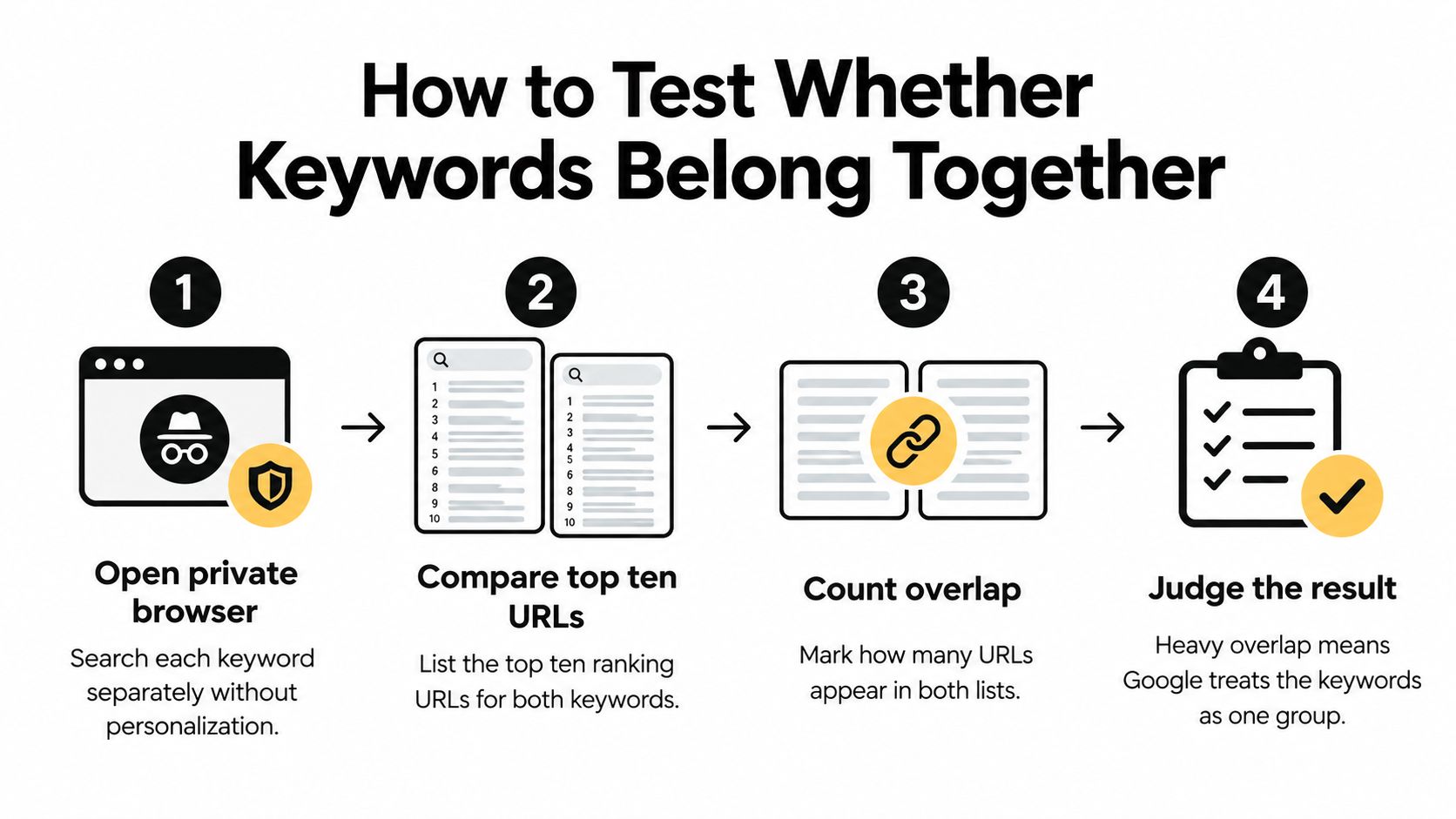
Search each keyword separately in a private browser window, record the top ten organic ranking URLs, and mark the URLs that appear in both lists. Keep the location and language consistent; private browsing reduces some personalization but doesn't remove geographic differences.
You're comparing pages, not just domains. Different articles from the same website don't count as the same URL.
The checklist makes the comparison easy to repeat.
Use overlap as evidence, not a command
Ahrefs' keyword-clustering guide describes a SERP similarity score from 0 to 100, with higher scores indicating stronger ranking-page overlap. That makes it easier to compare candidate groups at scale.
For manual review, use these rough working bands. They're editorial heuristics, not Google thresholds or guarantees.
| Shared URLs in the top 10 | Decision | Why |
|---|---|---|
| 6 or more | One page | Google is treating the queries as one need |
| 3 to 5 | Check intent and format before deciding | Overlap is real but the result type or funnel stage may differ |
| Fewer than 3 | Separate pages | Different ranking sets mean different expectations |
| Invoice template vs invoice factoring | Separate pages | Same root, very different ranking pages |
| Best CRM vs CRM pricing | Split by funnel stage | Vocabulary overlaps but the searcher's job does not |
Shared words are a useful sorting shortcut, but weak evidence for a publishing decision. Invoice factoring concerns financing, not downloading a document. Likewise, someone comparing CRM products isn't necessarily ready to evaluate a particular vendor's pricing.
Check the expected experience
Look beyond the overlap count. If the results consistently feature software lists, a standalone tool page may not satisfy the same expectation.
Open representative ranking pages and inspect what readers can do there. A title can make a result look informational even when the page's main purpose is to sell, compare, or provide a download.
Before approving a group, ask:
- Ranking URLs: Do substantially the same pages appear?
- Format: Do readers expect a guide, list, template, tool, or product page?
- Funnel stage: Are they learning, evaluating, or buying?
- Conversion goal: Can the page offer an appropriate next action for every query?
A tool can identify overlap. An editor must decide whether a coherent page can serve the people behind those searches.
How to Build Keyword Groups in Six Steps
Start with a spreadsheet that includes the keyword, source, monthly volume, difficulty, proposed intent, group name, and target URL. Keep rejected terms in a separate tab so someone doesn't accidentally reintroduce them later.
Build candidate groups
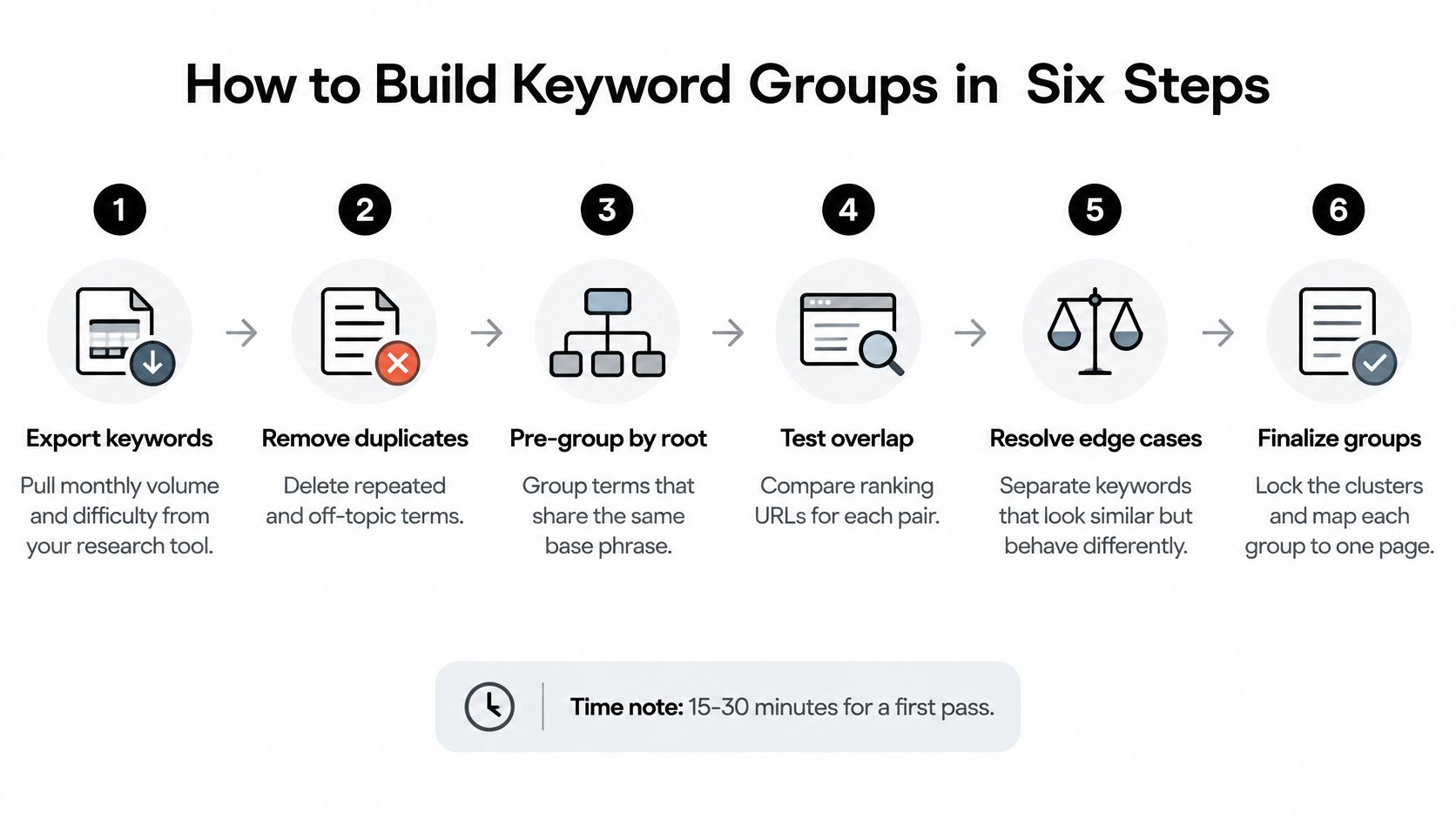
Export and clean the list. Pull keywords from your research tool with monthly volume and difficulty, then remove duplicates and off-topic terms. Keep useful audience modifiers, such as freelancer or agency, because they may reveal different requirements.
Pre-group by root phrase. Create rough buckets such as invoice, payment, and pricing. These are sorting aids, not approved page assignments, so don't spend time polishing their names.
Separate the intent inside each bucket. Distinguish informational, comparison, transactional, and navigational searches. An invoice bucket might contain a tutorial, a downloadable template, and a product search that need different destinations.
The visual workflow shows the mechanical tasks behind that first pass.
Turn candidates into decisions
Test borderline pairs against current results. Use the overlap bands as a starting point, then inspect the pages and SERP features. Record the reason whenever you override an automated assignment.
Name each group after the reader's job. Download an invoice template is more useful than invoice. A job-based name gives the writer a boundary and helps the team reject tangents.
Assign the primary keyword and implementation status. Mark the group as new, existing, or to consolidate, and attach its intended URL. Add a short note describing what the page must let the reader accomplish.
Link-Assistant's SEO statistics state that, in 2025, 94.74% of keywords received fewer than 10 monthly searches. That supports evaluating relevant low-volume variants together rather than assuming every phrase deserves an individual page.
Low volume alone doesn't decide ownership, though. A narrowly searched phrase can still describe a distinct task, while a popular phrase can belong within a broader page.
Automation can propose the group. The editor must approve the promise that its page makes.
When prioritizing, consider business relevance alongside demand and difficulty. You can compare keyword demand forecasts to distinguish plausible opportunities from groups that look attractive only because they contain many similar phrases.
Allow several focused hours for a careful manual pass through a few hundred keywords. Automated clustering can accelerate root-based sorting and overlap comparisons, but someone still needs to review borderline groups before publication.
Mapping Each Group to One URL Without Cannibalization
Give each intent group a primary URL. That doesn't mean every keyword containing the same noun belongs on that page, or that multiple ranking pages automatically prove a problem.
Ahrefs' secondary-keyword guidance supports turning clusters into decisions about existing pages, new content, and consolidation. It also explains why a tool's parent-topic assignment needs validation against the wider search results.
| Situation | Action | Example |
|---|---|---|
| No page ranks for the group | Write one new article around the primary keyword | Invoice reminder email with no page yet |
| One existing page already ranks in the top ten | Update and extend that page | An outdated invoice guide refreshed with current examples |
| Two or more URLs target one intent | Consolidate into the stronger URL and redirect the other | Two near-identical invoice template posts merged |
| One group mixes two intents | Split into two pages, one per intent | Invoicing software group split into pricing and how-to |
| The group is a branded search | Route to the homepage or product page and exclude from content plan | [your brand] login |
Diagnose before consolidating
If there's no suitable page, create the missing resource. If an existing guide already serves the group, improve its examples, completeness, and usability rather than commissioning a sibling article.
When near-duplicate pages target the same task, choose the stronger destination using relevance, search performance, links, and conversion usefulness. Preserve valuable material, redirect the retired URL, and update internal links to the destination.
Don't merge pages merely because both receive impressions for a broad term. A template page and an invoicing tutorial can share vocabulary while doing different jobs.
The working model is a clear intent group, a primary URL, a canonical keyword assignment, and supporting terms that don't change the page's purpose. Here, canonical keyword means your planning choice, not an HTML canonical tag.
Place supporting terms where they help
Use secondary phrases in subheadings and body copy when they introduce useful answers. Invoice number format fits naturally into an invoice guide because readers need to understand it, not because the phrase requires another appearance.
Google's spam policy defines keyword stuffing as filling pages with keywords or numbers to manipulate rankings, including unnatural lists and repetition. Don't turn a group into stacked phrases, thin sections, or location blocks.
Use the map to find relevant links from related pages. Then read the finished page aloud: every phrase should earn its place through meaning, not through membership in your spreadsheet.
Turn Keyword Groups into a Topical Architecture
A keyword map should also explain how visitors move through your subject area. Make these architecture decisions for the invoicing app:
Choose the parent subject. Use the keyword sending the most traffic to the strongest ranking page as a starting proxy, then validate the broader subject against current results. A busy keyword can hide a different intent.
Assign a pillar destination. A freelancer-invoicing overview can orient readers, while templates, tutorials, reminders, comparisons, and pricing retain focused supporting pages. Brand navigation stays with the product's main destinations.
Connect useful next steps. Link the pillar to supporting pages and let those pages return readers to the overview. Link sideways when the next task makes sense: an invoice-writing guide can lead to payment reminders, rather than inserting a pricing link without context.
Keep small variants within their matching intent. An obscure wording change doesn't need its own URL. A different task may need a supporting page even when demand looks modest.
Resolve competing ownership before expanding. If existing pages duplicate the same job, consolidate the weaker resource instead of adding another near-copy.
A pillar organizes a subject. A supporting page completes a particular task.
Use these SEO tips for business blogs to connect that architecture with briefs, navigation, and ongoing publishing.
Grouping When AI Overviews Answer the Query
Keywords with similar meanings can carry different traffic value when an AI Overview answers some searches directly. Intent still matters, but it no longer tells you enough about the opportunity.
A Pew Research Center study of more than 900 US users, reported by The Indian Express, found that people clicked a traditional search result 8% of the time when an AI Overview appeared, compared with 15% without one; only 1% clicked a source link inside the overview, and 26% ended the browsing session after seeing one, versus 16% without.
Evaluate that difference alongside the page's intended value.

Add a SERP-experience label
Record what searchers encounter, not just what they type. These categories can overlap, so choose the dominant experience and note meaningful exceptions.
| SERP experience | What the results show | Content objective | Metric to track |
|---|---|---|---|
| AI-answerable | An AI Overview answers the question directly | Concise, extractable definition plus original data or a tool | Citations and branded searches |
| Citation-seeking | Studies, reports and sourced data rank | Original data worth quoting | Links and citations earned |
| Comparison | Lists and versus pages dominate | Clear criteria and an honest verdict | Assisted conversions |
| Transactional | Product and pricing pages dominate | Pricing context and proof | Trials and purchases |
| Local | Map results dominate | Location pages with specific local detail | Calls and direction requests |
| Problem-solving | Forums and step-by-step guides dominate | Step-by-step fix with a template | Engaged sessions and return visits |
For an AI-answerable definition, explain the concept clearly, then offer something the summary can't replace: an editable template, original evidence, a calculator, or a relevant product workflow. Don't bury the answer to manufacture a click.
Comparison and transactional groups need a different approach. Help readers judge trade-offs, inspect proof, and understand cost rather than publishing more introductory articles.
This video offers another way to consider the changing search experience.
Measure the outcome the page can produce
Use citations, assisted conversions, and branded demand where direct clicks don't capture the objective. Treat those as separate indicators, not proof that an individual citation caused a sale.
The broader click environment was already constrained: according to SparkToro and Datos, as summarized by Create and Grow, 58.5% of Google searches in the United States and 59.7% in the European Union ended without a click to an external website in 2024.
When planning to rank content in AI Overviews, ask which groups deserve a shared page, which require separate experiences, and which should be evaluated beyond clicks. An overview's presence isn't, by itself, a reason to split a coherent group.
Build Your First Keyword Map This Week
Export and group your keywords, then review the 50 most valuable borderline pairs as a first-week working target. Assign URLs and log the date, intent, SERP features, ranking pages, and initial outcomes; mark unavailable outcomes as pending.
Review groups as search changes
Check high-value groups quarterly and after major SERP changes. Search Engine Land reports that Semrush's analysis of more than 10 million keywords found AI Overviews on 6.5% of queries in January 2025, just under 25% in July, and below 16% by November; it also reports Seer Interactive's finding of a 61% organic CTR decline for informational queries featuring overviews, while cited pages received 35% more organic clicks than uncited pages.
Use these review triggers:
- Divergent layouts: The results increasingly favor different experiences.
- Different goals: Queries require incompatible conversion paths or audience stages.
- Sustained overview changes: Reassess format and measurement before splitting.
Our keyword research provides live volume, difficulty, scoring, and clustering, and every published post is recorded in a work log with its target keyword and search performance. Pair that record with an SEO checklist for startup founders.
Build the log this week, starting with the ten groups of highest business value.
The SEO Agent connects live keyword research with article planning, source-checked drafting, internal linking, and CMS publishing. Visit The SEO Agent to turn your keyword map into approved content topics and track each published article's search performance.