Content Strategy for Website: A Framework for 2026
Learn how to build a content strategy for website in five stages: audience, keyword mapping, editorial calendar, measurement and scaling.
You have published consistently for months, traffic is inching up, and sales are not. Someone asks which pages helped the business, and the room goes quiet because the calendar is full but nobody agreed what each page was for.
That is the gap a clear content strategy for website growth closes. Treat every page as a bet on one outcome, a click, a citation in an AI answer, a conversion, or brand recall. Then choose its topic, format, and measure to fit that bet. A calendar alone is just a publishing schedule. A strategy tells you why a page exists before anyone writes it.
Table of Contents
- The Five-Part Framework at a Glance
- Define the Audience and Your Authority Area
- Audit Existing Pages Before Planning New Ones
- Map Keywords and Intent to the Right Page Types
- Plan the Editorial Calendar and Set Article Length
- Format Every Page for Scanning and Access
- Measure Results Beyond Organic Traffic
- Choose Your First Pillar and Publish This Month
The Five-Part Framework at a Glance
Think of the strategy as a map. The audience sets the destination. Keyword mapping chooses the routes. The calendar sets the pace. Measurement tells you whether you're on course, and scaling decides which routes deserve more pages.
| Stage | Question it answers | Output |
|---|---|---|
| Audience | Who is the content for, and why should they trust the site? | Reader profiles and an authority topic list |
| Keyword mapping | Which page answers each search intent? | Keyword-to-page map with owning URLs |
| Editorial calendar | What gets published, by whom and when? | 90-day calendar with owners and review dates |
| Measurement | Is each page achieving its goal? | Baselines and a metrics sheet for each page |
| Scaling | Which topics deserve more pages? | Pillar and cluster plan for the next quarter |
How the stages depend on each other
Skip the audience stage and keyword research will efficiently attract the wrong readers. Skip mapping and writers will create two pages competing for the same intent. Skip measurement and the calendar keeps funding topics that never earned their place.
Scaling works only after measurement. A topic deserves a pillar and supporting cluster when early pages show they can win the outcome they were built for. If they don't, adding more pages multiplies the problem.
Practical rule: Before approving a page, write its intended outcome in the brief. If nobody can name it, the page isn't ready.
You don't need to perfect all five stages before publishing. Start with your weakest one. A team with good writers but no owner map should fix mapping first. A team publishing often with no baselines should fix measurement.
Keep the framework on one page and review it quarterly. That habit makes trade-offs visible and keeps the team focused on creating content that supports business growth instead of chasing every keyword with volume.
Define the Audience and Your Authority Area
Say a software site ranks for dozens of marketing terms, yet almost no reader requests a demo. The content isn't necessarily weak. It's answering questions for people who were never likely to buy, on topics the company can't prove it knows better than anyone else.
Start by picturing the actual readers you're trying to help, not a keyword list.

Three questions for every segment
Ask three plain questions. Who is this reader? What task brought them here? What must they understand to finish that task?
Turn the answers into a short profile for each core segment. Include the reader's role, the problem they're solving, the words they use for it, and the decision they face next. Those words matter because customers rarely describe a problem in the polished language on your product page.
For example, an operations manager might search for why new customers stop replying after signup. Internally, you call that activation risk. If the article uses only your term, the right reader may never recognize it's for them.
Map what you can credibly teach
Next, list topics where you have first-hand experience, customer evidence, original data, or a tested method. Separate those from subjects you know only by reading other sites. The first list is your authority area. The second list is where you should publish cautiously or not at all.
Google's guidance on AI content and search explains that Google introduced its helpful-content system in 2022 to surface material created primarily for people, showing experience, expertise, authoritativeness, and trustworthiness. Use its questions as a checklist. Do you have a clear intended audience? Does the page demonstrate first-hand expertise? Is the site's primary purpose obvious? Will readers learn enough to achieve their goal?
That guidance also warns against publishing large volumes on unrelated topics hoping some will rank, relying heavily on automation without adding value, or mainly summarizing other sources. Google states that helpful, reliable content can be rewarded regardless of whether humans or AI systems produced it. The method matters less than usefulness.
The video below walks through audience thinking in practical terms, so you can see how a vague target becomes a usable profile.
A worked example
Consider a B2B software company whose team has deep experience in customer onboarding. Its blog, though, covers general productivity, remote work, and broad marketing tips because those keywords look large.
A tighter strategy drops the generic productivity posts. It builds around onboarding checklists, implementation mistakes, handoff templates, and adoption metrics. Each topic matches a named reader and something the company can demonstrate through its product work and customer support patterns.
Do this exercise now. Write three reader profiles. Then list your planned topics and cut any topic that no profile needs and no team member can support from direct experience. What's left is smaller, but it's defensible.
Audit Existing Pages Before Planning New Ones
Start with an inventory of every URL, not a brainstorm. For each page, record its title, main query, organic clicks, conversions, last update date, and owner. Then classify it as keep, refresh, merge, or retire.
- Pull twelve months of data: Use analytics and search reports to see which pages earned visits, assisted conversions, or no meaningful result.
- Flag orphan topics: Mark thin posts with no clear reader or purpose. Volume-first pages on unrelated subjects are retirement candidates.
- Merge duplicates: When three posts chase the same intent, choose one primary page, move useful material into it, and redirect the retired URLs there.
- Mark slipping pages: Pages that still matter but have lost visibility become refresh work, not reasons to write duplicates.
- Record decisions: Keep the inventory in a shared sheet so the keyword map starts from URLs you already own.
This order matters if you're planning search content before publishing. The audit tells you what's worth improving before you spend on new drafts.
Map Keywords and Intent to the Right Page Types
A keyword list tells you what people type. It doesn't tell you what kind of page will satisfy them. Mapping closes that gap by matching each intent cluster to one page type and one owning URL.
Sort by what the searcher wants
Informational queries ask what something is or how to do it. The reader wants a clear explanation. An explainer guide usually fits, especially when it opens with a direct answer and then adds examples.
Commercial investigation queries compare options. Words like best, vs, alternatives, and review signal that the reader is narrowing choices. A comparison page should show criteria, trade-offs, and who each option suits, not pretend to be a neutral tutorial.
Transactional queries suggest readiness to act. The reader looks for a service, product, pricing, or booking page. Sending that person to a long beginner guide creates friction.
Navigational queries seek a known brand, section, or resource. A clean hub or resource index helps the reader reach it quickly.
| Search intent | Example query | Page type |
|---|---|---|
| Informational | what is a content pillar | Explainer guide |
| Commercial investigation | best website content tool | Comparison page |
| Transactional | website content strategy service | Service or product page |
| Navigational | a brand's own resource section | Hub or resource index |
Apply the single-owner rule
Give each intent cluster one primary page. If you already have a strong guide for what is a content pillar, improve it when new questions appear. Don't publish a second guide with a slightly different title and hope both rank.
If two pages could honestly use the same title, they probably shouldn't both exist.
Teams often get confused. Related keywords don't always need separate pages. A cluster is a group of queries expressing the same underlying task. Separate pages are justified when the task, reader, or desired outcome changes.
Google's SEO Starter Guide recommends using the words people would use to look for a page in prominent places such as the page title and main heading, and in descriptive places such as alt text and link text. It also says title links should be unique, clear, concise, and accurate, with descriptive URLs.
Use that as an alignment check. The title, H1, URL, relevant alt text, and internal link wording should describe the same topic naturally. Don't force the exact phrase into every element, and don't promise an answer the page doesn't deliver.
Build the working map
For each cluster, record keyword, intent, intended outcome, page type, owning URL, and status. Status might be existing, refresh, merge, or new. Add the reader profile too, so a writer sees both the query and the person behind it.
This map becomes especially useful for AI search planning for lean teams, where a page may need a quotable answer for citation even if the click isn't guaranteed. Decide that before drafting, not after the traffic report disappoints you.
Plan the Editorial Calendar and Set Article Length
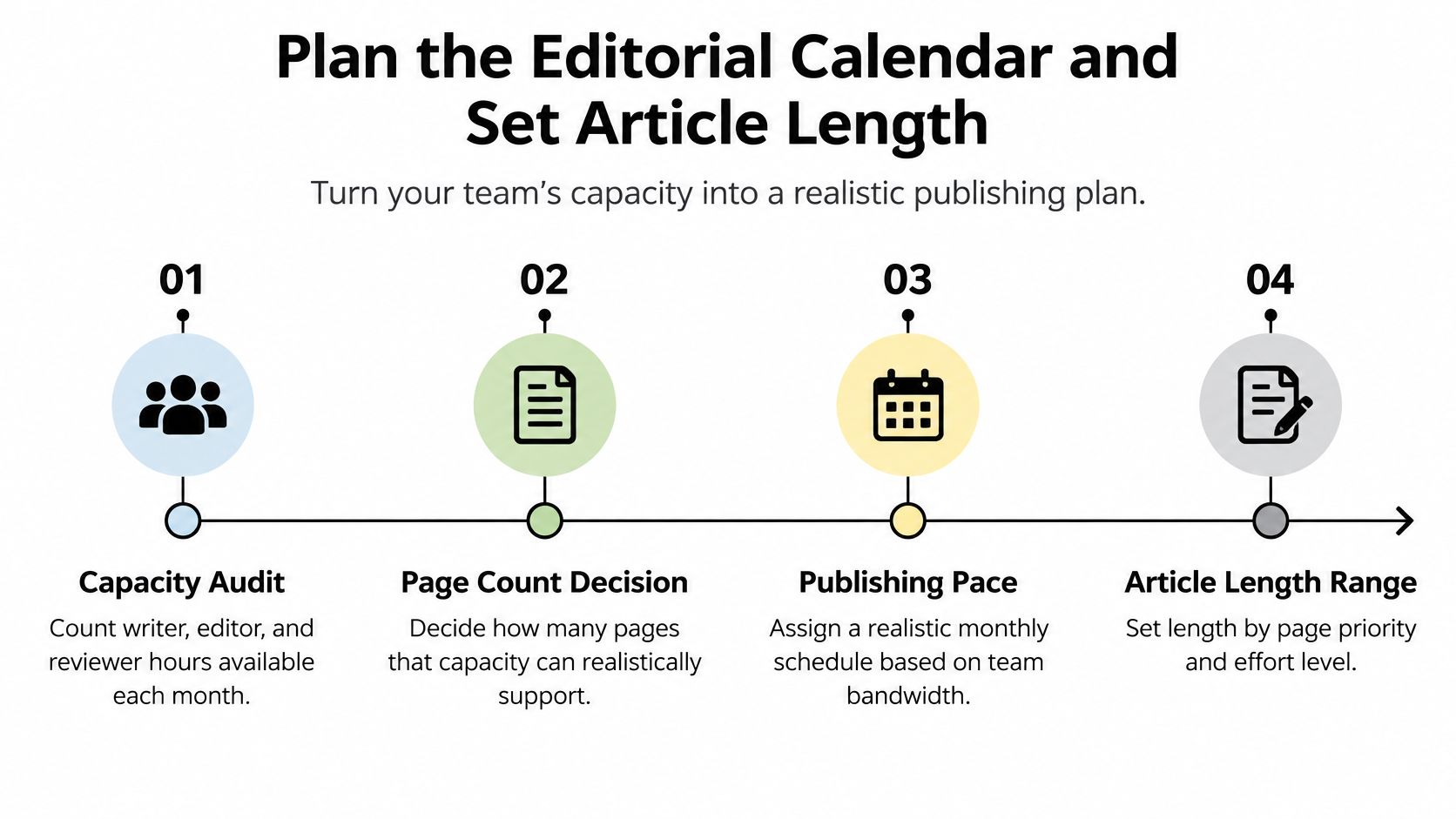
A calendar should reflect capacity, not ambition. Count the monthly hours your writer, editor, subject-matter reviewer, and publisher can give. Then decide how many pages that capacity can support without skipping fact-checking or review.
The visual below turns those decisions into a simple sequence, from available hours to length by task.
Run three tracks at once
Organize work into new pillar pages, supporting cluster articles, and refreshes. Pillars establish the main topic. Clusters answer narrower questions and link back. Refreshes protect pages that already have visibility but need updated examples, clearer answers, or a better next step.
| Month | Publishing work | Review point |
|---|---|---|
| Month 1 | Publish two pillar pages and complete the content audit | Day 30 check of the two pillar pages |
| Month 2 | Publish four cluster articles and refresh two older pages | Day 60 check of cluster indexing, clicks, and refresh movement |
| Month 3 | Review results and set the next quarter's targets | Day 90 review against baselines and intended outcomes |
Assign an owner and review date to every row. A topic without an owner is a wish. A page without a review date slowly becomes outdated while the team keeps adding new posts.
If approvals regularly stall, build a scalable content governance framework so reviewers know what they're checking, who has final say, and when a draft must move.
Let the task set the length
Google's announcement of the helpful content update says there is no Google-recommended word count. It asks whether content serves an intended audience, shows first-hand expertise, and leaves readers able to accomplish their goal.
So, a pricing explainer might be complete in a short page if it answers cost, inclusions, and next steps. A framework guide needs more room for decisions, examples, and checks. Don't stretch the first page to hit an arbitrary target, and don't squeeze the second until the reasoning disappears.
Set a review date six to twelve months after publication as a working rule for most evergreen pages in your own plan, sooner when prices, tools, or rules change. Teams evaluating top SEO automation tools should still make that editorial judgment themselves.
Add pages to a cluster only after the existing pages have completed a full measurement cycle. That pause stops the calendar from becoming the strategy.
Format Every Page for Scanning and Access
A reader doesn't owe your page a careful, linear read. Readers often scan for the part that matches their task, decide whether you understand it, and only then keep going.
The checklist below gives that scanning behavior a practical publishing standard.
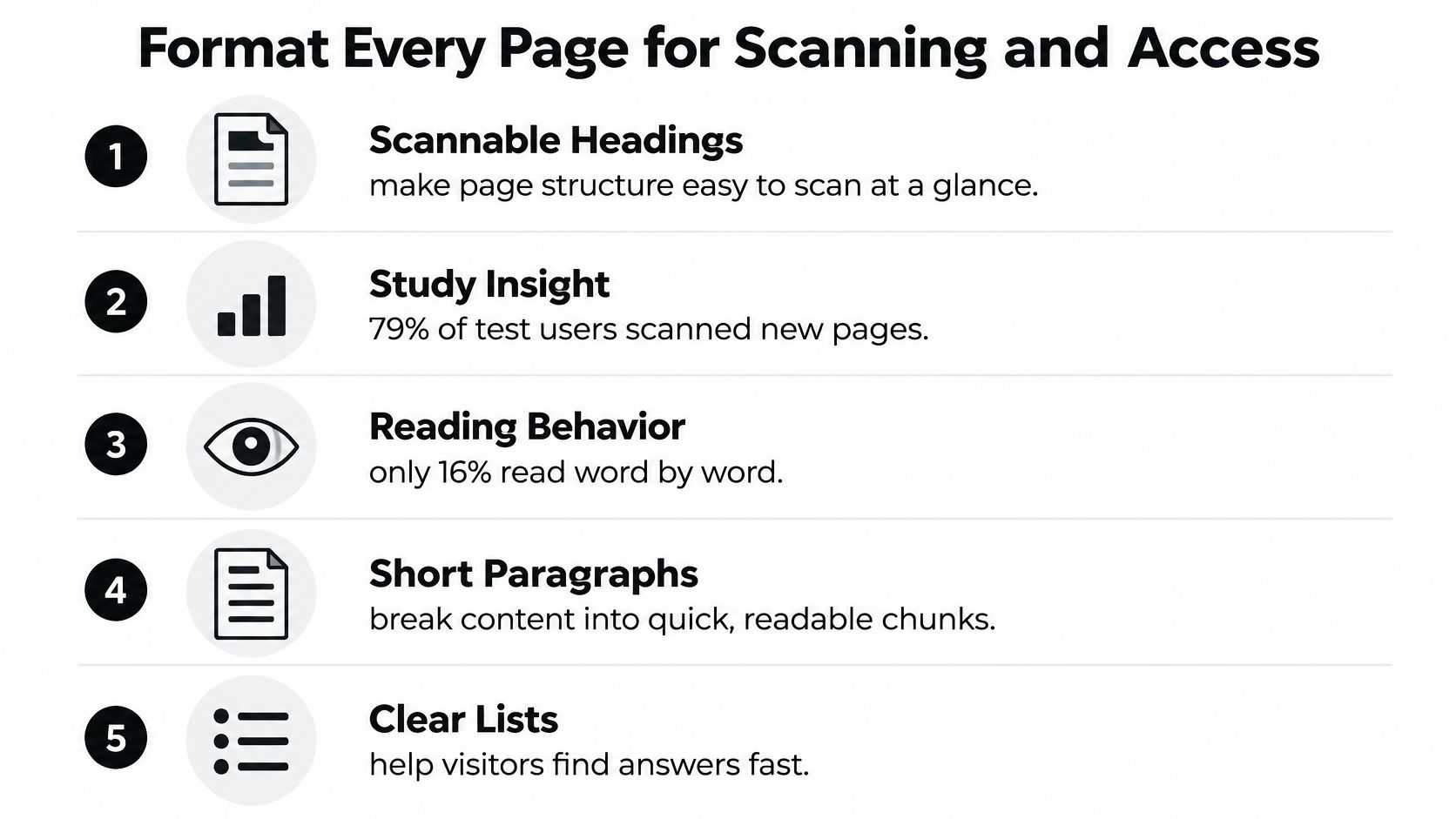
Nielsen Norman Group's study of how users read on the web was published in 1997 and found that 79% of test users scanned every new web page they encountered, while only 16% read word by word. Its scannable version produced 47% better measured usability, and its concise version produced 58% better measured usability.
Structure the page around findability
Open with the answer or decision-relevant context. Don't make readers pass through company history before they learn whether the page can help.
Use descriptive H2 and H3 headings, short paragraphs, lists for parallel items, and tables for comparisons. A heading such as Our Approach tells a scanner almost nothing. How the Editorial Calendar Is Built tells them exactly what they'll find.
Check every page against this list before publishing.
- Answer first: The opening paragraph states the main answer, recommendation, or decision frame.
- Named sections: Every H2 and H3 describes its topic without vague promotional wording.
- Comparable information grouped: Steps, options, prices, and features sit in a list or table.
- Meaningful visuals explained: Charts and images that carry information have a suitable text alternative.
- Performance checked: The page loads and responds without making readers wait or chase moving content.
Accessibility is editorial work
WCAG 2.2 requires text alternatives for non-text content so information can be converted into forms such as large print, braille, speech, symbols, or simpler language. It also states that headings and labels should describe topic or purpose.
That means alt text isn't a place to stuff keywords. Describe what a reader needs from the image. If a chart proves a point, state that point in nearby copy too.
Performance belongs in the same gate. Google's page experience guidance recommends Largest Contentful Paint within 2.5 seconds, Interaction to Next Paint below 200 milliseconds, and Cumulative Layout Shift below 0.1. Compress hero images, reserve space for embeds, and defer nonessential scripts so the answer appears quickly and stays still.
Those checks also support data-backed SEO for business blogs, because useful content loses impact when readers can't access it comfortably.
Measure Results Beyond Organic Traffic
Traffic tells you a page received visits. It doesn't tell you whether the bet paid off. Before publishing, choose one primary outcome for the page, a click, a citation in an AI-generated answer, a conversion, or brand recall.
Match the metric to the outcome
A comparison page may exist to produce qualified product visits. A definition page may aim to be cited because the answer can be summarized before a click happens. A practical template may aim for downloads and assisted conversions. Judging all three by sessions alone misleads you.
Pew Research Center analysis of browsing behavior from more than 900 U.S. adults found users clicked a traditional result in only 8% of searches showing an AI Overview, compared with 15% when no overview appeared, and clicks on links inside summaries occurred in just 1% of searches, according to reporting on Google AI Overviews and website clicks. A page can lose clicks yet still increase familiarity if answer engines treat it as a credible source.
| Metric | What it shows | Where to read it |
|---|---|---|
| Organic clicks | Traffic earned from search results | Search Console performance report |
| Impressions and average position | Visibility before a click | Search Console performance report |
| AI citations | Whether answer engines name, quote or link the page | Monthly manual audit of the same ten questions |
| Branded search lift | Demand created by content | Search Console brand queries |
| Assisted conversions | Pages that started a path to a conversion | Analytics assisted-conversion report |
| Engaged time on key sections | Reading depth on the parts that answer the question | Analytics engagement reports |
Set baselines before you publish
Record current clicks, impressions, branded queries, and conversions for the cluster. Then check at 30, 90, and 180 days. Those review points are an operating rhythm, not a promise that results must appear by a certain date.
Compare pages within the same cluster and intent. A transactional page with fewer visits but more demo starts may be outperforming a popular explainer. That's why SEO forecasting for startups and similar planning work should forecast business outcomes, not just sessions.
Audit citations manually
Choose the same ten questions each month and run them in the major answer tools your audience uses. Record whether your site is named, quoted, or linked, which page is cited, and whether the summary represents your position accurately.
If competitors are cited instead, inspect what they provided. They may have a clearer definition, original data, transparent methodology, or a concise answer block that's easier to attribute. Improve the evidence on your page rather than rewriting it into generic prose.
Rising impressions with no movement in conversions usually means the page answers the question but doesn't lead anywhere.
Add a relevant next step, such as a diagnostic, template, comparison, product page, or email signup. Keep it useful for the reader who just finished that section. A generic newsletter box ignored by everyone doesn't count as a conversion path.
Choose Your First Pillar and Publish This Month
Don't start by filling a year of slots. Choose one pillar, prove the outcome, and build from evidence.
- Score each candidate from 1 to 5: Rate audience need, your authority, intent match, and expected outcome. As a hypothetical example, a customer onboarding checklist might score 5, 5, 4, and 4 for a total of 18. General productivity tips might score 2, 1, 3, and 2 for a total of 8.
- Pick the highest total: If two topics tie, choose the one supported by stronger first-hand evidence.
- Set approvals: Name who signs off each draft and allow a fixed review window, such as three business days. In our workflow, customers review their content plan, edit drafts, and choose when approved articles publish.
- Build 90 days: Give every page an owner, outcome, publication date, and review date. We also turn each content finding into a queued article target that's drafted, checked against its sources, and published to the customer's CMS with metadata, images, and schema attached.
- Add baselines now: Record the metrics you'll compare at day 90 before the first page goes live.
Write the first plan this week and put the day-90 review date in the calendar today.
Turn that first pillar into a repeatable publishing system with The SEO Agent, which handles keyword research, sourced drafting, internal links, images, metadata, schema, and native CMS publishing. Review the plan, edit drafts, and choose when approved articles go live, so your team can keep shipping strategy-led pages without managing every step by hand.