How to optimize existing blog posts for SEO
Unlock traffic potential with our guide on how to optimize existing blog posts for SEO. Boost rankings and drive clicks efficiently!

Your blog has posts sitting on page two of Google, pulling in impressions but almost no clicks. Traffic that peaked six months ago is quietly sliding. The content is solid, but the rankings aren’t reflecting it. Learning how to optimize existing blog posts for SEO is often the fastest path back to organic growth, and it requires far less effort than writing from scratch. This guide walks through a data-driven process, from identifying which posts to prioritize to verifying that your changes actually moved the needle.
Table of Contents
- Preparing to optimize your existing blog posts
- Step-by-step process to optimize existing blog posts for SEO
- Common mistakes to avoid when refreshing blog content
- Measuring the impact and verifying improvements after optimization
- Why smart blog post optimization beats endless new content creation
- How The SEO Agent can streamline optimizing your blog posts
- Frequently asked questions
Key Takeaways
| Point | Details |
|---|---|
| Use data to prioritize | Leverage Google Search Console metrics like clicks and impressions to find which blog posts need SEO optimization most. |
| Target query gaps | Analyze which search intents have dropped and add targeted content sections to address those gaps explicitly. |
| Update metadata thoughtfully | Optimize titles, meta descriptions, and headers to improve click-through rates without changing URLs to keep SEO authority. |
| Avoid superficial changes | Only update your blog’s ‘last updated’ date after meaningful improvements to maintain user trust and search credibility. |
| Measure and iterate | Track SEO performance weekly or monthly post-optimization, and revisit content refresh if improvements don’t appear within 90 days. |
Preparing to optimize your existing blog posts
Before touching a single paragraph, you need the right data in front of you. Gut instinct has no place here. The Google Search Console Performance report tracks clicks, impressions, CTR, and average position, which are the four metrics that tell you whether a post is underperforming relative to its actual search visibility.
Understanding what each metric signals is critical:
- Clicks: The raw count of users who visited your post from search results.
- Impressions: How often your post appeared in search results, regardless of whether it was clicked.
- CTR (click-through rate): Clicks divided by impressions. A post with 5,000 impressions and 50 clicks has a 1% CTR, which is low for a position 5 ranking.
- Average position: Your post’s mean ranking across all queries it appeared for. Position 8 to 15 is the sweet spot for optimization candidates.
The smartest starting point is a content inventory. Export your Search Console data, pull in Google Analytics traffic figures, and build a simple spreadsheet. Sort by impressions descending, then flag posts where CTR falls below 3% for positions 1 to 10. Those are your highest-priority candidates. A data-led inventory approach using tools like Search Console and Analytics is necessary to identify high-potential pages for a refresh.
| Metric | What to look for | Action signal |
|---|---|---|
| High impressions, low CTR | Post ranks but doesn’t attract clicks | Rewrite meta title and description |
| Declining clicks over 90 days | Traffic eroding despite stable position | Audit content freshness and query gaps |
| Position 8 to 15 | Near page one but not there | Add depth, improve E-E-A-T signals |
| Position 1 to 3, low CTR | Ranking well but losing clicks to SERP features | Add FAQ schema, review title appeal |
Pro Tip: In Search Console, switch from the default “Last 3 months” to a custom comparison view, such as the last 3 months versus the prior 3 months. This filters out week-to-week noise and shows you genuine trend direction.
For more actionable guidance, the SEO blog optimization tips section on our site covers additional frameworks for prioritizing your content inventory.
Step-by-step process to optimize existing blog posts for SEO
With your inventory built and candidates identified, here is the workflow we recommend for each post you decide to refresh.
-
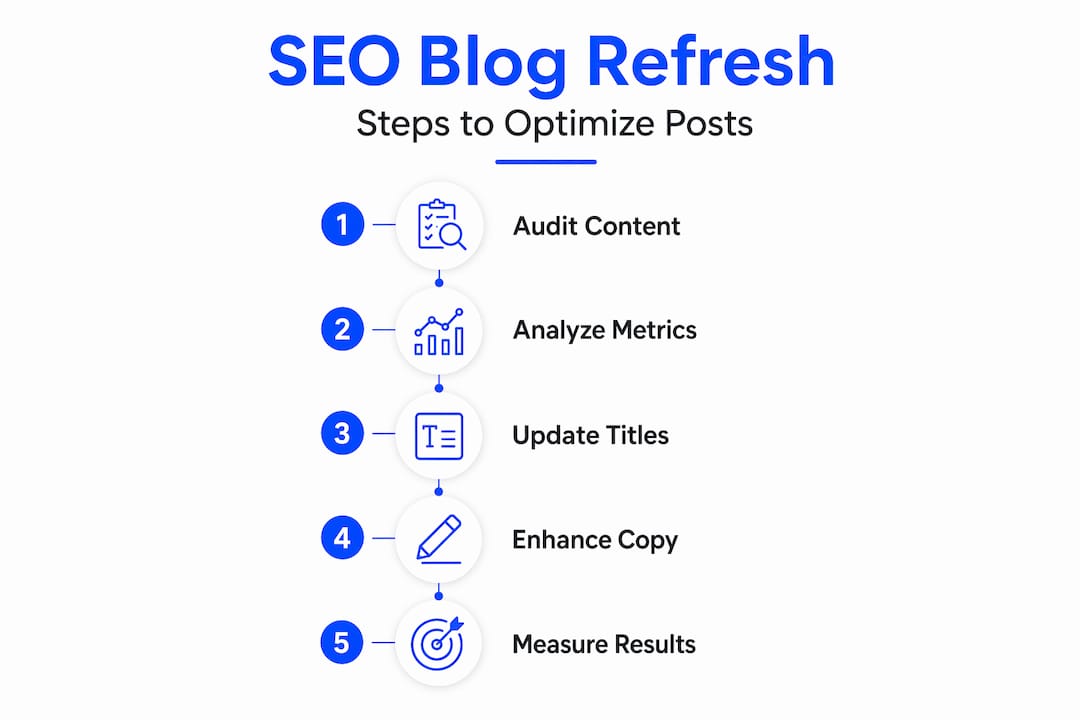
Identify the right candidates. Use your Search Console comparison data to find posts with declining clicks or a CTR below what their average position should deliver. Posts ranking between positions 8 and 20 with high impressions are prime targets.
-
Audit every statistic and source. Outdated data is a credibility killer. If your post cites a 2021 study, find the current version. Content refresh strategy best practices include auditing stats, updating meta tags, adding internal links, and requesting indexing after substantive edits.
-
Analyze the Queries tab in Search Console. Filter by your target post’s URL and review which queries are generating impressions but few clicks. These are query intent gaps. Using Query tab insights to turn dropped query intents into targeted content additions is one of the highest-leverage tactics available to you.
-
Add missing subtopics and FAQs. If users are searching “how long does X take” and your post never answers that, add a section. Each gap you fill is a new ranking opportunity on the same URL.
-
Rewrite the meta title and description. Your SEO title optimization tool can surface higher-CTR title variants based on live SERP data. Similarly, a strong meta description should include your target keyword and a clear reason to click, not just a summary of the post.
-
Add or update internal links. Link from newer, higher-authority posts back to the post you are refreshing. This signals relevance to Google and distributes page authority. Also update links within the refreshed post to point to related content.
-
Update the “last updated” date only after real changes. This is not a cosmetic exercise. Only change the date when you have made substantive improvements to content, data, or structure.
-
Request re-indexing in Search Console. After saving your changes, paste the URL into the URL Inspection tool and click “Request Indexing.” This accelerates how quickly Google picks up your updates.
One rule that overrides everything else: do not change the URL. Preserving the original slug protects your backlinks, your crawl history, and any ranking authority the page has accumulated. The practical SEO optimization steps available through our Shopify integration apply this same principle to product and collection pages.
| Action | Priority | Effort level |
|---|---|---|
| Rewrite meta title and description | High | Low |
| Fill query intent gaps from GSC | High | Medium |
| Update outdated statistics | High | Medium |
| Add internal links | Medium | Low |
| Add FAQ section with schema | Medium | Medium |
| Full content restructure | Low | High |

Pro Tip: Treat each post as a product with a conversion rate. The “conversion” is a click from search. If your CTR is low, your title and description are the first thing to fix, not the body content.
Common mistakes to avoid when refreshing blog content
Even founders who understand the value of content refreshes often undermine their own efforts with a few predictable errors.
- Updating the date without updating the content. Updating the “last updated” date without substantive improvements is manipulative and can hurt trust with both users and search engines. Google’s quality raters notice.
- Adding generic content instead of targeting gaps. Padding a post with loosely related paragraphs does not improve SEO. Every addition should map to a specific query you identified in Search Console.
- Chasing CTR in isolation. Misinterpreting Search Console metrics in isolation leads to wrong optimizations, like chasing CTR without considering ranking position and SERP features. A post at position 15 with low CTR needs a ranking improvement, not just a better title.
- Restructuring content without competitive evidence. Wholesale restructuring a post that is already ranking at position 6 is a risk. Only do it if SERP analysis shows that top-ranking competitors use a fundamentally different format.
- Changing the URL. This deserves repeating. Redirects lose a fraction of link equity and introduce crawl complexity. Keep the original URL.
The most common content refresh mistake is treating it as a publishing event rather than an analytical process. The post date is not the product. The rankings are.
Pro Tip: Before making any structural changes to a post, screenshot its current Search Console performance data. This gives you a clear before-and-after baseline and prevents you from second-guessing whether your changes helped.
For a broader look at what to avoid, our SEO blog pitfalls coverage includes real examples of optimization efforts that backfired.
Measuring the impact and verifying improvements after optimization
Optimizing a post and then ignoring the data is like running an experiment without reading the results. Here is how to track what actually changed.
- Monitor clicks, impressions, CTR, and average position together, not individually. A drop in impressions alongside a rise in CTR may mean Google has recategorized your post for fewer but more relevant queries. That can be a positive outcome.
- Use date comparison views in Search Console. Compare the 30 days after your refresh against the 30 days before. Then check again at 60 and 90 days.
- Performance improvements from a refresh often appear within 2 to 6 weeks for rankings and 4 to 10 weeks for traffic. Patience is part of the process.
- Use weekly or monthly data views to reduce noise and properly interpret trends. Daily data is too volatile for reliable conclusions.
- If no meaningful improvement appears after 90 days, go deeper. Reanalyze the SERP for your target keyword. Check whether a competitor published a stronger piece. Look at whether the query intent has shifted.
| Timeframe | What to check | Expected signal |
|---|---|---|
| 1 to 2 weeks | Indexing confirmed in GSC | URL Inspection shows “Indexed” |
| 2 to 6 weeks | Average position changes | Small upward movement for target queries |
| 4 to 10 weeks | Click and traffic changes | Gradual increase in clicks and CTR |
| 90 days, no change | Full SERP and query re-analysis | Identify whether deeper changes are needed |
Pro Tip: Set a recurring calendar reminder 30, 60, and 90 days after each refresh. Without a structured review cycle, optimized posts get forgotten and you lose the opportunity to iterate.
For posts that consistently perform well, build a refresh cycle into your content calendar. Evergreen guides covering core topics in your industry benefit from annual updates. High-traffic posts in competitive niches may need attention every six months. Our SEO automation solutions can track these cycles automatically, flagging posts that are due for review based on performance data.
Why smart blog post optimization beats endless new content creation
Here is a perspective that most content marketing advice glosses over: for founders running lean operations, the economics of content refreshes are significantly better than the economics of new content creation.
A new post starts with zero link equity, zero ranking history, and zero trust signals. It can take six to twelve months to rank competitively for anything meaningful. An existing post at position 12 already has all three. Existing pages have link equity and ranking history that new pages lack, which accelerates SEO gains from optimization.
Refreshing proven content produces better returns per hour invested than starting from scratch. This is not a theoretical claim. It reflects how Google’s ranking systems actually work: authority compounds over time on a URL, and optimization work applied to that URL benefits from the compounding.
The trap we see founders fall into is what we call “SEO theater.” They update a date, add a paragraph, and call it a refresh. That is not optimization. Real optimization is analytical. It starts with Search Console data, identifies specific gaps, and makes targeted changes that address those gaps directly.
The right balance for most small businesses is roughly 70% new content, 30% systematic refreshes, adjusted based on how large your existing content library is. Once you have 50 or more posts, that ratio should shift closer to 50/50. The compounding effect of well-maintained existing content is one of the most underused advantages in small business SEO.
Explore our SEO experimentation and insights for data on how refresh strategies perform across different industries and content types.
How The SEO Agent can streamline optimizing your blog posts
Applying these optimization steps manually across dozens of posts is time-intensive. The SEO Agent automates the most labor-heavy parts of the process, from tracking which posts are declining to generating optimized titles and meta descriptions based on live SERP data.

Our SEO automation feature monitors your content library continuously, flagging posts that show declining clicks or CTR drops before they become a significant traffic problem. The SEO title generator tool produces click-optimized title variants grounded in current search demand data, removing the guesswork from meta rewrites. For founders running Shopify stores, our Shopify SEO app applies the same refresh logic to product and collection pages. The result is a systematic, data-driven optimization process that runs without requiring your daily attention.
Frequently asked questions
What metrics should I focus on when optimizing my existing blog posts?
Focus on clicks, impressions, CTR, and average position together to get a full picture of performance. The Search Console Performance report tracks all four metrics, which must be interpreted together for actionable insights rather than in isolation.
How often should I refresh my blog posts for SEO?
High-priority pages ranking in the top 10 should refresh every 6 months or immediately if rankings decline, while evergreen guides should update annually. Content tiers define refresh frequency: top pages every 6 months, evergreen guides annually, and standard posts every 18 to 24 months.
Should I change the URL when I update a blog post?
No. Keep the original URL to preserve link equity and search rankings, as changing it requires redirects and risks losing accumulated authority. Never change the URL during a refresh to protect backlinks, bookmarks, and crawl history.
What’s a common mistake that reduces the effectiveness of blog post optimization?
Changing the “last updated” date without making significant content improvements can mislead users and search engines, hurting both trust and rankings. Only update the date after substantive content changes to maintain credibility.
How can I use Google Search Console to identify which posts need optimization?
Compare performance over recent months to spot posts with declining clicks or CTR, then analyze the Queries tab to discover which keyword intents dropped. Use the “last 3 months” comparison in Search Console and the Queries tab to identify specific content refresh opportunities.